
DocuPipe for n8n: Document Extraction Inside Your Workflows

Ben Saad
Updated Apr 22nd, 2026 · 8 min read
Table of Contents
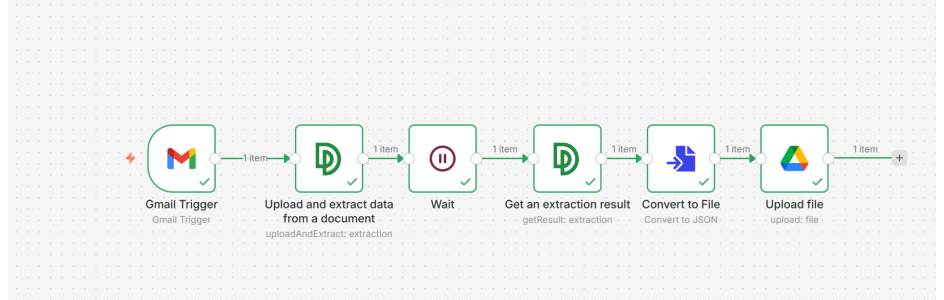 n8n workflow using the DocuPipe community node to extract documents from Gmail and save the structured data to Google Drive
I just published n8n-nodes-docupipe, a community node that brings DocuPipe's document extraction directly into n8n. If you already build workflows in n8n, you can now turn any document (invoices, contracts, medical records, forms, handwritten scans) into clean structured JSON in seconds, without leaving the canvas. The same extraction engine that has processed over a billion pages in production is now a single node in your workflow.
npm install n8n-nodes-docupipe
Why I built it
DocuPipe is the extraction layer purpose-built for real-world documents. Over a billion pages have run through it in production, and it's what teams adopt when other tools fail on the edge cases: handwriting and checkboxes, complex table layouts, 150+ languages, low-quality scans, and legacy forms. It delivers accurate, schema-conformant data where most pipelines produce inconsistent results. But a strong extraction engine only helps if you can connect it cleanly to the rest of your stack without writing and maintaining a lot of glue code.
n8n is where a lot of teams already orchestrate their automation: Gmail to a CRM, an S3 bucket to a database, a webhook to a Slack message. Before this node, getting DocuPipe into that picture meant an HTTP Request node, a Wait node, a polling loop, and a handful of JSON expressions. It worked, but it was the kind of setup you configured once and then avoided revisiting.
Now it's one node.
The other factor: n8n's community node ecosystem has matured significantly over the last year. Self-hosted instances can install community packages with a single click from Settings, and n8n Cloud supports verified community nodes as well. The barrier to shipping a first-class DocuPipe experience inside n8n dropped from "fork n8n" to "publish an npm package," so we did. For teams evaluating automation platforms more broadly, we also integrate with Make for the no-code audience.
What the node does
The package ships two nodes: a DocuPipe action node and a DocuPipe Trigger for event-driven workflows. The action node exposes the core API surface as native n8n operations: Extraction (Upload and Extract, Get Result), Classification, Document handling (upload, split, merge), and Schema management. Credentials are handled the normal n8n way: paste in your API key once, reuse it across workflows.
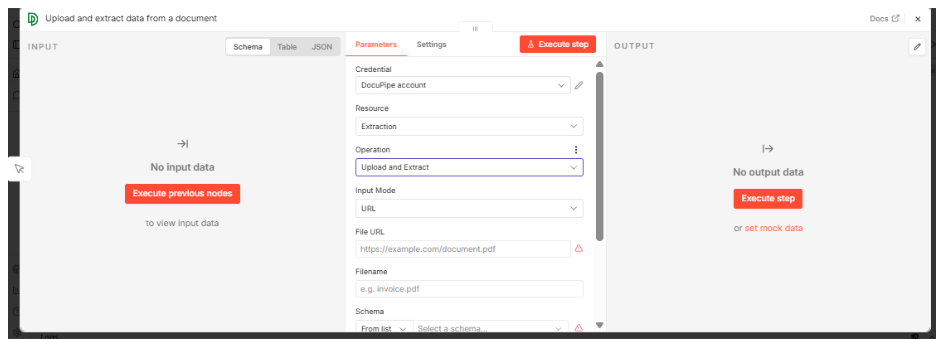 DocuPipe node parameters panel in n8n with Credential, Resource set to Extraction, Operation set to Upload and Extract, and File URL and schema selector
You can point it at a URL, an uploaded file, or a binary field from an upstream node. Pick a schema from your DocuPipe account and the node runs the full extract-and-structure pass for you.
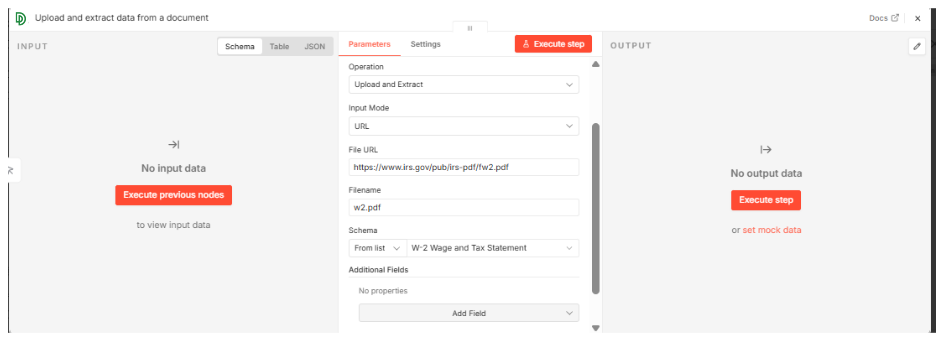 DocuPipe n8n node configured to pull a W-2 PDF from the IRS URL and match it against the W-2 Wage and Tax Statement schema
The Trigger node is there for the opposite flow: instead of your workflow calling DocuPipe, DocuPipe calls your workflow. You register the trigger's webhook URL as a destination on a DocuPipe schema, and every completed extraction posts its result to the workflow. That removes the wait-then-poll dance entirely.
How it works
Under the hood the node wraps DocuPipe's asynchronous API. Upload and Extract submits the document and returns a
documentId and jobId immediately. DocuPipe handles the work of turning pixels into a structured, schema-conformant object, whether the source is a crisp PDF or a mobile-phone capture of a tax form. Get Extraction Result retrieves the structured JSON once the job completes. The contract is simple: upload, wait, get. The node handles the API plumbing, so you can focus on what the downstream workflow does with the clean, typed data that comes out the other end.A few things that matter in practice:
- Schemas live on the DocuPipe side. You define them once in the DocuPipe dashboard (or via API) and the node pulls the list into a dropdown. So a single workflow can handle invoices, contracts, medical intake forms, and W-2s just by swapping the schema selector.
- Output shape is deterministic. Whatever fields and types your schema defines, that's exactly what comes back. No surprises, no "sometimes it's a string, sometimes an array" drift between runs. (Schema-driven governance explains why this matters for downstream systems.)
- Provenance travels with the result. Each extracted value carries bounding-box coordinates linking it back to the source document. If a downstream reviewer needs to verify a field, the location is right there. See preventing AI hallucinations with visual review for the full story.
- It respects n8n's credential model. No hard-coded keys in workflow JSON. Credentials are stored encrypted by n8n and referenced by name.
Setting one up, start to finish
Here's one way to wire it up. Gmail in, structured JSON in Drive out. This is the exact workflow in the header image.
- Gmail Trigger: point it at an inbox and filter for messages with attachments (by label, subject match, sender, whatever fits).
- DocuPipe: Upload and Extract: pick the attachment's binary field from the Gmail node as the input. Choose the schema that matches what you're expecting (invoice, W-2, medical record, or create a new one in your DocuPipe dashboard and it'll show up in the dropdown). Submitting this node fires off the extraction job and returns the
documentId. - Wait: a few seconds is plenty for most single-page documents. Longer scans or multi-page PDFs may need more. (If you'd rather not block, swap Wait for the DocuPipe Trigger node and let a webhook fire the moment the job finishes.)
- DocuPipe: Get Extraction Result: pass the
documentIdfrom step 2 through. You get back the structured JSON in exactly the shape of your schema. - Convert to File: optional, but useful if you want a
.jsonfile on disk. - Google Drive: drop the file into a review folder.
Five minutes of drag-and-drop. No custom code, no polling loop, no JSON wrangling. Work that previously required a dedicated engineering task is now a single node, and it pays off the first time it runs.
Once the data is extracted, it arrives in the shape a clean system of record expects: structured fields, typed values, ready to route anywhere. No post-processing, no cleanup pass, no chasing down fields the extraction missed.
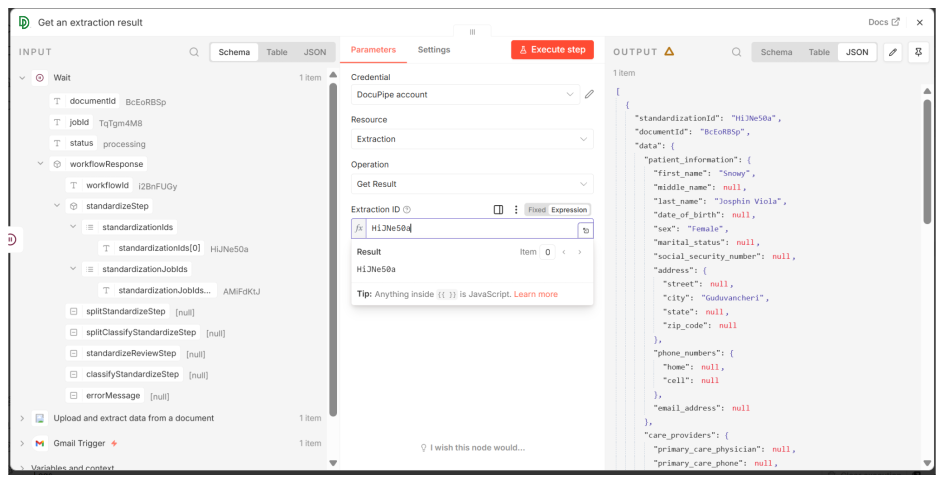 Structured JSON output from the DocuPipe extraction showing patient_information fields including first_name, last_name, date_of_birth, address and phone_numbers parsed from a medical record
And because it's just JSON at that point, any downstream n8n node can consume it. Push it into Postgres, convert it to a file, hand it to an LLM agent, fire a Slack notification, whatever the workflow needs.
Patterns I've actually shipped
A few workflow shapes this node unlocks. None of these are hypothetical. They are customer workflows running in production today, reducing what was previously a multi-week engineering project to an afternoon of configuration.
Invoice inbox to accounting. Gmail Trigger filters for invoices, DocuPipe extracts line items and vendor details against an invoice schema, a Code node reshapes the JSON into the accounting system's format, an HTTP Request node pushes it to the accounting API. A Slack node posts a summary to a finance channel when anything fails validation.
Contract intake to review queue. A shared Drive folder triggers on new PDFs, the Classification operation routes by contract type (NDA, MSA, SOW), a per-type Extraction pulls structured terms, and an Airtable node populates a legal review queue with the key fields surfaced up top.
Medical record ingestion. Secure SFTP drops PDFs into a watched bucket, the DocuPipe Trigger fires as each extraction completes, patient demographics and clinical fields get written to a FHIR-shaped record, and anything with low confidence gets routed to a human reviewer via an n8n approval flow with human-in-the-loop review.
Tax document season. A shared mailbox for W-2s and 1099s feeds the Trigger-based flow, per-form-type schemas pull the right fields, and a final node pushes the structured result to the downstream tax prep system.
The pattern is always the same: n8n handles the "what happens next" logic, DocuPipe handles the "turn any document into clean data" step. Neither side has to know much about the other, which is exactly how this kind of infrastructure should feel.
Tips and gotchas worth knowing up front
- Pick your schema before you build the workflow. The node's dropdown reflects whatever schemas exist in your DocuPipe account. If it's empty, go create one first. Iterating on schema design while also iterating on workflow logic gets confusing fast.
- Prefer the Trigger node for anything at scale. Wait works fine for low volume, but a Wait node holds an execution slot open. At hundreds or thousands of documents a day, webhooks (Trigger) are cleaner.
- Binary data is just binary data. n8n handles file contents as a binary property on the item. When you wire Gmail or Drive into the DocuPipe node, you're referencing that property by name. No base64 juggling.
- Classification first, extraction second, if document types are mixed. The Classification operation is cheap and tells you what kind of document you have. Route into different Extraction branches based on that classification. Cleaner than running every schema against every document and picking the winner.
- Self-hosted n8n works great. If you're running n8n in your own VPC, the community node installs like any other. Combined with DocuPipe's ISO 27001 posture, this is a genuinely shippable setup for regulated industries.
A few things worth knowing about DocuPipe itself
- It handles the hard cases. Handwriting, checkboxes, rotated scans, multi-column tables, 150+ languages. The cases that have historically been the weak point of every OCR pipeline are where DocuPipe performs best. If you've attempted to build this in-house, you already understand why AI fails to understand documents without purpose-built infrastructure.
- ISO 27001 certified. Deployable inside self-hosted n8n environments, VPCs, and air-gapped networks for teams in regulated industries. Compliance is a first-class concern, not an afterthought.
- Open source node. A community package on npm. Audit it, fork it, submit PRs. The extraction quality that used to require an enterprise sales cycle is a single
npm installaway. - The API remains available. Everything the node does is exposed on the DocuPipe API directly. If n8n isn't the right fit for a particular workflow, you can drop down to raw HTTP calls, or embed DocuPipe directly into your SaaS product.
Ready-made templates
We've published a few templates on n8n.io you can import directly. Install the node, open a template, add your credentials, and it runs.
Browse them on the DocuPipe creator page, or go straight to one:
- Extract data from email attachments to Airtable
- Extract data from Dropbox documents and post to Slack
- Extract data from Gmail attachments to Google Sheets
Each one is a working version of the patterns above. Fork it, swap in your schema, and run.
Install and go
In your n8n instance, go to Settings → Community Nodes and install:
n8n-nodes-docupipe
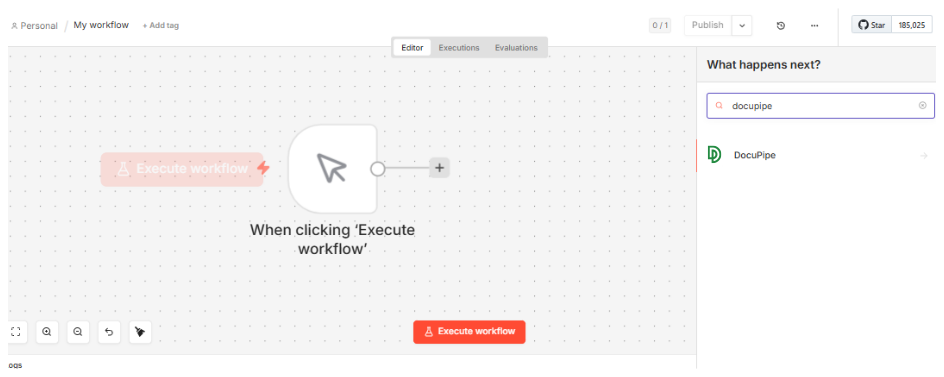 n8n node picker searching for 'docupipe' and surfacing the DocuPipe community node ready to drop on the canvas
Or add it to a self-hosted instance directly:
npm install n8n-nodes-docupipe
Package: npmjs.com/package/n8n-nodes-docupipe
Don't have a DocuPipe account yet? Start free. You get 300 credits on signup, no credit card required.
Recommended Articles

Related Documents