
Healthcare Document Automation: A Complete Guide (2026)

DocuPipe Team
Updated Jan 16th, 2026 · 8 min read
Table of Contents
Healthcare Document Automation: A Complete Guide
Healthcare runs on documents, but processing them manually drains staff time and introduces errors.
Healthcare document automation uses Intelligent Document Processing (IDP) to extract, classify, and route data from medical records, claims, referrals, and other clinical documents - reducing administrative burden while maintaining HIPAA compliance.
The average clinician spends more time on paperwork than with patients. This guide breaks down what healthcare document automation actually looks like, which documents it handles, and how to evaluate solutions without getting burned by compliance gaps.
What You Need to Know
The problem: Clinicians are forced to spend nearly half their time on documentation. That's time not spent focused on patient care, resulting in high burnout and radical inefficiency.
What automation handles: Claims, EOBs, referrals, prior authorizations, intake forms, lab reports - anything with information that needs to move into another system.
The compliance question: HIPAA compliance is not optional. Any solution touching PHI needs SOC 2, BAAs, and audit trails at a minimum.
Bottom line: If your documents are low-volume (which is increasingly rare in medicine), manual does work. But if you're processing hundreds to thousands of variable documents weekly, automation will pay for itself quickly.
What Is Healthcare Document Automation?
Healthcare document automation applies Intelligent Document Processing (IDP) to clinical and administrative documents - extracting structured data from unstructured inputs like faxed referrals, scanned forms, and PDF lab reports.
Healthcare generates more document types than almost any other industry - and unlike finance or logistics, errors aren't just costly, they can be very dangerous. That's what makes healthcare both a perfect fit and a high stakes industry for automation.
What Healthcare Documents Can Be Automated?
| Document Type | What Gets Extracted |
|---|---|
| Insurance claims | Service codes, charges, patient IDs, dates of service |
| EOBs (Explanation of Benefits) | Payment amounts, adjustments, denial reasons |
| Referrals | Referring provider, diagnosis, requested services |
| Prior authorizations | Authorization numbers, approved services, expiration dates |
| Patient intake forms | Demographics, insurance info, medical history |
| Lab reports | Test names, values, reference ranges, flags |
| Discharge summaries | Diagnoses, medications, follow-up instructions |
| Prescription/Rx documents | Medication, dosage, refill counts, prescriber info |
What these documents all have in common: structured information is trapped in their unstructured formats. The data is there, it just needs to be extracted and routed to the right system.
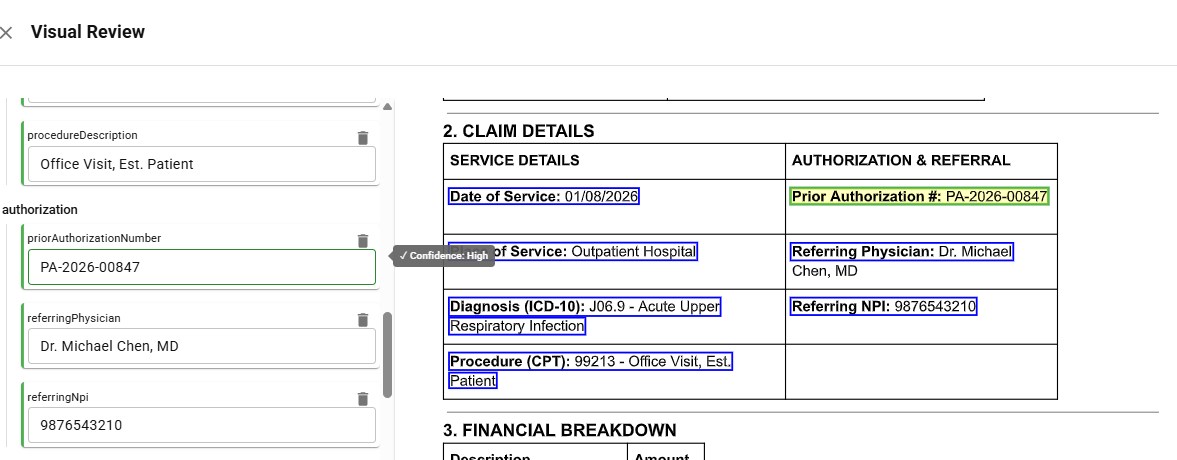 Healthcare claim form with extracted fields highlighted and corresponding structured data output
Top Use Cases for Document Automation in Healthcare
These are a few examples of where healthcare operations quickly see the ROI from utilizing document automation.
Claims Processing
Claims are where healthcare orgs often start with automation. You're pulling service codes, patient info, and charges from a ton of different formats, then checking everything against payer requirements. Get it wrong and the claim bounces. Automation catches those errors before submission, which is why denial rates drop significantly.
Patient Intake and Registration
Every new patient means forms, insurance cards, IDs. Someone has to pull the demographics, verify coverage, and get it all into the system. Automation handles the extraction and flags what's missing - so front desk staff aren't buried in mundane data entry while patients wait for a quick appointment.
Referral Management
Referrals show up everywhere - fax, email, portal - and half the time they're missing something. IDP pulls the referring provider, diagnosis, and requested services, then routes it to the right department. This means no more referrals dying in a fax queue, getting buried in your email, or getting lost in the portal.
Prior Authorization
Prior authorization delays fundamentally hold up patient care, but they don't have to. The process requires pulling clinical details from records and matching them to what the payer wants. Automation can efficiently handle the extraction and track where each request stands.
See how it works → Try DocuPipe free
Is Automated Document Processing HIPAA Compliant?
Automated document processing can be HIPAA compliant - but only if the solution is built for it. Not all are.
When evaluating any IDP solution for healthcare, verify these requirements:
| Requirement | What to Look For |
|---|---|
| HIPAA compliance | Vendor explicitly states HIPAA compliance, with documentation |
| BAA (Business Associate Agreement) | Vendor must sign a BAA before touching PHI |
| SOC 2 Type II | Independent audit of security controls |
| Data encryption | At rest and in transit (AES-256, TLS 1.2+) |
| Access controls | Role-based permissions, audit logs |
| Data residency | Where is data processed and stored? |
| Retention policies | How long is data kept? Can it be deleted? |
Plenty of vendors claim HIPAA compliance without actually signing BAAs or completing SOC 2 audits. Make sure to ask for documentation upfront - if they hesitate to do so, that's your answer.
How to Choose a Healthcare Document Automation Solution
Beyond compliance, here's what separates solutions that work from ones that create more problems:
| Factor | Why It Matters |
|---|---|
| Accuracy with confidence scores | Healthcare can't tolerate hallucinations. Look for solutions that flag low-confidence extractions for human review. |
| Human-in-the-loop workflows | Automated doesn't mean unattended. You need a review interface for edge cases. |
| Pre-trained on healthcare documents | Generic IDP struggles with medical terminology and document layouts. |
| Integration with your stack | EHR, RCM, and PM systems - if data can't flow downstream, automation stops at extraction. |
| Scalability | Volume spikes happen. The solution should handle surges without manual intervention. |
If you find yourself weighing whether to build a complex document processing system in-house or buy a solution, that's a deeper conversation - but for most healthcare organizations, the compliance burden and technological complexities make buying a faster and more reliable path.
FAQ
Healthcare document automation uses an Intelligent Document Processing system to extract and route data from clinical and administrative documents such as claims, referrals, and intake forms - reducing manual data entry and errors.
It can be - but only if the vendor is built for it. Look carefully for signed BAAs, SOC 2 Type II certification, and clear data residency policies before trusting any new system.
Claims, EOBs, referrals, prior authorizations, intake forms, lab reports, discharge summaries, prescriptions, etc. - really any document with information can be automated.
OCR simply extracts text from documents. IDP uses OCR technology as a foundation, then adds classification, field extraction, and validation - turning a scanned form into structured data ready for use.
That depends on the solution. API-based platforms can be integrated in days. Enterprise deployments with custom workflows and EHR integrations typically take only weeks to a few months.
Most organizations see a 30-50% reduction in document processing time and a significant decrease in claim denials from data entry errors. ROI usually materializes within months, not years.
Yes! Modern IDP handles handwriting quite well. The bigger question is accuracy and confidence scoring. It's important to find solutions that flag any uncertain extractions for human review rather than guessing it's correct and moving on.
No! IDP solutions integrate with existing EHR, RCM, and practice management systems via API. The goal is to feed structured data into your current stack, not replace it.
Key Takeaways
- Healthcare document automation uses IDP to extract and route data from claims, referrals, intake forms, and other clinical documents
- Top use cases: claims processing, patient intake, referral management, and prior authorization
- HIPAA compliance is non-negotiable - verify BAAs, SOC 2, encryption, and data residency before selecting a vendor
- Accuracy matters more in healthcare - look for confidence scoring and human-in-the-loop workflows
- Most organizations see ROI within months through reduced processing time and fewer claim denials
See how healthcare teams are already automating their documents with DocuPipe.
Recommended Articles

Related Documents