
Schema-Driven Governance: Forcing AI to Speak Your ERP's Language

Nitai Dean
Updated Mar 30th, 2026 · 12 min read
Table of Contents
Schema-Driven Governance: Forcing AI to Speak Your ERP's Language
The invoice extraction worked perfectly in testing. In production, it crashes your SAP import on day one. The AI returned "invoice_date" but your database column is "InvoiceDate". Yesterday it was "2024-03-15", today it's "March 15, 2024". The amounts sometimes include currency symbols, sometimes don't. Your integration team spends more time fixing AI outputs than the old manual process took.
Large language models are probabilistic. Same input, different outputs. Field names vary. Date formats shift. Nested structures reorganize. For chatbots, this flexibility is a feature. For enterprise systems that demand exact schemas, it's catastrophic.
SAP expects dates in one format. Oracle expects another. Field names must match database columns exactly. Data types must satisfy validation rules. Any deviation causes import failures, data corruption, or silent errors that surface months later during audits.
This article examines why unstructured LLM outputs fail enterprise integration, how Schema-on-Read architecture addresses the problem, and how schema-driven extraction produces consistent outputs from probabilistic models.
For the broader context on enterprise document AI infrastructure, see the Enterprise Document AI Infrastructure hub article. For handling extraction failures and routing to human review, see The Human-in-the-Loop (HITL) Escalation Protocol.
The Danger of Unstructured LLM Outputs in Legacy Databases
Legacy enterprise systems were designed for predictable, structured data. They have rigid schemas, strict validation rules, and zero tolerance for variation. LLMs were designed for flexibility and natural language understanding. These design philosophies collide when LLM outputs must feed legacy systems.
Schema Mismatch Failures
Consider a simple invoice extraction. The LLM extracts these fields:
{ "Invoice Date": "March 15, 2026", "Total": "$1,234.56", "Vendor": "Acme Corp." }
The ERP system expects:
{
  "invoice_date": "2026-03-15",
  "total_amount": 1234.56,
  "vendor_id": "V-00847"
}
Every field has problems:
- Field names use different conventions (title case vs. snake_case)
- Date format is human-readable vs. ISO 8601
- Amount includes currency symbol and is a string vs. a number
- Vendor is a name vs. an internal identifier
Without transformation, this data cannot enter the ERP. With manual transformation, the process is error-prone and does not scale.
Type Coercion Errors
LLMs treat all outputs as text. They do not distinguish between:
- The string "1234" and the integer 1234
- The string "true" and the boolean true
- The string "null" and the absence of a value
When downstream systems interpret these values, errors cascade:
- String concatenation instead of numeric addition
- String comparison instead of boolean logic
- Null pointer exceptions from unexpected string values
These errors are insidious. They may not cause immediate failures. Instead, they corrupt data silently, creating problems discovered weeks or months later when reports do not reconcile or audits reveal inconsistencies.
Structural Variation
LLMs reorganize output structure based on input phrasing and model state:
First extraction:
{
  "line_items": [
    {"product": "Widget A", "qty": 10, "price": 5.00},
    {"product": "Widget B", "qty": 5, "price": 10.00}
  ]
}
Second extraction of the same document:
{
  "products": ["Widget A", "Widget B"],
  "quantities": [10, 5],
  "prices": [5.00, 10.00]
}
Both representations contain the same information, but their structures are incompatible. Code expecting the first structure fails on the second. Integration pipelines break unpredictably.
The Shift from ETL to ELT: Raw Ingestion First
Traditional document processing follows an ETL pattern: Extract structure during ingestion, Transform into normalized formats, Load into target systems. This approach assumes you know the required structure before processing begins.
ETL fails for document AI because requirements change. The schema you need today is not the schema auditors will demand next year. Fields you ignored during initial extraction become critical. Document types you never anticipated appear in your workflow.
ELT Architecture for Documents
ELT inverts the processing order: Load raw data first, apply structure at query time.
For document AI, this means:
- Ingest the original document and preserve it completely
- Parse the document to extract text and layout information
- Store both the original and parsed representation
- Apply schemas when extracting structured data
- Re-extract with new schemas when requirements change
The critical difference is step 3. By storing parsed representations (not just extraction results), you can apply new schemas to historical documents without re-ingesting originals.
Schema-on-Read Benefits
Schema-on-Read means structure is applied at extraction time, not ingestion time:
Requirement flexibility:
- Add new fields to schemas without reprocessing
- Change field types as integration requirements evolve
- Support multiple schemas for the same document type
Historical reprocessing:
- Apply new schemas to documents processed years ago
- Extract fields that were not in the original schema
- Respond to audit requests for information not previously extracted
Schema versioning:
- Maintain multiple schema versions simultaneously
- Route documents to appropriate schema versions
- Compare extraction results across schema versions
Experimentation:
- Test new schemas against existing documents
- Measure extraction quality before production deployment
- A/B test schema variations
Organizations that adopted ETL patterns for document AI are now stuck. They extracted specific fields years ago and discarded the rest. When auditors ask for additional information, they must reprocess original documents (if they still have them) or admit the data is lost.
Schema-Driven Extraction in DocuPipe
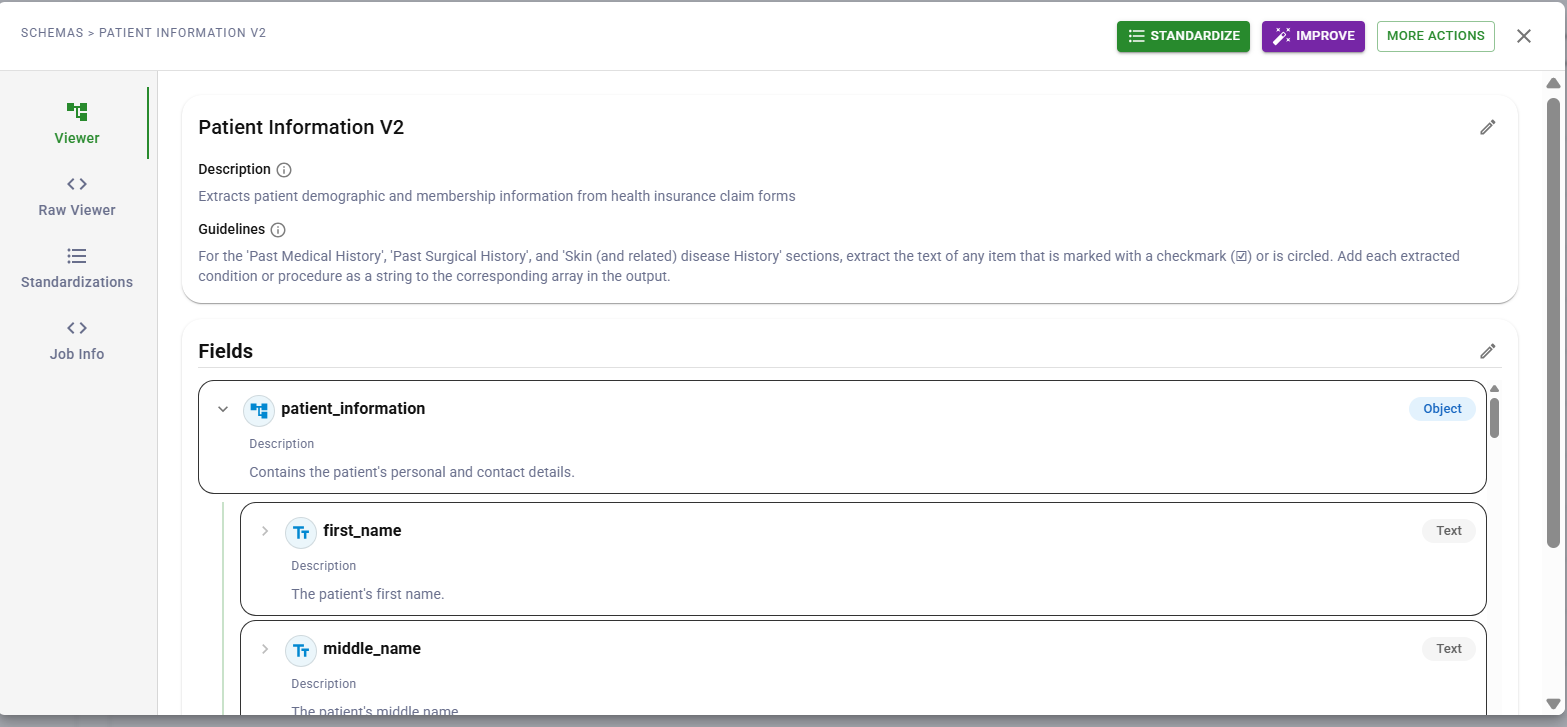 DocuPipe schema builder interface
Schema-on-Read requires a mechanism to guide extraction consistently. DocuPipe uses schema definitions to tell the LLM exactly what fields to extract and how to format them.
JSON Schema Definitions
Every extraction operation uses a schema that specifies fields, types, and descriptions. The schema guides the LLM during extraction:
{
  "type": "object",
  "properties": {
    "invoice_date": {
      "type": "string",
      "description": "Invoice issue date in ISO 8601 format (YYYY-MM-DD)"
    },
    "due_date": {
      "type": "string",
      "description": "Payment due date in ISO 8601 format (YYYY-MM-DD)"
    },
    "total_amount": {
      "type": "number",
      "description": "Total invoice amount as a number without currency symbols"
    },
    "currency": {
      "type": "string",
      "enum": ["USD", "EUR", "GBP", "CAD", "Other"],
      "description": "Three-letter ISO 4217 currency code"
    },
    "line_items": {
      "type": "array",
      "items": {
        "type": "object",
        "properties": {
          "description": {"type": "string"},
          "quantity": {"type": "integer"},
          "unit_price": {"type": "number"},
          "total": {"type": "number"}
        }
      }
    }
  }
}
The schema serves as instructions to the model: extract these fields, use these formats, output this structure. Clear field descriptions improve extraction accuracy because the model understands what each field should contain.
Enum Fields for Categorical Data
For fields with known possible values, enum types constrain outputs:
{
  "document_type": {
    "type": "string",
    "enum": ["Invoice", "Purchase Order", "Receipt", "Credit Memo", "Other"],
    "description": "Type of financial document"
  }
}
Best practice: include an "Other" value to catch documents that do not match expected categories. This prevents the model from forcing a bad match when none of the enum values fit.
Schema Versioning
Schemas evolve as requirements change. DocuPipe supports versioned schemas:
- Create new schema versions (invoice_v1, invoice_v2, invoice_v3)
- Compare extraction results across versions
- Maintain multiple active versions for different use cases
- Roll back to previous versions if new schemas produce issues
This versioning enables gradual schema evolution without breaking existing workflows.
What Schemas Control vs. What They Do Not
Schemas guide extraction but have important limitations to understand:
Schemas control:
- Field names in the output
- Expected data types (string, number, array, object)
- Enum values for categorical fields
- Output structure and nesting
- Field descriptions that help the model understand intent
Schemas do not enforce:
- Required vs. optional fields (all fields are treated as optional by the extraction model)
- Value constraints like minimum/maximum
- Format validation (the model attempts to follow format hints in descriptions)
- Cross-field validation rules
For enterprise integrations requiring strict validation, implement a validation layer in your downstream pipeline. DocuPipe provides the structured extraction; your systems can apply business rules, type coercion, and constraint checking as needed.
Building Validation into Your Pipeline
After DocuPipe extracts structured data, your integration layer can apply validation:
In your code:
- Validate required fields are present
- Check data types match expectations
- Apply business rules (amounts within ranges, dates in sequence)
- Transform formats as needed for target systems
Tools that help:
- Pydantic for Python validation
- JSON Schema validators for any language
- Database constraints as a final gate
- ETL tools with built-in validation
This separation keeps DocuPipe focused on extraction while giving you full control over validation logic specific to your business rules.
Implementation Considerations
Deploying schema-driven extraction effectively requires attention to schema design, versioning, and downstream integration.
Schema Design Best Practices
Write schemas that help the model extract accurately:
Clear field descriptions:
- Describe what the field should contain, not just its name
- Include format hints ("date in YYYY-MM-DD format")
- Specify units when relevant ("amount in dollars, no currency symbol")
Appropriate field types:
- Use
numberfor amounts you need to calculate with - Use
stringfor identifiers even if they look numeric - Use
arrayfor repeating elements like line items - Use
objectfor nested structures like addresses
Enum design:
- Include common values plus "Other" for edge cases
- Keep enum lists focused (5-10 values work better than 50)
- Use descriptive values ("Invoice" not "INV")
Versioning Strategies
As requirements change, evolve schemas carefully:
Additive versioning:
- Add new fields without removing existing ones
- Old integrations continue working
- Simplest approach for forward compatibility
Breaking changes:
- When you must change field names or types
- Create a new schema version (v2)
- Migrate integrations before deprecating old version
Parallel versions:
- Run multiple versions for different use cases
- Different downstream systems may need different structures
- Version identifier in output enables routing
Integration Patterns
Extracted data flows to enterprise systems through standard patterns:
Direct database insertion:
- Map JSON fields to database columns
- Apply type conversion in your insertion logic
- Use database constraints as a validation layer
API integration:
- Transform extracted data to match API contracts
- Handle missing optional fields gracefully
- Log extraction results for debugging
Message queue delivery:
- Publish extractions to queues for async processing
- Use dead letter queues for failed validations
- Enable retry logic for transient downstream failures
File-based exchange:
- Serialize extractions to CSV, XML, or EDI as needed
- Apply format transformations for partner requirements
- Validate before transmission
Conclusion
Enterprise document AI must produce consistent, structured outputs that legacy systems can consume. LLM variability is a challenge when data feeds ERPs, populates databases, or triggers automated workflows.
Schema-driven extraction addresses this by guiding the LLM with clear field definitions, types, and descriptions. The model extracts what you specify in the structure you specify. Combined with downstream validation in your integration layer, this produces reliable data pipelines.
The result is document AI that integrates with enterprise infrastructure rather than fighting it. Extracted data matches expected formats. Field structures align with database schemas. Your validation layer catches issues before they propagate.
For organizations building document AI pipelines, schema design and downstream validation work together. DocuPipe handles the extraction; you control the business rules.
LLMs are probabilistic and may produce different field names, date formats, or data structures for identical inputs. Enterprise systems like ERPs require exact schema matches and consistent data types. Schema-driven extraction guides the model to output specific fields in specific formats, reducing variability and making downstream integration reliable.
Schema-on-Read applies structure at extraction time rather than ingestion time. Documents are parsed and stored with their full content preserved, then schemas are applied when data is needed. This allows you to extract new fields from historical documents, support multiple schemas for the same document type, and respond to changing requirements without re-ingesting originals.
DocuPipe extracts data according to your schema but does not enforce validation rules like required fields or value constraints. All fields are treated as optional during extraction. For enterprise integrations requiring strict validation, implement a validation layer in your downstream pipeline using tools like Pydantic, JSON Schema validators, or database constraints.
Recommended Articles

Related Documents