
Handwriting & Checkboxes at Scale: Why Gov & Healthcare Run on Paper

Uri Merhav
Updated Mar 27th, 2026 · 12 min read
Table of Contents
Handwriting & Checkboxes at Scale: Why Gov & Healthcare Run on Paper
A benefits processor stares at a scanned application. The applicant's handwriting is rushed, half-cursive, written on a clipboard in a busy waiting room. The checkbox for disability status has both "Yes" and "No" circled, then one scratched out. The legacy OCR system returns garbage. Another form for manual entry.
This happens millions of times daily across government agencies and healthcare systems. Patient intake forms. Benefits applications. Inspection reports. Consent documents. Field assessments. Organizations know digitization would improve efficiency. They've tried for decades. Legacy Intelligent Character Recognition (ICR) systems promised automation in the 1990s. Those promises remain largely unfulfilled.
The problem isn't effort. It's that real-world handwriting defies every assumption ICR systems were built on. Cursive varies by individual. Forms are filled inconsistently. Checkboxes are marked with X, check marks, circles, or scribbles. The controlled conditions that make ICR work don't exist in the field.
What You Need to Know
The problem: Legacy ICR was trained on clean handwriting samples. Real-world forms are rushed, messy, and filled on clipboards. The technology fails systematically.
What's different now: Multimodal vision-language models read documents the way humans do - visually, with context. They interpret "Dr. Smith" because it appears in a physician signature field, not because they recognized each letter perfectly.
What's achievable: ~95% accuracy on printed and clearly handwritten text. ~70% on physician notes (flagged for review). Checkboxes, signatures, and mixed content all handled in one pass.
Bottom line: If your forms have handwriting, you've probably tried automation before and given up. The technology has fundamentally changed.
For the broader context on enterprise document AI infrastructure, see the Enterprise Document AI Infrastructure hub article. For related challenges with structured data, see Table Extraction for Complex Government & Financial Filings.
The Failure of Legacy ICR on Messy Documents
Intelligent Character Recognition emerged in the 1990s as an extension of OCR. Where OCR handled printed text, ICR would handle handwriting. The technology worked in controlled conditions and failed everywhere else.
The Training Data Problem
Legacy ICR systems were trained on carefully collected handwriting samples. Writers were instructed to write clearly. Forms were designed for optimal recognition. Scanning conditions were standardized.
Production documents violate every assumption:
- Writers are rushed, stressed, or indifferent to legibility
- Forms are filled on clipboards, car dashboards, or unstable surfaces
- Scanning happens on multifunction printers with varying settings
- Paper quality ranges from crisp forms to weathered field documents
The gap between training conditions and production reality produces systematic failures. Characters that looked clear during training become ambiguous when written hastily. Forms designed for ICR are ignored when users fill them their own way.
Character-Level Limitations
ICR operates at the character level. It identifies individual letters and digits, then assembles them into words and numbers. This approach has fundamental limitations:
Segmentation failures:
- Cursive writing connects letters without clear boundaries
- Compressed writing runs characters together
- Spacing within words varies unpredictably
- The system cannot find characters it cannot segment
Context blindness:
- Each character is recognized independently
- No awareness of what words should appear
- Medical terms become nonsense strings
- Names are mangled consistently
Vocabulary mismatch:
- Post-processing dictionaries improve common words
- Domain-specific terms have no dictionary support
- Proper nouns fail dictionary correction
- Abbreviations are unrecognizable
Form Variance Handling
ICR systems expect forms to match templates exactly. Reality delivers endless variation:
Print variations:
- Different paper sizes and orientations
- Varied print quality and contrast
- Photocopied forms with degradation
- Forms filled before printing vs. after
Completion variations:
- Fields ignored or left blank
- Content written outside designated areas
- Additional notes in margins
- Strike-throughs and corrections
Physical condition:
- Folds, creases, and tears
- Water damage and staining
- Coffee rings and dirt
- Tape and adhesive marks
ICR systems trained on pristine templates fail on documents that have lived in the real world.
Checkbox Recognition Failures
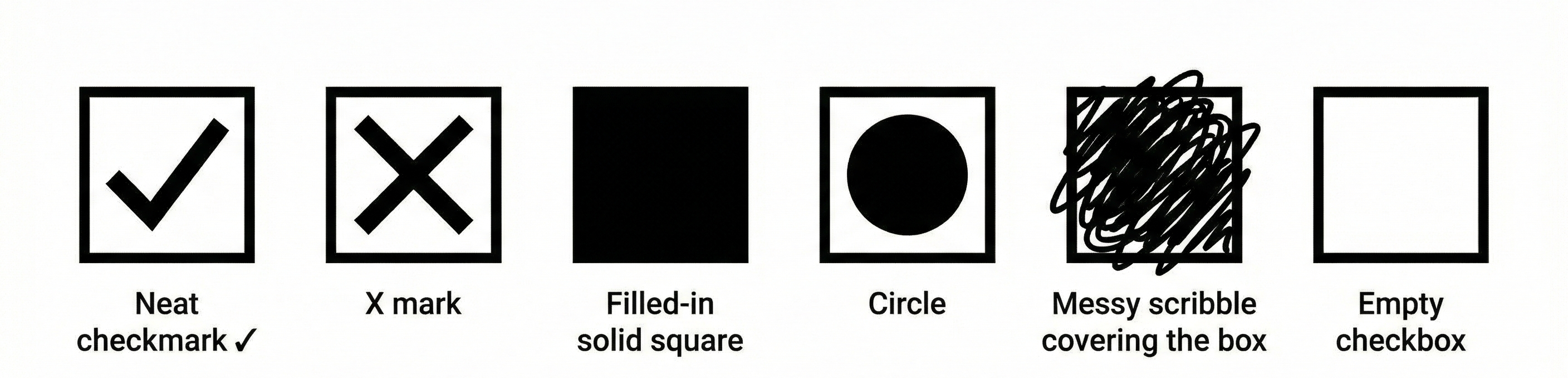 Checkbox variation examples showing different marking styles
Checkboxes seem simple. They are either checked or not. ICR systems struggle regardless:
Marking variations:
- X marks vs. check marks vs. filled boxes
- Partial fills and light marks
- Marks that extend beyond boxes
- Circles around boxes rather than marks inside
Detection failures:
- Boxes not found due to print quality
- Marks misidentified as noise
- Adjacent content interfering with detection
- Multi-page forms losing checkbox context
Semantic confusion:
- Which option was intended when multiple are marked?
- Is a strike-through a correction or selection?
- Are empty boxes intentionally blank or overlooked?
For forms where checkbox answers determine eligibility, benefits, or treatment, these failures have real consequences.
See how it works → Try DocuPipe free
How Multimodal VLMs Process Complex Structural Forms
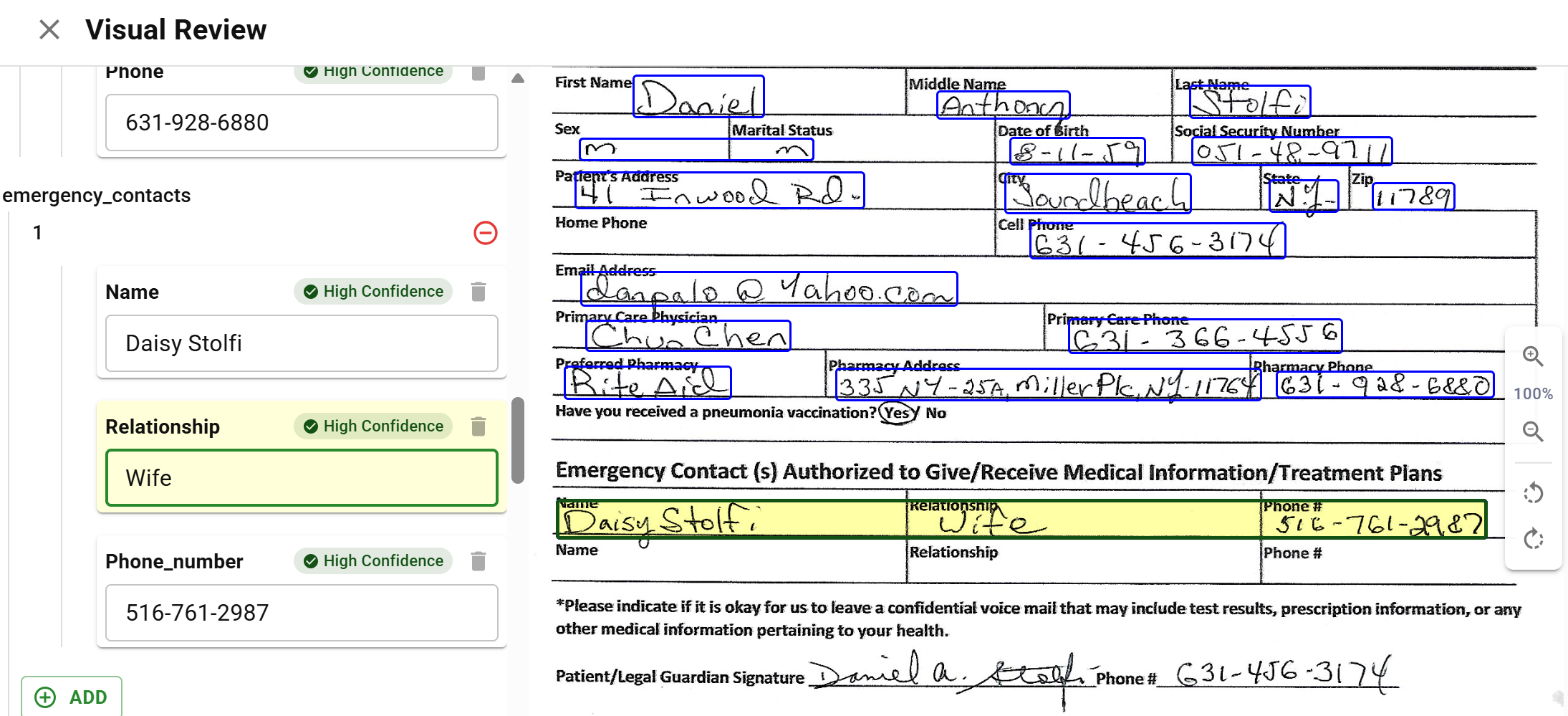 Handwriting extraction showing patient form with extracted values
Vision-language models approach documents differently. Rather than recognizing characters and assembling them into text, VLMs perceive documents as images and interpret their meaning holistically.
Visual Understanding Over Character Recognition
A VLM sees the entire page as a human would. It perceives:
- The overall form structure and layout
- Where fields are and what labels apply to them
- The visual appearance of handwritten content
- The relationship between marks and their contexts
This visual understanding operates at a higher level than character recognition. The model does not identify "a" then "n" then "d". It interprets the visual pattern as "and" based on context, appearance, and expectation.
Contextual Interpretation
VLMs bring world knowledge to document interpretation:
Form understanding:
- Medical forms have expected field types
- Government forms follow conventions
- Dates appear in predictable locations
- Signatures have characteristic appearances
Content prediction:
- Medical terminology has constrained vocabulary
- Address fields expect geographic content
- Phone numbers have recognizable patterns
- Names have linguistic structure
Error correction:
- Implausible values trigger reconsideration
- Missing content prompts closer inspection
- Inconsistencies suggest interpretation errors
- Context resolves ambiguous characters
This contextual awareness enables interpretation that pure character recognition cannot achieve.
Handling of Non-Standard Input
VLMs tolerate document variation that breaks ICR:
Quality variation:
- Degraded images trigger slower, more careful analysis
- Low contrast is compensated through visual processing
- Noise and artifacts are filtered contextually
- Partial content is interpreted from available evidence
Format variation:
- Unexpected layouts are analyzed visually
- Non-standard forms are still interpretable
- Handwritten additions to printed forms are handled
- Mixed content types process together
Handwriting variation:
- Individual writing styles are accommodated
- Cursive, print, and mixed styles work
- Poor legibility triggers uncertainty rather than garbage
- Unusual characters are interpreted from context
Confidence-Aware Output
Unlike ICR, which produces a single interpretation, VLMs can express uncertainty:
Per-field confidence:
- Each extracted value has an associated confidence
- Low confidence triggers human review
- High confidence proceeds automatically
- Confidence calibration improves over time
Alternative interpretations:
- Multiple possible readings can be offered
- Human reviewers see options rather than single guesses
- Ambiguous content surfaces for resolution
- Learning from corrections improves future interpretation
Honest failures:
- Illegible content is marked as unreadable
- Missing fields are identified as absent
- Damaged regions are flagged rather than fabricated
- The system admits what it cannot determine
Handwriting Processing Capabilities
Handwriting processing capabilities vary by document type, writing style, and language. Understanding what processing can achieve helps organizations set realistic expectations for their specific documents.
Processing Mode Selection
Different documents benefit from different processing approaches:
OCR + Layout (spatial mode):
- Best for printed text with clear forms
- Handles printed handwriting reasonably well
- Fastest processing for high-volume scenarios
- Lower cost per document
Multimodal (image mode):
- Best for cursive and challenging handwriting
- Handles forms where visual context matters
- Slower but more accurate on difficult content
- Higher cost justified for quality improvement
Hybrid approach:
- Printed regions via OCR for speed
- Handwritten regions via multimodal for accuracy
- Automatic detection of region types
- Optimized cost/quality balance
DocuPipe automatically selects processing mode based on document characteristics, or allows explicit mode specification when document types are known.
Language and Script Coverage
Handwriting recognition varies by language:
Latin scripts (English, Spanish, French, German, etc.):
- Strongest recognition capabilities
- Both print and cursive supported
- Extensive training data availability
- Production-ready for most use cases
Hebrew and Arabic:
- Right-to-left scripts supported
- Print handling stronger than cursive
- Some regional variations present challenges
- Specific evaluation recommended
Asian scripts (Chinese, Japanese, Korean):
- Strong recognition across CJK scripts
- Print and handwritten content both supported
- Character complexity handled well
- Some edge cases with highly stylized calligraphy
Other scripts:
- Capabilities vary by script family
- Evaluation against sample documents recommended
- Some scripts may require specialized models
- Coverage expanding continuously
Document Type Considerations
Specific document types have characteristic challenges:
Medical forms:
- Physician handwriting is notoriously difficult
- Medical terminology aids interpretation
- Structured forms help field identification
- Prescription extraction remains challenging
Government applications:
- Diverse population handwriting styles
- Multiple languages on single forms
- Field completion varies widely
- Volume justifies optimization effort
Field inspection reports:
- Environmental conditions affect quality
- Abbreviated notation is common
- Sketches and diagrams may appear
- Handwriting combined with printed content
Educational documents:
- Student handwriting quality varies
- Standardized test forms help processing
- Essay content is contextually rich
- Grade levels affect expectations
Checkbox and Selection Field Handling
Selection fields have specific capabilities:
Standard checkboxes:
- Filled, empty, and partially filled detection
- X marks, check marks, and filled boxes recognized
- Box boundary tolerance for imprecise marks
- Multi-select forms handled correctly
Radio buttons:
- Single-selection enforcement when expected
- Mark detection with position awareness
- Handling of marks near but not in buttons
- Unmarked detection for required fields
Written selections:
- Circle-the-answer detection
- Cross-out elimination recognition
- Written letters or numbers in selection fields
- Combination of marks and writing
Confidence and review:
- Low-confidence selections flagged
- Ambiguous marks routed to humans
- Selection conflicts highlighted
- Override capabilities for human reviewers
Production Validation
Before production deployment, validate capabilities against actual documents:
Sample testing:
- Process representative sample of real documents
- Include difficult examples intentionally
- Measure accuracy against ground truth
- Identify systematic failure patterns
Threshold calibration:
- Set confidence thresholds based on sample results
- Balance automation rate against accuracy
- Configure human review triggers
- Plan for review capacity requirements
Continuous monitoring:
- Track production accuracy over time
- Detect drift as document populations change
- Adjust thresholds based on observed performance
- Feed corrections back for improvement
Real-World Example: Healthcare Consent Forms
A healthcare system processes consent forms that include:
- Patient demographics (printed or handwritten)
- Medical history checkboxes
- Handwritten physician notes
- Signatures from patient and witness
Legacy ICR systems struggle with these mixed-content forms, often requiring manual review of nearly every document.
With multimodal processing:
- Demographics extraction reaches ~95% accuracy on printed and clearly handwritten text
- Checkbox recognition achieves ~97% accuracy across standard checkbox styles
- Physician notes interpretation reaches ~70% accuracy and is flagged for review
- Signature detection achieves ~99% accuracy
The ~95% accuracy on demographics alone eliminated ~70% of manual review effort. Physician notes remain challenging but are pre-extracted with uncertain fields highlighted, reducing review time even when human verification is required.
Key Takeaways
- Legacy ICR fails because it was built for clean samples - real-world forms are rushed, messy, and filled on clipboards
- Multimodal VLMs read documents visually, like humans - they use context, not just character recognition
- ~95% accuracy is achievable on clear handwriting - physician notes hit ~70% but get flagged for review
- Checkboxes aren't simple - X marks, check marks, circles, scratch-outs all need handling
- The technology has fundamentally changed - if you tried automation before and gave up, try again
Process your handwritten forms with DocuPipe.
Legacy ICR was trained on carefully collected samples where writers wrote clearly on standardized forms under controlled scanning conditions. Production documents violate every assumption: rushed writing, forms filled on clipboards, varying scan quality, and weathered paper. ICR also operates at the character level without context, making it unable to use domain knowledge to interpret ambiguous characters.
VLMs perceive documents as images and interpret them holistically rather than recognizing characters individually. They bring world knowledge to interpretation: understanding that medical forms have expected field types, dates appear in predictable locations, and phone numbers have recognizable patterns. This contextual awareness enables interpretation that pure character recognition cannot achieve.
DocuPipe handles standard checkboxes with X marks, check marks, and filled boxes. It detects partially filled marks and marks extending beyond boxes. Radio button single-selection is enforced when expected. Written selections including circle-the-answer and cross-out elimination are recognized. Low-confidence selections are flagged for human review.
Recommended Articles


Related Documents