
Invoice Data Extraction: Automate AP with AI (2026 Guide)

Nitai Dean
Updated Mar 22nd, 2026 · 8 min read
Table of Contents
- Why Invoice Extraction Is Different from General Document Extraction
- What Kinds of Fields Can Be Extracted from Invoices?
- So How Does Invoice Data Extraction Work?
- Invoice Extraction Accuracy: What to Expect
- Common Invoice Extraction Challenges
- Invoice Extraction vs. Manual Data Entry
- What to Look for in an Invoice Extraction Software
- FAQ
- Key Takeaways
Invoice Data Extraction: Automate AP with AI
Every invoice has the same data: vendor, amount, line items, due date. But every vendor formats that data differently. Here's how to extract it reliably.
Invoice data extraction is the automated process of identifying and capturing specific fields from invoices, such as vendor name, invoice number, line items, totals, and payment terms, and converting them into structured data for accounts payable systems. Unlike manual data entry or basic OCR, modern extraction handles the reality that every vendor uses different invoice formats, and some will use multiple formats across different departments or billing cycles.
The average AP team processes invoices from tens to hundreds of vendors. Each vendor has their own template (or templates). Some send cleaned up PDFs. Some send skewed scans. Some send blurry photos from their phone. Manual data entry costs $10-20 per invoice when you account for labor, error correction, and delays. If you want to learn more about the broader state of extraction technology, check out our guide to document extraction—we're going to be focusing on invoices here.
What You Need to Know
The problem: Invoice formats vary across industries, companies, and even departments. The same fields (vendor, total, line items) appear in radically different places on each vendor's invoice. Template-based approaches just can't keep up with the current level of variability.
What works: AI-powered extraction that can understand invoice structure regardless of the layout. Systems that can find "total" whether it's at the bottom right, bottom left, or buried in a summary table.
Accuracy expectations: Modern solutions hit 95-99% field-level accuracy. When combined with minimal human review, practically every error can be caught and amended before the data hits your ERP.
ROI timeline: Most organizations see positive ROI within 2-3 months. Processing costs drop from $10-15 per invoice to under $1.
Table of Contents
- Why Invoice Extraction Is Different
- What Fields Can Be Extracted from Invoices?
- How Invoice Data Extraction Works
- Invoice Extraction Accuracy: What to Expect
- Common Invoice Extraction Challenges
- Invoice Extraction vs. Manual Data Entry
- What to Look for in Invoice Extraction Software
- FAQ
- Key Takeaways
Why Invoice Extraction Is Different from General Document Extraction
Invoices seem simple. They all have the same basic fields—dates, totals, vendors. But in practice, invoice extraction has its own set of unique challenges.
Extreme layout variability. You receive invoices from every vendor you work with. A company with 200 vendors has at least 200 different invoice formats (and that's in the unlikely scenario where every vendor only has 1 invoice format). Template-based extraction requires maintaining those 200+ templates, and it breaks every time a vendor updates their format.
Line item complexity. Invoices aren't simple header data. They contain tables of line items with descriptions, quantities, unit prices, and totals. These tables have a ton of varying structures: some have tax per line, some have discounts, some span multiple pages. See our guide to table extraction for why this is technically challenging.
Derived fields. Some fields don't appear explicitly but are quickly understood in context. For instance, "Net 30" implies a due date 30 days from the invoice date. But for an extraction system to really be quality, it needs to understand these conventions and be able to then calculate derived values.
Three-way matching. Invoice data doesn't really exist in isolation. It needs to match against purchase orders and receiving documents. Extraction must output structured data in a format that enables this matching.
What Kinds of Fields Can Be Extracted from Invoices?
Below are just a few of the many examples—
Header Information
- Vendor name and address
- Invoice number
- Invoice date
- Due date (explicit or derived from payment terms)
- Payment terms (Net 30, Net 60, etc.)
- PO number (for matching)
- Currency
Line Items
- Description
- Quantity
- Unit price
- Line total
- Tax per line (if applicable)
- Discount per line (if applicable)
- Item codes or SKUs
Summary Totals
- Subtotal
- Tax amount
- Shipping/handling
- Discounts
- Total amount due
Banking and Payment
- Bank name and address
- Account number
- Routing number
- Payment instructions
So How Does Invoice Data Extraction Work?
Step 1: Document Ingestion
Invoices arrive from a mix of channels: email attachments, supplier portals, scanned mail, mobile uploads. The extraction system normalizes everything into a consistent format for processing.
Step 2: Invoice Classification
Before extraction, the system confirms this is actually an invoice (not a quote, statement, or purchase order) and identifies the vendor if possible. Classification routes the document to the appropriate extraction workflow.
AI models then analyze the document structure: where headers are, where the line item table begins and ends, where totals appear. This happens without templates, using learned patterns from millions of invoices.
Step 3: Field Extraction
The system extracts each field based on context, not position. "Total" is found by understanding what totals look like on invoices, not by looking at a specific coordinate on the page.
For line items, the system parses table structure: identifying columns, handling merged cells, and extracting each row as an individual item.
Step 4: Validation
Business rules validate the extracted data by asking questions like:
- Do line items sum to the subtotal?
- Does subtotal plus tax equal total?
- Is the invoice date reasonable?
- Is this a duplicate of a previously processed invoice?
Step 5: Output and Integration
Finally, validated data exports as structured JSON or feeds directly into ERP systems (SAP, Oracle, NetSuite, QuickBooks) via API or pre-built connectors.
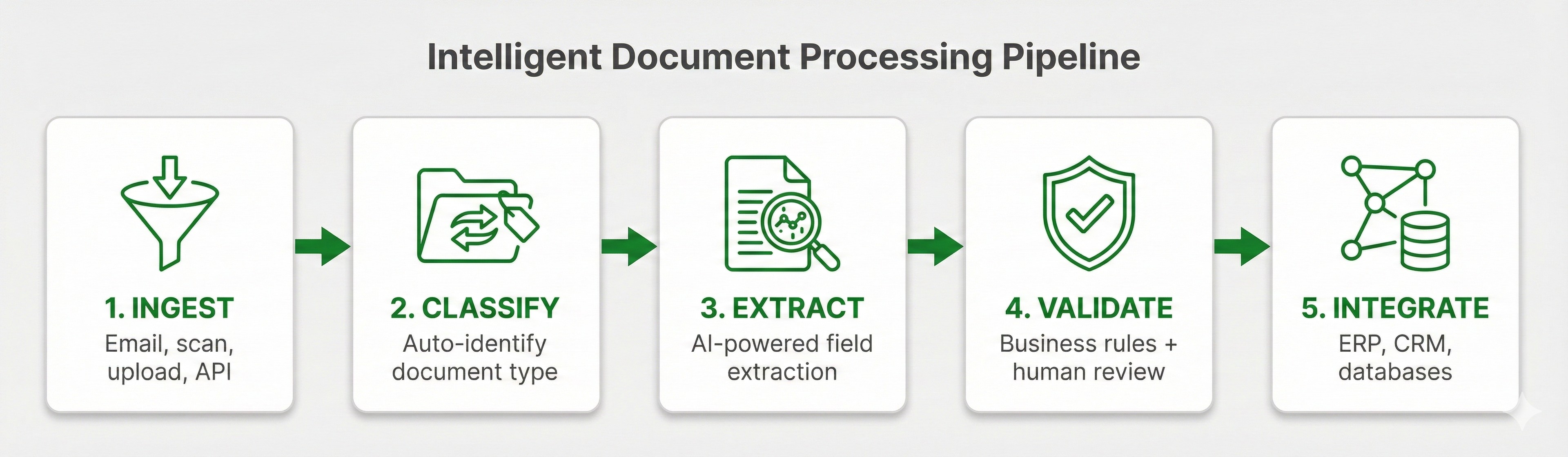 Invoice extraction pipeline: Ingestion, Classification, Field Extraction, Validation, and Output to ERP systems
Invoice Extraction Accuracy: What to Expect
Accuracy varies by field type and document quality.
| Field Type | Typical Accuracy | Notes |
|---|---|---|
| Invoice number | 98-99% | Usually clear and unambiguous |
| Invoice date | 97-99% | Multiple date formats handled |
| Vendor name | 95-98% | Varies with logo quality and formatting |
| Total amount | 96-99% | High priority field, heavily optimized |
| Line items | 90-95% | Complex tables are harder |
| Payment terms | 90-95% | Often requires interpretation |
| PO number | 85-95% | Not always present or clearly labeled |
Key insight: 95% accuracy sounds good until you do the math. At 10,000 invoices per month, 95% accuracy means 500 invoices need correction. That's why confidence scores and human review matter. The goal is identifying which 5% need attention, so instead of combing through all 10,000 invoices to find those that need corrections, your team can simply review the few the system flags.
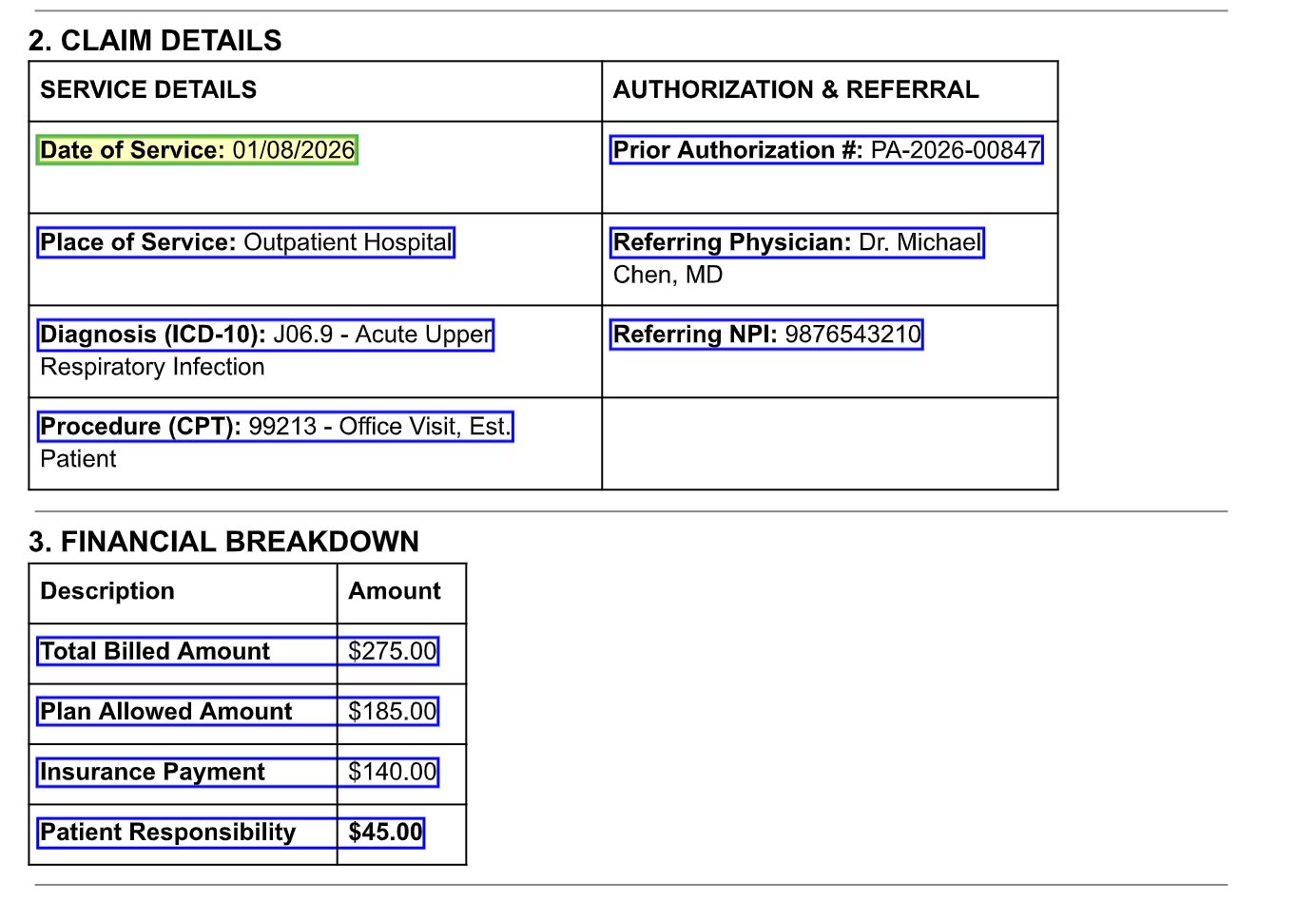 Invoice with extracted fields and confidence indicators
Common Invoice Extraction Challenges
Multi-Page Invoices
Long invoices with many line items that span across multiple pages. To handle this a quality extraction system needs to:
- Continue the line item table across page breaks
- Not double-count totals that appear on multiple pages
- Handle headers that only appear on page one
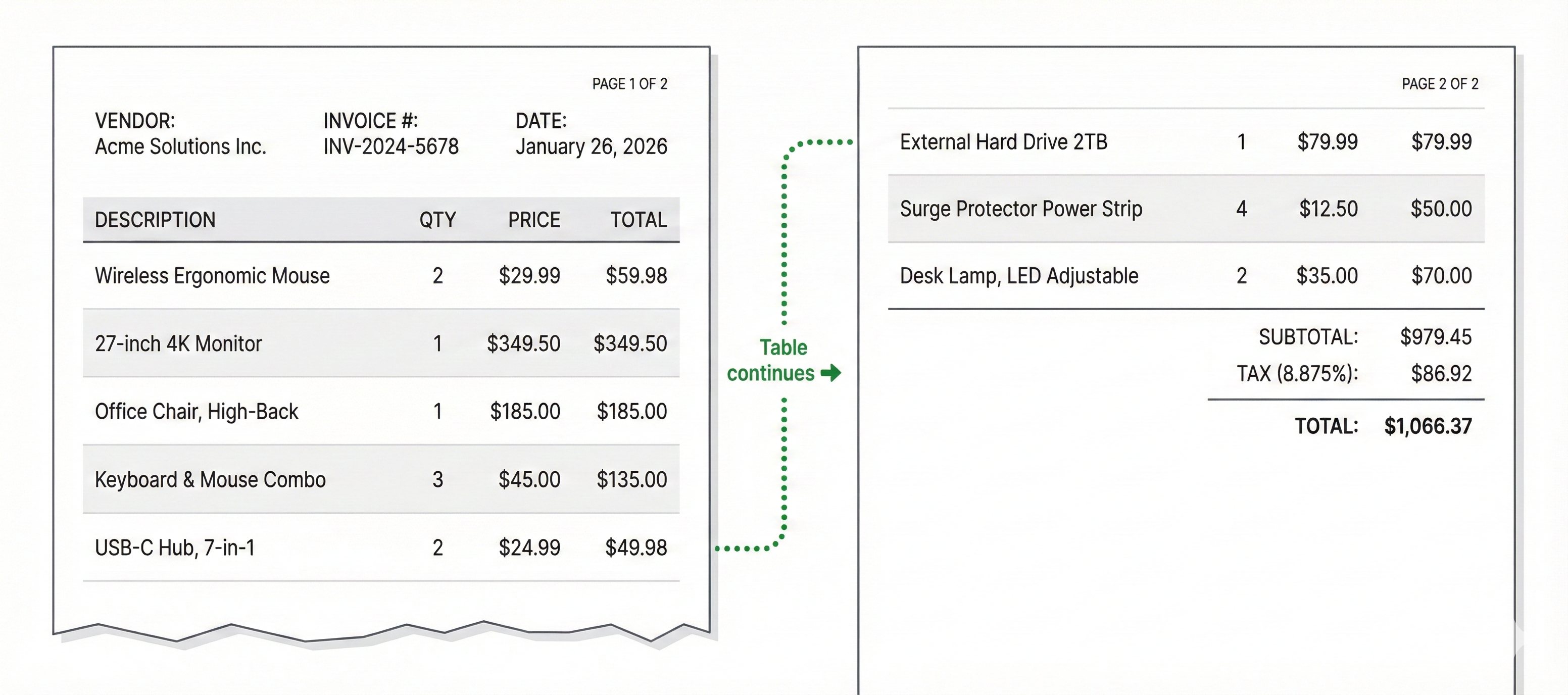 Multi-page invoice with table continuation
Handwritten Annotations
Invoices often arrive with handwritten notes: such as approval signatures, corrections, reference numbers, etc. A quality system needs to distinguish these from the printed content and decide what to extract based on context.
Poor Quality Scans
Faxed invoices, photos taken at angles, low-resolution scans. Preprocessing helps. But a low quality upload will still sometimes result in a lower quality output. This is why confidence scores are integral, to flag the data points that require additional review.
Non-Standard Formats
Credit memos, debit notes, pro forma invoices. These look similar to invoices but have different semantics. It is integral for classification to distinguish them and route appropriately.
International Invoices
Different countries have different invoice requirements, tax structures, and formatting conventions. It's important to utilize systems that can handle the added complexity that multi-currency and multi-language documents introduce.
Invoice Extraction vs. Manual Data Entry
| Factor | Manual Entry | AI Extraction |
|---|---|---|
| Cost per invoice | $10-15 | Under $1 |
| Processing time | 10-15 minutes | Seconds to minutes |
| Error rate | 1-4% | 1-5% (before review) |
| Scalability | Hire more people | Same system handles more volume |
| Consistency | Varies by person | Same rules every time |
| Audit trail | Manual logging | Automatic, complete |
The ROI math is very straightforward: a team processing 5,000 invoices monthly at $12 each spends $60,000/month on processing. At under $1 per invoice with AI extraction, that quickly drops to $5,000. The $55,000 monthly savings funds the technology many times over.
What to Look for in an Invoice Extraction Software
Accuracy on Your Invoices
Request a proof-of-concept with your actual invoices, especially the messy ones. Vendor demos use clean, well-formatted samples. If a vendor won't do a custom POC, try it yourself. Some systems (such as DocuPipe) offer free credits to test the software. Make sure to utilize these credits to ensure the tool can actually handle your specific real-world documents.
Line Item Extraction Quality
Header fields are relatively easy. Line items are where solutions differentiate. Evaluate how the system can handle complex tables, multi-page line items, and varying column structures.
ERP Integration
Extracted data needs to reach your AP system. Evaluate pre-built connectors for your ERP, API quality for custom integration, and data mapping flexibility.
Three-Way Matching Support
Check if the solution supports matching invoices against POs and receiving documents.
Duplicate Detection
Processing the same invoice twice creates accounting problems. Look for built-in duplicate detection based on invoice number, vendor, amount, and date.
Human Review Workflow
Even the best extraction needs human review for edge cases. Evaluate the review interface: can reviewers see source documents alongside extracted data? Can they correct fields efficiently?
FAQ
Invoice data extraction automatically captures fields like vendor name, invoice number, line items, and totals from invoices and converts them to structured data for accounts payable systems.
Modern solutions achieve 95-99% field-level accuracy out of the box. Accuracy varies by document quality and field type. Human review can easily handle the remaining exceptions.
Yes. AI-powered extraction works without templates, handling layout variations automatically. The beauty of IDP is that you don't need to configure a new template for every vendor.
Pricing typically ranges from $0.05-0.50 per invoice depending on complexity and volume. This compares to $10-15 per invoice for manual processing.
Yes. The system uses OCR to convert scanned images to text, then extracts structured data. Quality depends on scan resolution.
Simple invoices process in seconds. Complex multi-page invoices with many line items may take 30-60 seconds. Human review adds time for flagged documents.
Most organizations see positive ROI within a couple months. Processing costs typically drop 60-80% while accuracy improves and processing time shrinks from days to hours.
Key Takeaways
- Invoice extraction automates AP by capturing vendor info, line items, and totals from any invoice format.
- Layout variability is the core challenge. AI-powered extraction handles it without templates.
- 95-99% accuracy is achievable, but confidence scores matter for identifying the exceptions that need review.
- ROI is fast. Processing costs drop from $10-15 to under $1 per invoice. Most organizations break even in 2-3 months.
- Line item extraction differentiates solutions. Header fields are easy. Complex tables are hard.
Invoices shouldn't pile up waiting for someone to handle manual entry. The data should flow into your AP system automatically, matched against POs, validated, and ready for quick payment. That's why we built DocuPipe—to eliminate the bottleneck and let your AP team focus on important exceptions, not mundane data entry.
Recommended Articles

Related Documents