
Vendor Paperwork Is a Matching Problem: Two Free Tools for Quotes and COIs

Uri Merhav
Updated Jul 2nd, 2026 · 6 min read
Table of Contents
Vendor Paperwork Is a Matching Problem: Two Free Tools for Quotes and COIs
Nobody struggles to read one vendor document. The struggle is matching them. Three quotes for the same job have to be matched against each other, line by line, before anyone can pick a winner. A folder of certificates of insurance has to be matched against the contract and the calendar before anyone can say every vendor is covered. We built a free browser tool for each - no signup:
- Quote Comparison - drop 2-6 vendor quotes and get one aligned comparison matrix.
- COI Tracker - drop a folder of certificates of insurance and get one tracker with every expiration checked against today.
Three quotes, three vocabularies
Vendors never describe the same thing the same way. One quote says "sit-stand desk 160cm", the next says "height-adjustable workstation, 1600mm", the third just says "desk, electric". The items are identical; the words are not. So the comparison spreadsheet gets built by hand: re-key each vendor's line items, decide which rows correspond, and hope nothing got lost in the transcription.
Quote Comparison does the alignment for you. Drop each vendor's quote into a slot and the line items are matched across vendors by what they mean, not how they are worded - and the result is one matrix:
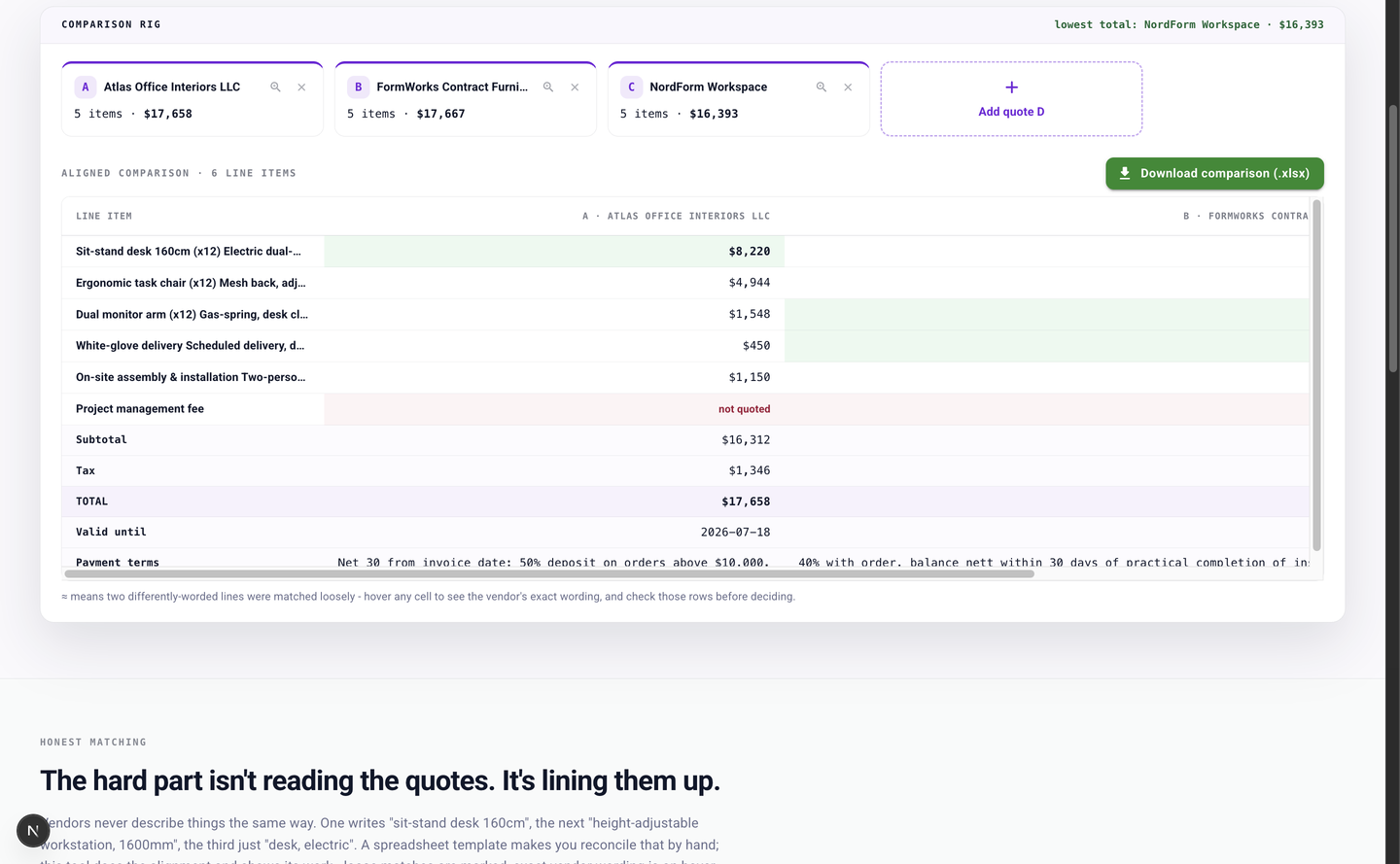 Three vendor quotes aligned into one comparison matrix: matching line items on the same row, the best price highlighted green per row, a red "not quoted" flag where a vendor skipped an item, and subtotal, tax, total, validity, and payment terms at the bottom
Three things in that screenshot are the reason the tool exists:
- Best price per row. Each line's lowest price is highlighted green, so the row-by-row picture is visible at a glance rather than after an afternoon of formatting.
- Loose matches show their work. When two differently worded lines are matched with less certainty, the cell carries an explicit ≈ marker, and hovering shows each vendor's exact wording - the judgment call stays yours, with the evidence in front of you.
- Gaps are marked, not papered over. Anything a vendor didn't quote shows a red "not quoted" flag instead of silently disappearing into an average. Scope gaps are often the expensive part of an award, and they surface here before you sign.
Totals, tax, quote validity, and payment terms line up at the bottom of the matrix, and the whole comparison downloads as a workbook you can share. Procurement and office managers get their end-of-day comparison without re-keying; construction estimators get sub bids in six formats leveled into one sheet.
Sixty certificates, one question: who is expired?
The other matching problem is the certificate folder. Every vendor sends a certificate of insurance in whatever shape their agent produced - clean forms, grainy faxes, carrier letters written in prose - and the compliance questions are always the same. Who is expired? Who lapses next month? Whose certificate actually has the additional-insured box checked?
COI Tracker reads the folder and answers directly:
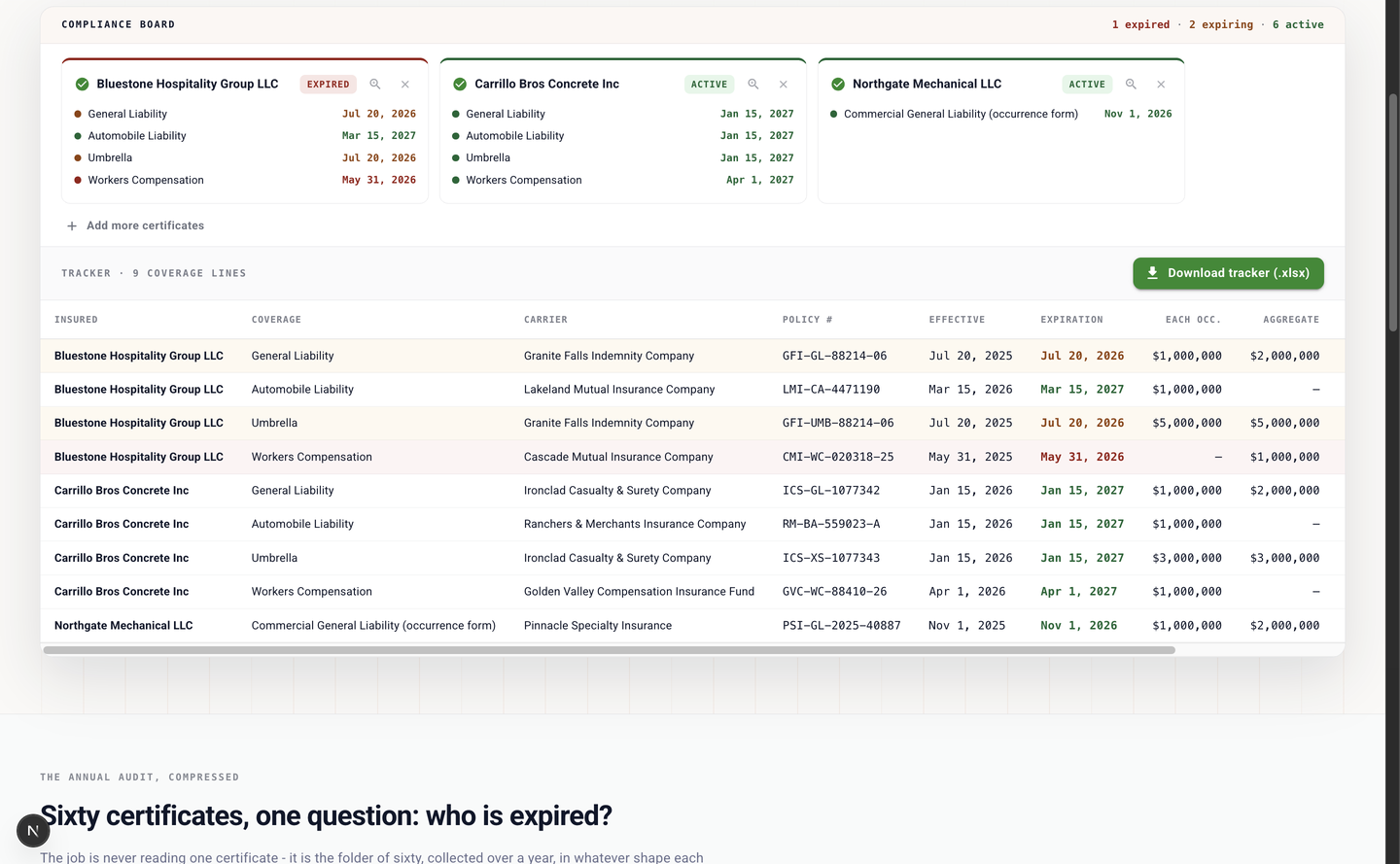 The COI compliance board: three certificate cards with EXPIRED and ACTIVE status pills, above a tracker table with carriers, policy numbers, effective and expiration dates, limits, and red and amber highlighting on expired and expiring coverage lines
Each certificate becomes a status card, and every coverage line lands in one tracker table: coverage type, carrier, policy number, effective and expiration dates, each-occurrence and aggregate limits. The two fields that decide whether a certificate satisfies a contract - additional insured and waiver of subrogation - live in checkboxes, not text, and the extraction reads those marks off the form itself and carries them into the tracker as explicit yes/no columns.
Then every expiration date is compared to today: expired lines highlight red, anything expiring within 30 days highlights amber, and the download includes a renewal-calendar sheet sorted by expiration so the next lapses sit at the top. Property managers get the annual vendor re-check in one pass; GCs get every sub's certificate checked against the contract before mobilization.
The fine print
Both tools are free, run in the browser, and require no signup. Files are capped at 14MB each, and each run processes the first 20 pages of a file. Files are encrypted in transit and at rest, processed on ISO 27001-certified, HIPAA-compliant infrastructure, and never used to train models. The sample quotes and certificates on both pages are fictional, so you can try the full flow without exposing a real vendor's pricing or coverage.
When vendor paperwork never stops arriving
Both tools run on the same extraction engine as the DocuPipe platform. Quotes and certificates don't arrive once - they arrive with every RFQ and every renewal - and a DocuPipe workflow runs the same extraction on every inbound document at scale: every quote extracted as it lands, every certificate checked into a tracker that stays current, with the results delivered as structured data instead of attachments. A free account is enough to set that up.
These are two of our free document tools - the full list lives at www.docupipe.ai/tools.
Recommended Articles
Related Documents