
The Auto-Renewal Tripwire: Term-Switcheroos, Notice Ceilings, and Certified-Mail Clauses

Uri Merhav
Updated Jul 6th, 2026 · 6 min read
Table of Contents
The Auto-Renewal Tripwire: Term-Switcheroos, Notice Ceilings, and Certified-Mail Clauses
A contract does not renew by accident. Someone wrote the clause to renew, and worded it so the one date that could stop it is easy to miss. We built a free tool that reads that date out of every contract you drop in - the contract renewal tracker - and this post is about what it is reading.
Here is a real one, from a janitorial services agreement. It is on page 4, in "Miscellaneous," three sections down from where anyone stops reading:
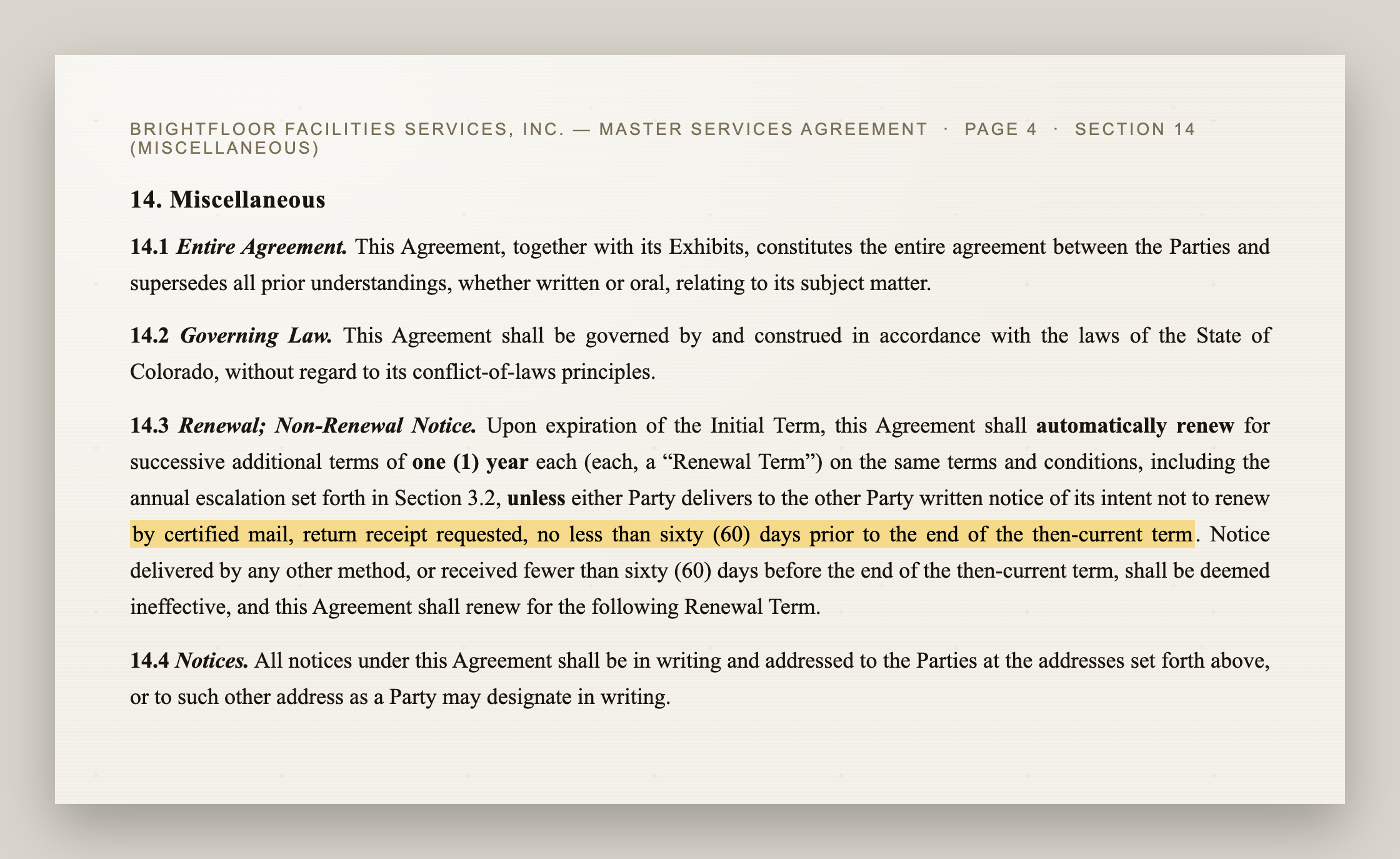 Section 14.3 of a master services agreement, headed "Renewal; Non-Renewal Notice." The paragraph states the agreement automatically renews for successive one-year terms unless a party gives notice, with the phrase "by certified mail, return receipt requested, no less than sixty (60) days prior to the end of the then-current term" highlighted
Read the highlighted part. There are three separate tripwires packed into one sentence.
Tripwire 1: the delivery-method trap
"By certified mail, return receipt requested." Not email. Not a note to your account rep. The clause even spells out the consequence: "Notice delivered by any other method ... shall be deemed ineffective, and this Agreement shall renew." You can send a non-renewal notice on time, by the wrong channel, and still be locked in for another year. The method is part of the deadline.
Tripwire 2: the notice ceiling
That janitorial contract wants notice "no less than sixty (60) days" before the term ends - a floor. Plenty of contracts add a ceiling too. A SaaS order form we tracked reads: notice is valid "no earlier than ninety (90) days, and no later than thirty (30) days, prior to the expiration." That is a 60-day window that opens and closes. Give notice in month eleven because you were being organized, and it is void. You have to hit the slot.
Tripwire 3: the term-switcheroo
The renewal term is not always the same length as the one you signed. The same SaaS agreement renews for "the greater of twelve (12) months or the length of the then-expiring term." Sign a three-year deal, miss the window, and you have not renewed for a year - you have renewed for another three. This is the pattern behind every "we got locked in again" story: the renewal is engineered to be longer and harder to exit than the notice window suggests.
None of these are your fault for missing. They are a lot of contracts, each one worded to slip past, and the dates are buried where nobody looks. The job was never willpower. The job is getting the dates out of the PDFs.
Read the deadline, not the renewal date
Drop your contracts into the tool and it reads each renewal clause and does the date math. The important move: it keys the urgency on the notice deadline, not the renewal date. The renewal date is when the next term starts. The notice deadline is the last day you can stop it - usually 30, 60, or 90 days earlier. Alert on the renewal date and you are already too late; alert on the notice deadline and you can still act.
 A "what needs action in the next 90 days" panel with three columns. NOTICE DUE in red: a janitorial MSA, notice due in 15 days. IN WINDOW in amber: a SaaS agreement, in the notice window with 13 days left. OPTION OPEN in blue: an office lease, renewal option opens in 21 days
Each contract also comes back as a card with the math shown and the source clause quoted, so you can check it against the contract rather than trust a number:
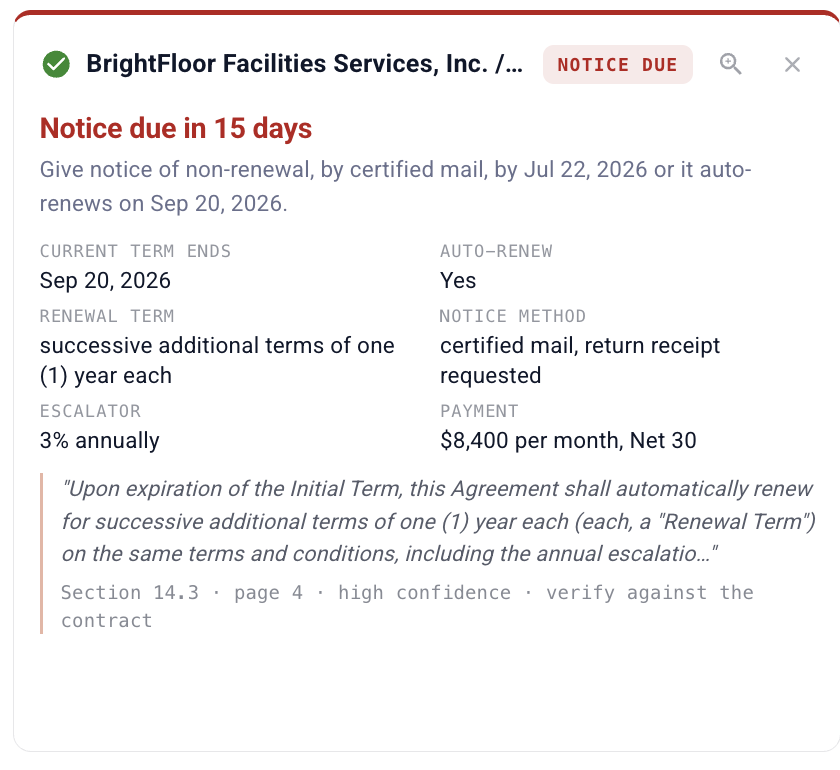 A contract card reading "Notice due in 15 days," with the current term end, auto-renew flag, renewal term, notice method (certified mail), a 3% escalator, and payment terms, plus the exact renewal clause quoted and a note that it came from Section 14.3, page 4, high confidence
That is deliberate. The real risk with a tool like this is not the paperwork - it is trusting a wrong date and missing a real deadline. Every date links back to the clause and the page it came from, and the tool tells you to verify against the source. It reads escalators, notice methods, and payment terms in the same pass, so the whole picture is on one card.
Not every window is a threat
Some clauses are opportunities. An office lease we tracked has a renewal option the tenant can exercise "no earlier than twelve (12) months and no later than nine (9) months" before expiration. Miss that window and you lose a right you wanted, not a right you were trying to escape. The tool shows those in blue as option windows - the months you can renew, not just the day something expires.
Take the dates with you
When the batch is done, one click gives you a tracker spreadsheet - every contract, every notice deadline, sorted by days-until - and a calendar file that drops each deadline into Google Calendar, Outlook, or Apple Calendar with reminders 7 days and 1 day before. No account connection; the calendar file is built in your browser.
 The tracker bar with a "Calendar (.ics)" button and a "Download tracker (.xlsx)" button, above a consolidated table of three contracts with their current term end, auto-renew flag, notice deadline, days-until, notice method, source page, and a color-coded status
One honest note on the law, since it always comes up: the auto-renewal statutes that require a vendor to send you a reminder are aimed at consumer subscriptions. They generally do not cover business-to-business contracts, so a commercial auto-renewal usually stands exactly as written. Catching your own notice window is the reliable defense - which is the whole point of getting these dates onto a calendar before they pass.
Try the contract renewal tracker - it is free, needs no signup, and there are three sample contracts one click away if you would rather not upload your own to see it work.
DocuPipe is a software platform, not a law firm. Extracted dates and obligations are informational, not legal advice; verify key dates against the source contract.
Recommended Articles
Related Documents