
One Row Per Form: Your Browser Can Read a Filled PDF, Acrobat Charges $240 a Year for a Worse Version

Uri Merhav
Updated Jul 6th, 2026 · 6 min read
Table of Contents
One Row Per Form: Your Browser Can Read a Filled PDF, Acrobat Charges $240 a Year for a Worse Version
Here is the document. One filled copy of a charity 10K registration form - text fields, a dropdown, a radio group, two checkboxes, all filled in by a runner:
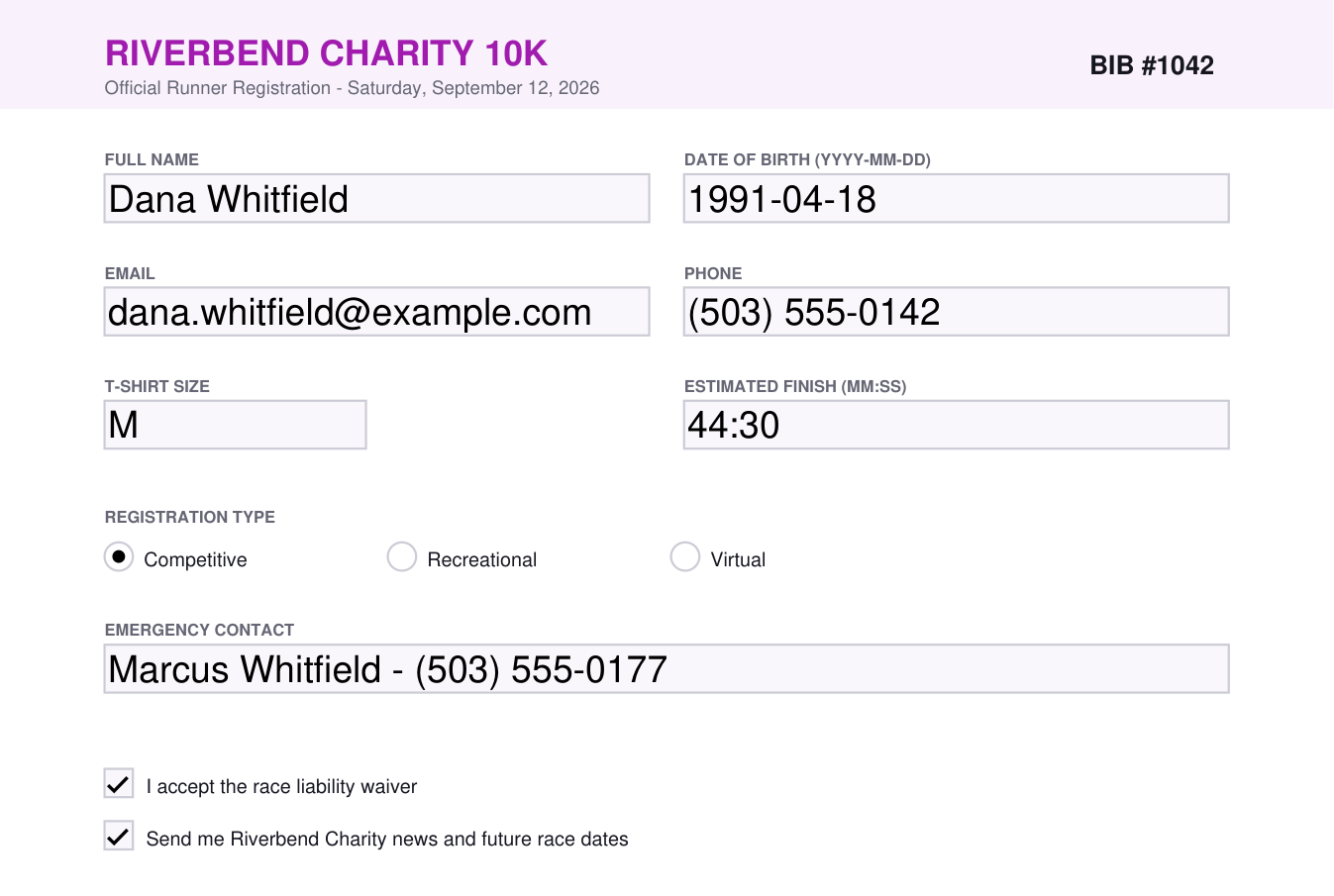 A filled Riverbend Charity 10K registration form: full name Dana Whitfield, date of birth, email, phone, T-shirt size M, Competitive selected, emergency contact, and both waiver and newsletter checkboxes ticked
Now imagine fifty of these in a folder. The runners are different, the answers are different, but the form is the same. The job is never one form - it is turning the whole stack into a table you can sort and filter: one row per runner, one column per question. Who picked Competitive, who still has not signed the waiver, how many larges to order.
People do this by hand. They open each PDF, read the boxes, and type the answers into a spreadsheet row. An hour later they have fifty rows and a headache.
Acrobat can do this. Sort of.
Acrobat Pro has a feature for exactly this, buried in Prepare Form mode: "Merge Data Files into Spreadsheet." In practice the forum threads about it all sound the same. It demands that every form have the exact same fields. One malformed file can abort the whole export. And people report it crashing, or writing a 0-byte CSV, once the batch gets near a hundred files. It also costs a paid subscription, around $20 to $30 a month.
That is a lot of friction for a job your browser can already do.
One row per form, whatever the field set
PDF Form to Excel takes the stack and builds one grid: a row per form, and columns that are the union of every field name it sees. Drop the six registrations and the table fills itself:
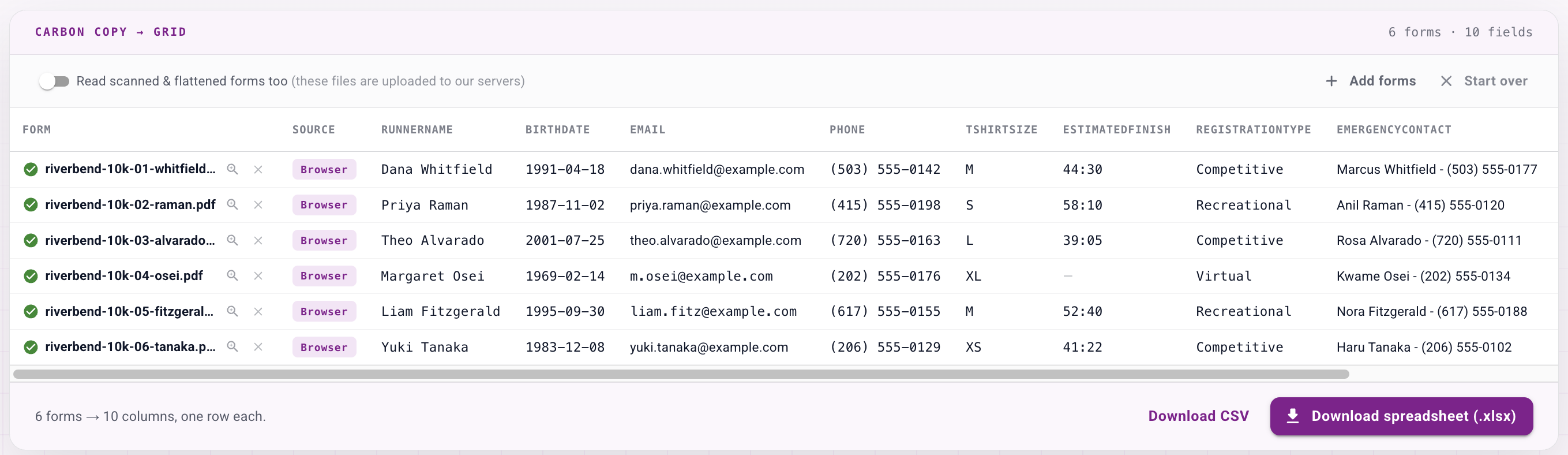 The tool's responses grid: six registration forms as rows, each marked Browser, with columns for runner name, birth date, email, phone, T-shirt size, estimated finish, registration type, and emergency contact, above Download CSV and Download spreadsheet buttons
Each checkbox becomes Yes or No. The dropdown and the radio group become whatever option was selected - M, Competitive. A field one form leaves blank simply stays blank on that row. And because the columns are a union, the forms do not have to be identical: drop a slightly different version and its extra questions just become extra columns.
The download is a real .xlsx with two sheets - a Responses sheet with one row per form, and a Field map sheet that lists every field, its type, and how many forms filled it in. There is a CSV button too.
The part that surprises people: nothing is uploaded
Look at the badge on every row above. It says Browser, not because of branding, but because that is literally where the reading happened. A filled PDF form stores its answers in a form layer, and your browser already ships a PDF engine that can read that layer. So for digital forms, this tool makes zero network calls - the files never leave your machine. You can open your network tab and watch nothing get sent.
That is a real privacy promise, not "we delete it after" but "it never arrived."
Scanned and flattened forms still work
Sometimes a form has no digital fields left - it was printed, filled by hand or by another program, and scanned back to a flat image. The browser has nothing to read there. So the tool flags those forms, asks before it does anything, and only then reads them on our servers with the same extraction that powers the rest of DocuPipe. They land in the same grid, marked with an AI badge:
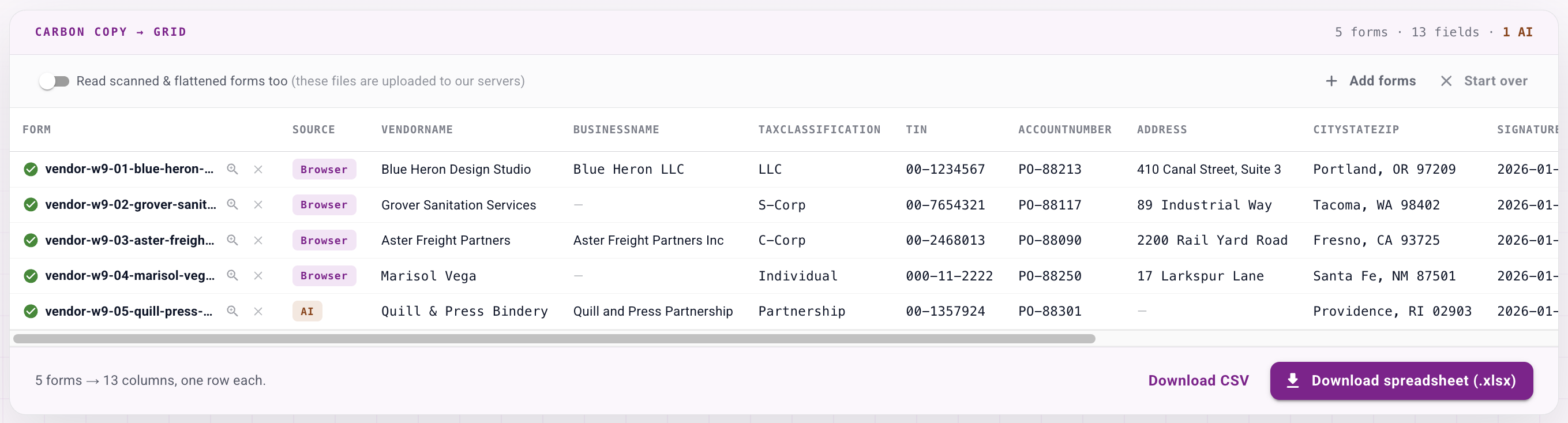 A grid of five vendor tax forms: four marked Browser and read locally, one scanned form marked AI, all lined up under the same columns - vendor name, business name, tax classification, TIN, account number, address, and city/state/ZIP
Four of those vendor W-9s were digital and read in the browser. The fifth was a flattened scan, so it went through the AI path - and it lined up under the same columns as the other four. Digital stays free and instant and private; the scanned fallback is there when you need it, capped at ten per run.
If you already have Acrobat's own exported data - a .fdf or .xfdf file - you can drop that too. It is parsed in the browser like everything else.
Why not Excel's Get Data, or Power Automate?
Excel's Get Data from PDF is the answer people find first, and it disappoints them: it reads visible page tables, not the values typed into form fields, so it hands back the blank template text instead of the filled-in answers. And you do not need a Power Automate flow or a Python script with a PDF library for this either - those exist precisely because the built-in export is painful.
Here is the whole comparison in one place:
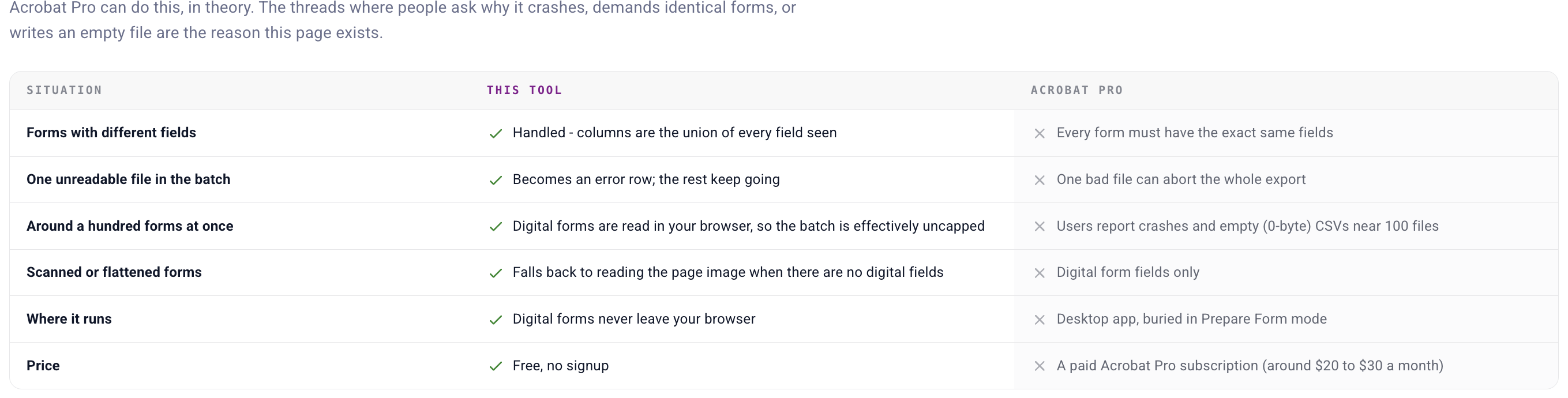 A comparison table: for forms with different fields, one bad file, a hundred forms at once, scanned forms, where it runs, and price - this tool handles each where Acrobat Pro requires identical forms, aborts on a bad file, crashes near a hundred files, reads digital fields only, runs as a buried desktop feature, and costs a subscription
The obvious question this tool raises
If a stack of forms can become a spreadsheet in one drop, why do it by hand ever again? That is DocuPipe, the platform behind this page: workflows that run the same extraction on every form that arrives - by email, API, or folder sync - and append each one to your spreadsheet or system automatically, with a schema you control. The tool is the single-batch version; the platform is the every-form-forever version. More on why we give the first one away in why we're doubling down on free tools.
The fine print
Free, no signup. Digital forms and .fdf/.xfdf files are read entirely in your browser and never uploaded. Only scanned or flattened forms are sent to be read, and only after you turn that on; those travel encrypted, are processed on ISO 27001-certified, HIPAA-compliant infrastructure, and are never used to train models. Every sample form on the page is fictional - invented runners and vendors, fake TINs - so you can run the whole flow without touching anything real.
One of our free document tools - the full list lives at www.docupipe.ai/tools. Working with the documents themselves? PDF to Excel turns any PDF's tables into a workbook, and Image to Excel does the same for a screenshot.
Recommended Articles
Related Documents