
Five Shops, Five Email Layouts, One Tracker: Free Email to Excel With Nothing to Authorize

Uri Merhav
Updated Jul 5th, 2026 · 6 min read
Table of Contents
Five Shops, Five Email Layouts, One Tracker: Free Email to Excel With Nothing to Authorize
Here is the document. A forwarded order confirmation, pasted exactly as it left the inbox - headers, line items in prose, and the quoted question underneath from the original thread:
---------- Forwarded message ---------
From: Larkspur Pottery <hello@larkspurpottery.example.com>
Date: Sat, Jun 27, 2026 at 2:18 PM
Subject: Your Larkspur Pottery order is confirmed
To: Priya Raman <priya.raman@example.com>

Hi Priya,

Your order is confirmed! We're wrapping everything in the studio now.

Order LP-1187, placed June 27, 2026

You ordered:
* Speckled dinner plate, set of 4 - $148.00
* Small bud vase, sage glaze - $34.00

Subtotal $182.00
Shipping (USPS Priority) $14.50
Total $196.50

We'll email tracking as soon as it ships (usually 3-5 business days -
each piece is checked by hand).

Warmly,
Mira at Larkspur Pottery

On Fri, Jun 26, 2026 at 8:02 PM Priya Raman <priya.raman@example.com> wrote:
> Hi! Quick question before I order - is the sage glaze food safe?
> Thanks!
Nothing about this is machine-friendly. The order number lives in a sentence. The line items are asterisk bullets with the price at the end. The total sits three lines below the subtotal. And the bottom third of the paste is quoted history from an earlier message that must not end up in your spreadsheet.
Now multiply by the rest of a real inbox. Another shop sends a terse dotted-line receipt with no From header at all. A wholesaler sends a SKU grid with freight terms. A French boutique confirms in bilingual prose with amounts in euros. Same job - "get these orders into a sheet" - five completely different layouts. This is why people paste twelve emails into Excel by hand and lose an hour.
One row per email, whatever the layout
Email to Excel takes each email as a paste - the whole thing, headers and all - and stacks them as cards. Then every email becomes one row in a single tracker:
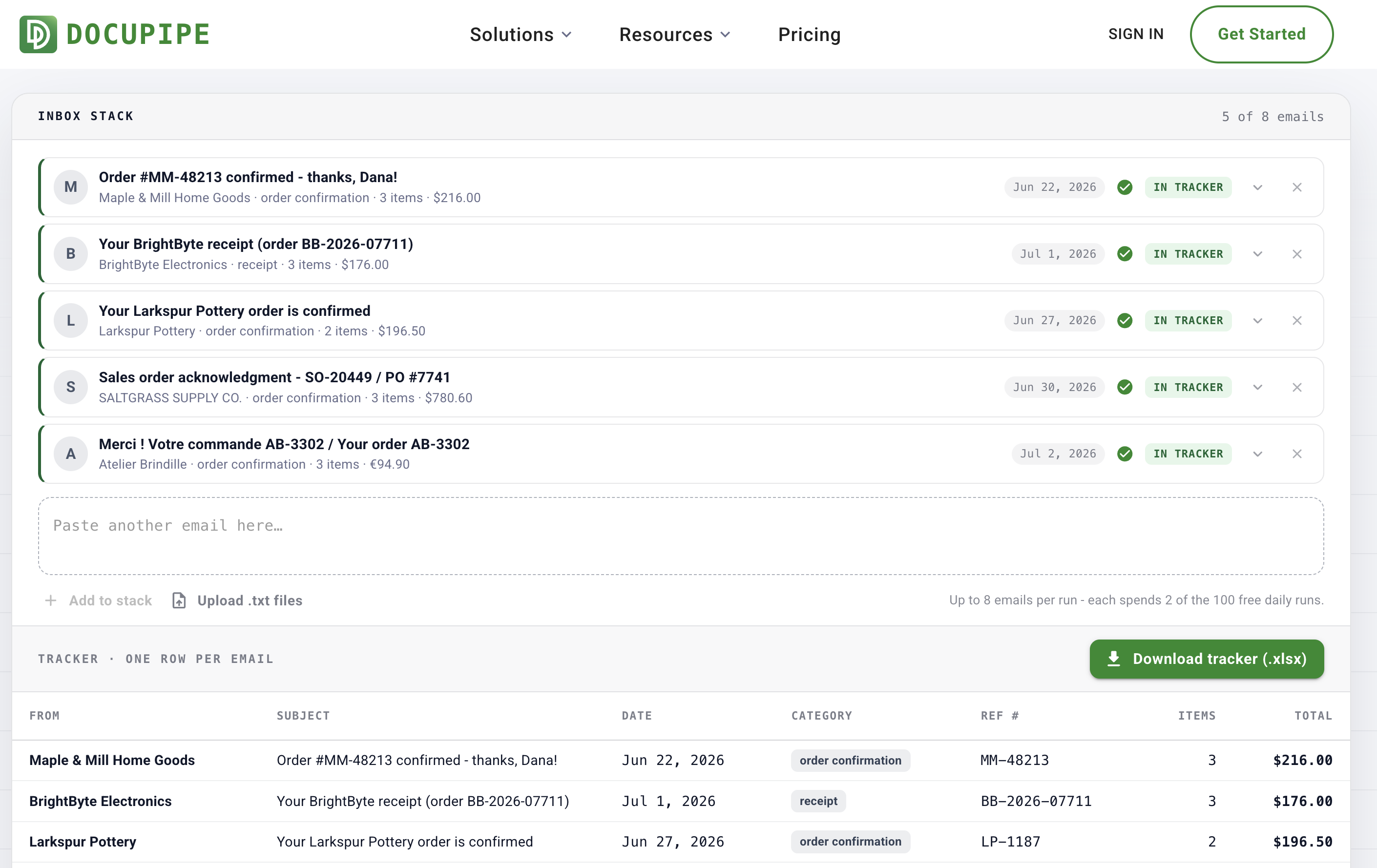 The inbox stack: five pasted emails as cards - a shop confirmation, a terse receipt, the forwarded pottery order, a wholesale acknowledgment, and a French order - each marked IN TRACKER, above a tracker table with one row per email
The forwarded email above became the Larkspur Pottery row: reference LP-1187, June 27, 2 items, $196.50 - and the quoted history under it was ignored, because the extraction reads the most recent message. The terse receipt with no From header still produced a sender. The French email mapped into the same columns as everything else, total in euros:
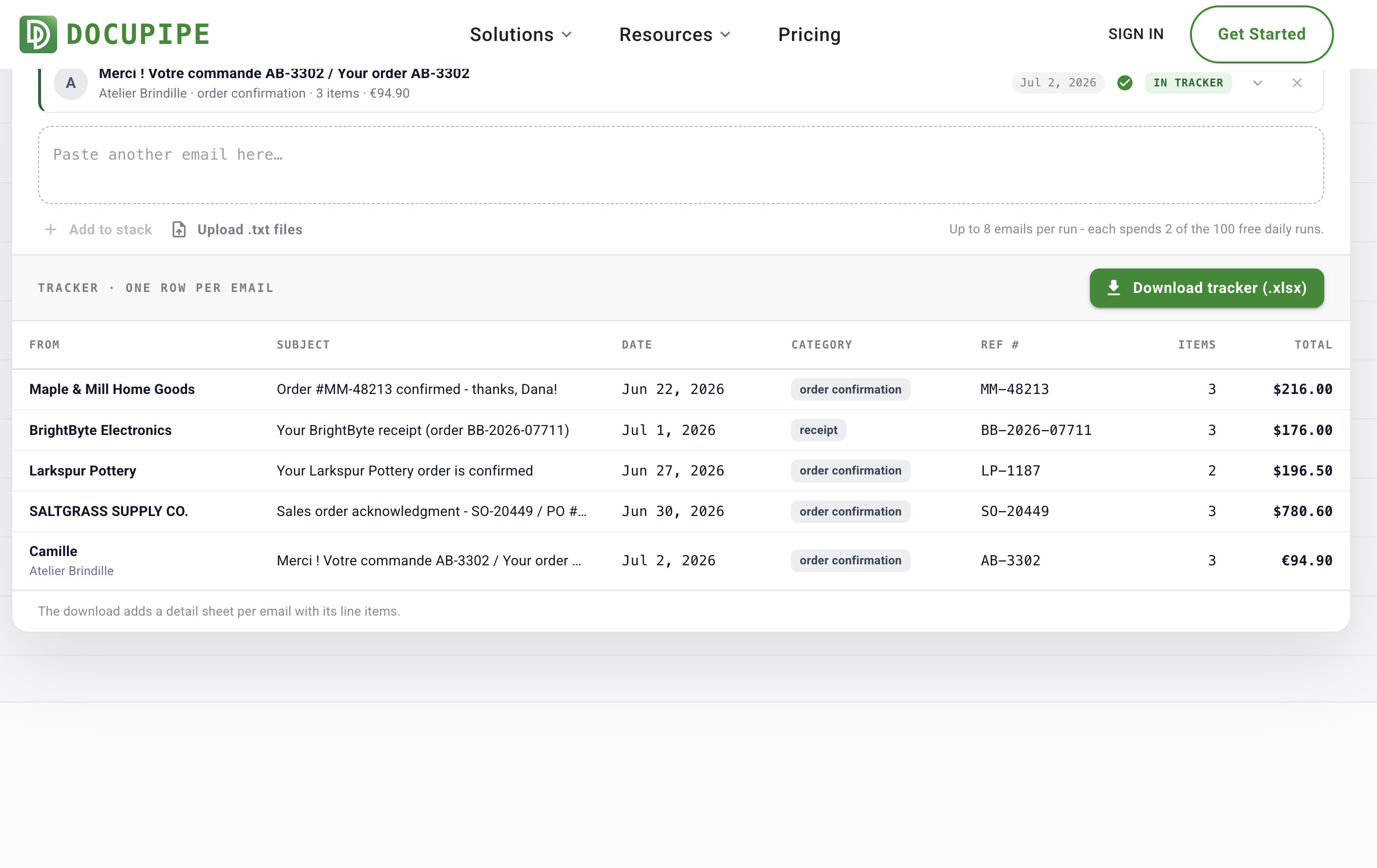 The tracker: five rows with From, Subject, Date, Category, Ref #, Items, and Total columns - including the BrightByte receipt, the SALTGRASS wholesale acknowledgment at $780.60, and the Atelier Brindille order at €94.90 - above a green "Download tracker (.xlsx)" button
The downloaded .xlsx adds a detail sheet per email with its line items - description, quantity, unit price, amount.
The safest inbox integration is no integration
Everything else on this search result page is subscription email-parsing software, and it all starts the same way: connect your mailbox, grant permissions, configure a template per sender, then see if it works. This tool inverts that. There is no mailbox connection and no permission screen - you paste the text of each email, and that is all the page ever sees. Nothing to authorize, nothing to revoke, and no per-sender templates, because each email is read on its own.
Up to 8 emails per run, any mix of senders and layouts. Each email spends 2 of the 100 free daily runs the page allows. No .eml or .msg upload yet - open the email and copy the text, or upload .txt files, one email per file.
The fine print
Free, no signup. Pasted text travels encrypted, is processed on ISO 27001-certified, HIPAA-compliant infrastructure, is encrypted at rest, and is never used to train models. All five sample emails are fictional - invented shops, invented buyers - so you can run the whole flow without pasting anything real.
The obvious question this tool raises
If a paste can become a tracker row, why paste at all? That's DocuPipe, the platform behind this page: workflows that run the same extraction on every incoming document automatically, with a schema you control and no templates to configure. The tool is the single-batch version; the platform is the every-email-forever version. More on why we give the first one away in why we're doubling down on free tools.
One of our free document tools - the full list lives at www.docupipe.ai/tools. Attachments are their own converters: PDF to Excel for PDFs, Image to Excel for screenshots.
Recommended Articles
Related Documents