
Search the Pile, Split the Pile: Two Free Tools for Scanned Paper

Uri Merhav
Updated Jul 2nd, 2026 · 6 min read
Table of Contents
Search the Pile, Split the Pile: Two Free Tools for Scanned Paper
The real unit of scanned paper is the pile, not the file. A production set from opposing counsel, a records box someone digitized in 2009, a closing package fed through the office scanner front to back. We built two free browser tools for that shape of problem - no signup, nothing installed:
- Scanned PDF Search - drop a pile of image-only scans and search across all of them at once, like a search engine.
- Document Splitter - drop one "stapled pile" PDF and get it split at the real document boundaries, every piece named by what it contains.
Single files get OCR tools. Piles get you.
Every converter on the internet will make one PDF searchable, and that was never the hard part. The hard part is that scanned paper arrives in bulk: two thousand image-only pages and one name to find, or a 60-page scan that is secretly seven documents. Existing tools treat the file as the unit of work. The actual work is the pile.
Search a pile of scans like a search engine
Scanned PDF Search takes up to 10 files at a time - scans, faxes, photos of paper - and runs OCR on all of them the moment they land. Then you type a query and get every hit across the whole pile: which file, which page, and a snippet with the match highlighted.
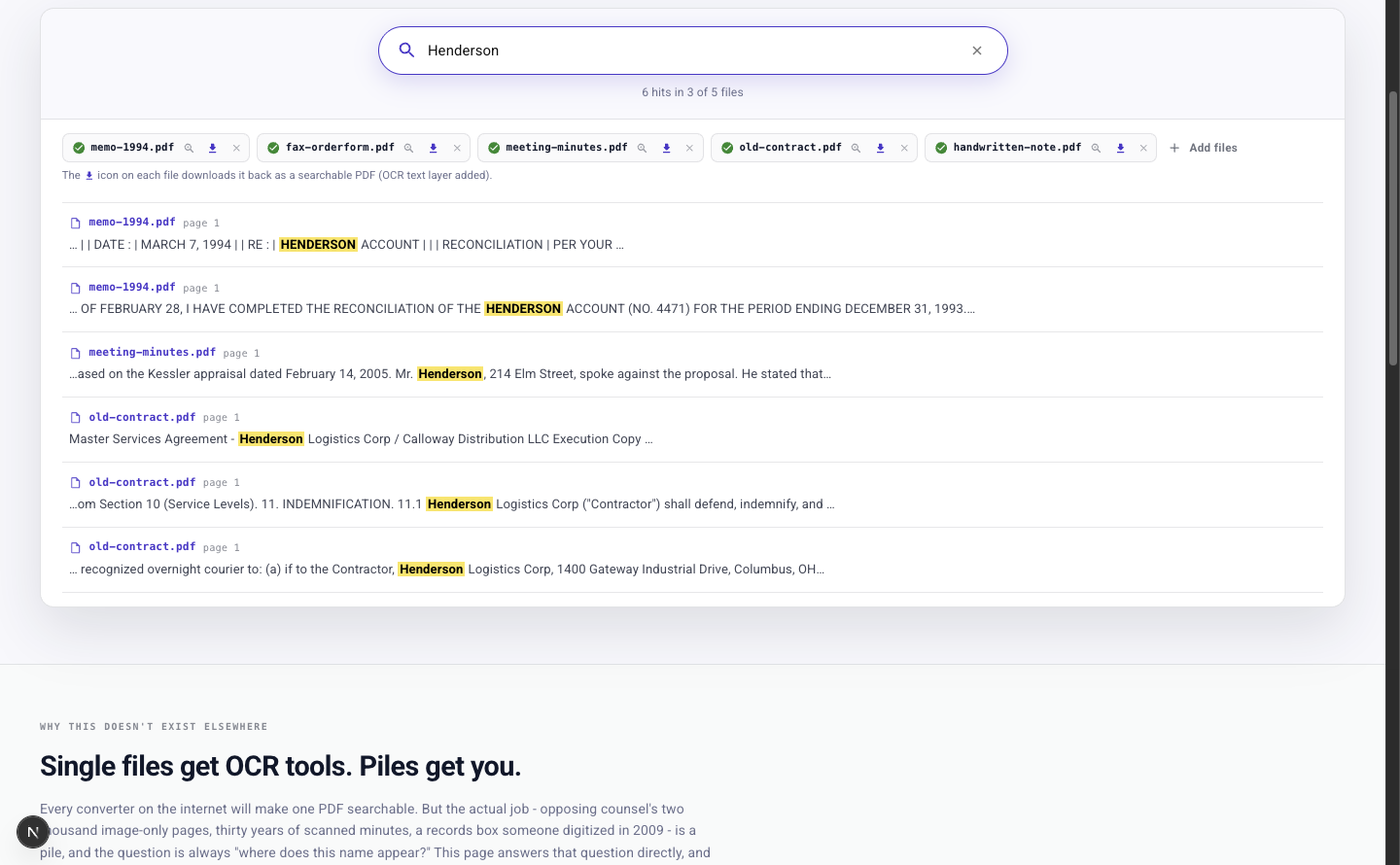 Searching "Henderson" across a pile of five scanned files: six hits in three of the five files, each with the file name, page number, and a highlighted snippet
The screenshot above is the sample pile that ships with the tool: five fictional scans - a 1994 typewriter memo, a faxed order form, council meeting minutes, a contract excerpt, and a handwritten note. Searching "Henderson" returns six hits across three of the five files. A paralegal asking "where does the Henderson account appear in this production set" gets file names and page numbers to cite, not a folder to open one PDF at a time.
Two details matter here. First, the searching itself happens in your browser against the recognized text, so your queries are never sent anywhere; only the OCR runs on our servers, over an encrypted connection. Second, every file comes back downloadable as a searchable PDF with a text layer added - the pile you leave with is permanently better than the one you arrived with.
This is built for paralegals and litigation support running name searches across production sets, records clerks with decades of scanned minutes and permits, and anyone staring at a records-request dump of image-only memos.
Split the stapled pile at the real boundaries
The second tool handles the other kind of pile: a single PDF that is secretly many documents. Document Splitter reads that file and finds where each document starts and ends from the content itself - a new letterhead, a new form, a new date block - not from page counts.
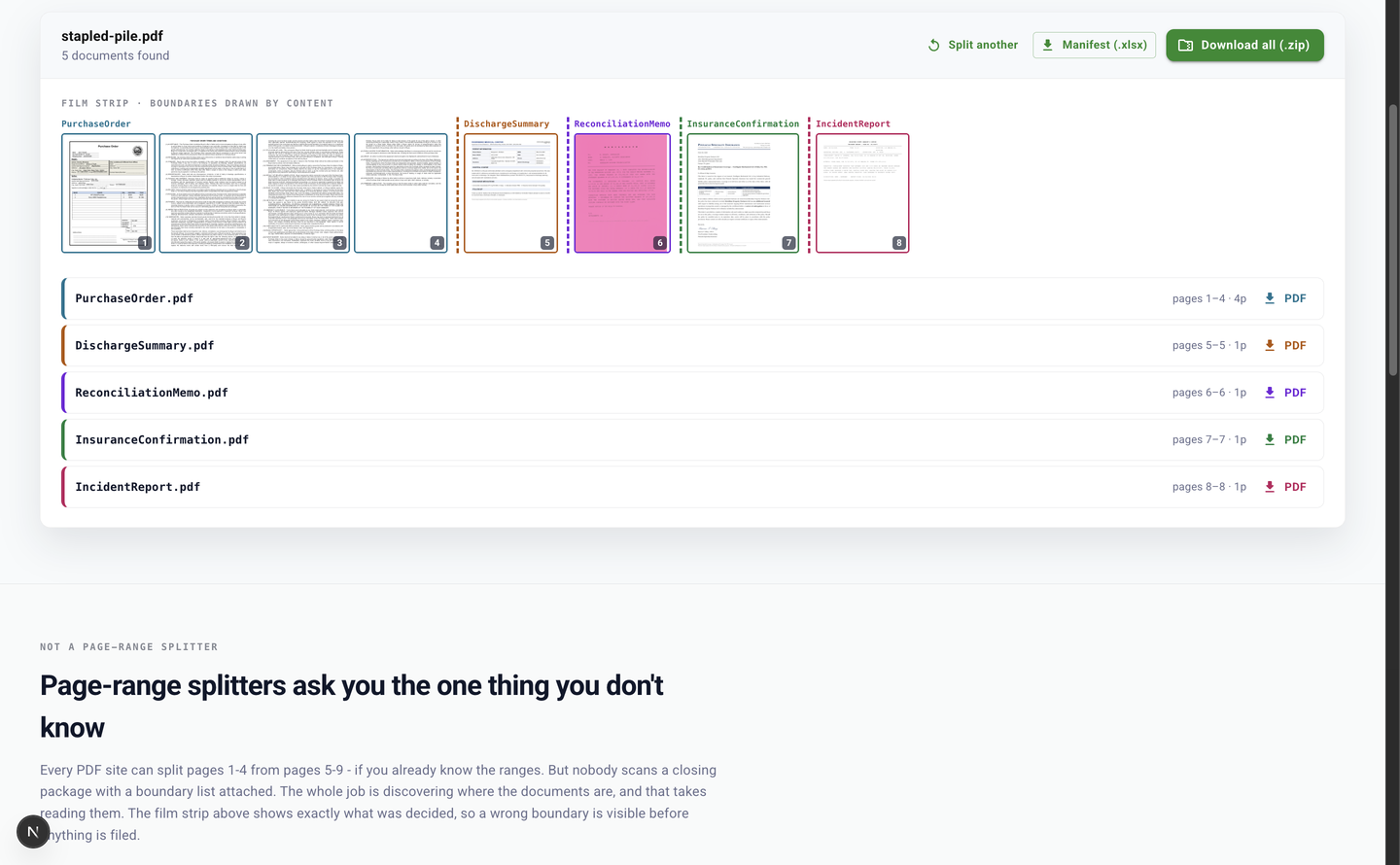 The Document Splitter film strip: eight page thumbnails with colored dashed boundaries between documents, and the resulting pieces named by content - a purchase order, a discharge summary, a reconciliation memo, an insurance confirmation, and an incident report
The result is a film strip of page thumbnails with dashed boundaries drawn between the detected documents, so you can see exactly what was decided before anything is filed. An eight-page scan comes out as a four-page purchase order, a discharge summary, a reconciliation memo, an insurance confirmation, and an incident report - each named by what it contains, not "part-3.pdf". You can download each piece individually, or everything as a ZIP with a manifest sheet mapping every file back to its original pages.
The usual alternative is a page-range splitter, and page-range splitters ask you the one thing you don't know. "Split pages 1-4 from pages 5-9" assumes you already read the pile and wrote down the boundary list - at which point the software is doing the easy half of the job. Discovering the boundaries is the job, and that takes reading the pages.
This one is built for title and escrow processors whose closing packages arrive scanned as one blob, medical records clerks with patient charts scanned front to back, and claims and mortgage intake desks receiving the "everything" PDF a customer emailed in.
The fine print
Both tools are free, run in the browser, and require no signup. Files are capped at 14MB each, and each run processes the first 20 pages of a file. Files are encrypted in transit and at rest, processed on ISO 27001-certified, HIPAA-compliant infrastructure, and never used to train models. The sample documents on both pages are fictional, so you can try everything without touching real records.
When the pile arrives every day
Both tools run on the same extraction engine as the DocuPipe platform. When piles arrive continuously - every production set, every closing package, every inbound fax - a DocuPipe workflow runs the same extraction on every inbound document at scale: split, classify, and extract into structured data your systems can query, instead of a folder of PDFs someone has to dig through. A free account is enough to set that up.
These are two of our free document tools - the full list lives at www.docupipe.ai/tools.
Recommended Articles
Related Documents