
What is Intelligent Document Processing? The Complete Guide for 2026

Uri Merhav
Updated Mar 23rd, 2026 · 14 min read
Table of Contents
- Introduction
- So, What is Intelligent Document Processing (IDP)?
- But Wait, How Does Intelligent Document Processing Actually Work?
- IDP vs OCR: What's the Real Difference?
- IDP vs RPA: How They Work Together
- Benefits of Intelligent Document Processing
- Intelligent Document Processing Use Cases
- Key Technologies Powering Intelligent Document Processing
- How to Choose Intelligent Document Processing (IDP) Software
- The Future of Intelligent Document Processing: 2026 and Beyond
- Frequently Asked Questions About Intelligent Document Processing
- Key Takeaways
- Start Processing Documents Intelligently
What is Intelligent Document Processing? The Complete Guide
In the range of manual entry, OCR, and AI-powered extraction, intelligent document processing (IDP) has become essential for all enterprises. Unlike templates or basic OCR, IDP can validate and scale, turning any document into actionable data - invoices, contracts, forms, etc.
Introduction
Intelligent document processing (IDP) is AI-powered software that can automatically capture, classify, extract, validate, and integrate data from structured, semi-structured, and unstructured documents. Since its inception, it has become the automation foundation for scaling enterprises to capture, validate, and act on the data in their documents.
At 9:00 AM, an invoice hits your inbox. By 9:04, it's already been classified, extracted, matched to a purchase order, and a pricing discrepancy is flagged for review because the unit price doesn't match the PO. No manual entry, no templates, no one wasting their time copying and pasting between two different systems.
This is IDP. And for teams dealing with growing document volume, it's no longer optional. According to Gartner, 80-90% of enterprise data is trapped in documents that legacy tools can't process reliably. OCR-only approaches break when layouts change (and they always do) because they rely on templates or rules to extract fields. RPA bots can't really understand what they're looking at. Meanwhile, stacks of documents continue growing.
The result? Teams are buried in hours of manual work and errors leak into their downstream systems and processes.
This guide will cover everything you need to know about intelligent document processing: what it is, how it works, how it differs distinctly from OCR and RPA, and how to evaluate whether it's right for your organization.
What You Need to Know About IDP
What is it: Intelligent document processing (IDP) uses AI to read, understand, and extract data from any kind of document. It doesn't just recognize text like a simple OCR tool; it actually comprehends the meaning and understands the context.
How it works: Through five stages, IDP transforms disorganized documents into usable data (Ingest, Classify, Extract, Validate, Integrate).
Key differences: OCR can read characters; IDP understands documents. RPA can execute actions; IDP provides the data for RPA to act on.
Business impact: Organizations using IDP typically see 70-80% cost reduction for document processing, with accuracy climbing toward 95-99% extraction accuracy once validation is in place, and processing times up to 10x faster.
Bottom line: IDP has become an essential infrastructure layer for any organization that is processing documents at scale.
So, What is Intelligent Document Processing (IDP)?
Intelligent document processing (IDP) is AI-powered software that automatically captures, classifies, extracts, validates, and integrates data from structured, semi-structured, and unstructured documents.
That definition is dense, so it helps to look at what IDP does in real document workflows.
"Any document type" means IDP handles the entire spectrum of document disorganization:
- Structured documents: such as tax forms and applications with fixed fields (W-2s, 1040s).
- Semi-structured documents: such as invoices and purchase orders where data is predictable but layouts vary across organizations (utility bills, expense reports)
- Unstructured documents: such as contracts, emails, and medical records where information is lost in a mess of free-form text (think doctor's scribbles on a form)
"Automatically captures, classifies, extracts, and validates" describes what IDP does. It doesn't digitize documents like a scan would; it understands them. IDP can identify what kind of document it's looking at, pull out data points, check that data against business rules, and deliver validated information ready for downstream systems.
"AI-powered" is what fundamentally separates IDP from older approaches. IDP combines optical character recognition (OCR), machine learning, natural language processing, and computer vision to read documents like a human - understanding the context and handling constant variations.
IDP doesn't convert images to text - it converts documents to actionable data.
But Wait, How Does Intelligent Document Processing Actually Work?
IDP processes documents through five stages. Each stage builds on the previous one in a process transforming raw documents into organized, actionable data. In our experience, most IDP failures happen when one of these stages is weak or skipped entirely.
At DocuPipe, we call this five-stage workflow the Document Intelligence Pipeline. It's our framework for understanding modern IDP's system for transforming documents into structured, validated, actionable data.
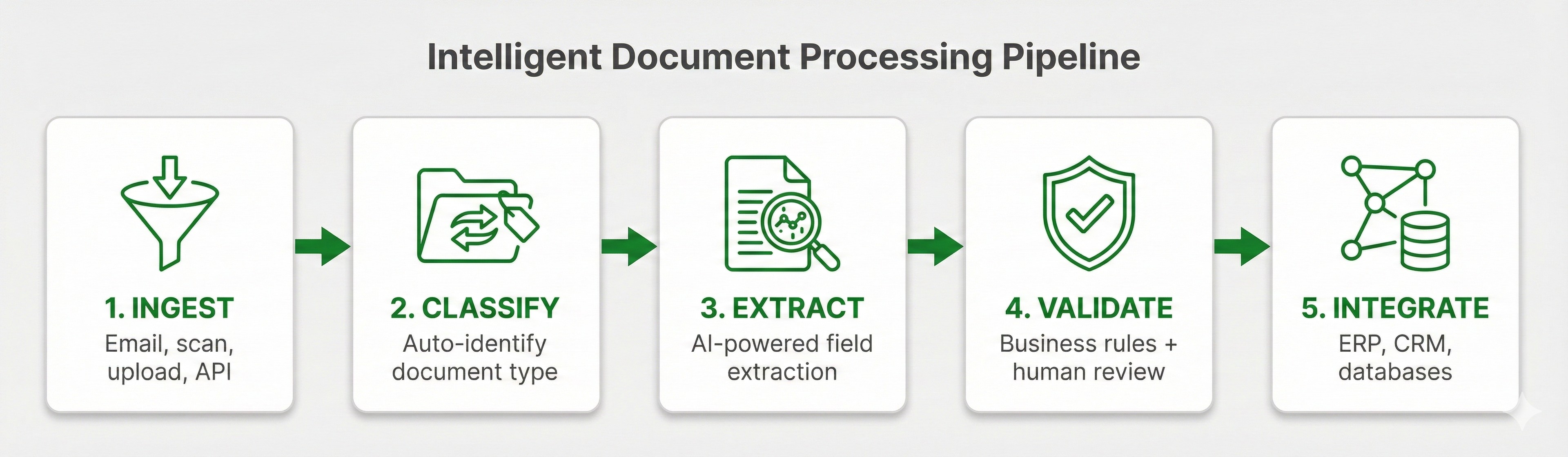 IDP workflow diagram showing five stages: Ingest, Classify, Extract, Validate, and Integrate
The 5 Stages of IDP
Stage 1: Document Ingestion / Capturing
Documents enter the system from wherever they originate:
- Email attachments
- Scanned paper documents
- Digital uploads (PDF, DOCX, images)
- API integrations with other systems
- Mobile capture
Once the document has entered the system, it then normalizes everything into a consistent format for processing. This includes image preprocessing (deskewing crooked scans, reducing noise, enhancing contrast), as to maximize accuracy in later stages of the pipeline.
Stage 2: Document Classification
Before extracting any data, IDP identifies what it's looking at. Is this an invoice or a purchase order? A medical claim or an explanation of benefits? A bill of lading or a customs declaration?
AI classification models in the system automatically identify document types based on their visual layout, text content, and structural patterns. This routes each document to the appropriate extraction workflow without having to do redundant manual sorting.
This applies even more because modern IDP can handle mixed batches of documents. That means you can feed it a stack of different document types and it will sort them all automatically.
Stage 3: Data Extraction
This is what differentiates IDP. The system extracts specific data fields from each document:
- Header information (vendor name, invoice number, date)
- Line item details (descriptions, quantities, prices)
- Tables and nested data structures
- Signatures, stamps, and handwritten notes
IDP combines elements from multiple technologies: traditional ML handles parsing (OCR converts images to text, layout detection identifies document structure, computer vision detects tables and checkboxes), then LLMs process that parsed content to classify documents and extract specific field values. Because of the way this system is designed, it works even when layouts vary between documents.
Unlike template-based extraction that fails when formats change, modern IDP uses AI models that can generalize across variations. So when you get a new vendor whose invoice is a different, confusing new layout, the system still classifies and extracts it accurately, without any manual configuration.
Stage 4: Validation and Verification
Raw extraction isn't enough, and if IDP stopped at step 3 it wouldn't be much help. Data needs verification before it's usable, which is why IDP applies rules to validate extracted information.
The system then assigns confidence scores to each of the extracted fields. High-confidence extractions go through the system automatically. Lower-confidence results get flagged for further human review.
Crucially, the system shows exactly where each piece of extracted data comes from in the original document. This means that someone reviewing doesn't have to scroll through every single line looking for each issue. Instead, they can jump directly between lower-confidence items, speeding up the review process dramatically.
The result: people reviewing only have to focus on what requires their attention.
Stage 5: Integration and Output
Validated data flows to downstream systems where it's used:
- ERP systems for accounts payable
- CRM platforms for customer onboarding
- Claims management systems for insurance processing
- Databases for reporting and analytics
IDP connects through APIs, webhooks, and pre-built integrations with commonly used enterprise platforms. The output is structured data (JSON, XML, CSV) ready for processing.
Complete audit trails track every single document through the pipeline: when received, how classified, what extracted, who reviewed, where sent.
The Document Intelligence Pipeline (Ingest, Classify, Extract, Validate, Integrate) provides a framework for evaluating all IDP solutions. Each stage should be easily defined, with clear outputs.
DocuPipe is built natively around this pipeline, allowing teams to deploy intelligent document processing without weak templates, hard-coded rules, or lengthy professional services engagements.
IDP vs OCR: What's the Real Difference?
This is the most common question about intelligent document processing, and the most important to understand. See our full IDP vs OCR comparison →
OCR (optical character recognition) converts images of text into machine-readable text. That's it. That's all it can do.
OCR is a component of IDP, not in any way a competitor to it. Think of OCR as the text recognition layer of the system: necessary, but unable to determine what any of that text actually means on its own.
Here's what OCR can't do alone:
- Understand what type of document it's processing
- Know which text represents an invoice number, a date, or an address
- Handle documents where the same information appears in multiple different locations
- Validate new extracted data against existing business rules
IDP adds the "brain." It uses OCR for text recognition, then applies AI to understand a document's structure, extract specific fields, validate identified information, and deliver data.
| Capability | OCR | IDP |
|---|---|---|
| Converts images to text | ✓ | ✓ |
| Understands document context | ✗ | ✓ |
| Classifies document types | ✗ | ✓ |
| Extracts specific data fields | Basic | Advanced |
| Handles layout variations | ✗ | ✓ |
| Validates against business rules | ✗ | ✓ |
| Works without templates | ✗ | ✓ |
The practical difference is that while OCR gives you a wall of text, IDP gives you structured data you can actually use.
If you've tried OCR-based tools in the past that broke every time a vendor changed their invoice format, that's not a limitation of all document automation. That's a limitation of template-based approaches that IDP was fundamentally designed to solve.
IDP vs RPA: How They Work Together
Another common point of confusion: how does IDP relate to robotic process automation (RPA)? See our full IDP vs RPA comparison →
In short, they're complementary, not competitive.
RPA automates repetitive tasks: ex. clicking buttons, copying data between systems, filling out forms. Effectively, RPA bots are the "hands" that execute mundane actions.
But RPA bots need data to work with. They can't read a PDF invoice and understand what it says - they need structured data inputs to function.
IDP provides that input. IDP is the "brain" that reads documents, extracts data, and delivers it in a form that RPA can actually use.
| Aspect | IDP | RPA |
|---|---|---|
| Primary function | Understand documents and extract data | Automate repetitive tasks |
| Handles unstructured data | ✓ | ✗ |
| Requires structured input | ✗ | ✓ |
| Uses AI/ML | ✓ | Limited |
| Role in automation | Provides data | Executes actions |
Often IDP extracts invoice data (vendor, amount, line items, due date, etc.), validates it against a purchase order, then hands this newly structured data to an RPA bot. This RPA bot then enters it into the ERP system and the payment workflow is triggered.
In this case, neither technology replaces the other. In fact, organizations aiming to optimize automation often use both.
Benefits of Intelligent Document Processing
Why are organizations investing consistently in IDP? The benefits of AI document processing span saved cost, higher speeds, increased accuracy, and efficient scalability.
 IDP by the Numbers: 70-80% cost reduction, 95-99% extraction accuracy, 10x faster processing, 90%+ straight-through rate
Reduced Processing Costs
According to Ardent Partners, manual document processing costs an average of $13-$20 per document when you account for the combination of labor, error correction, and delays. IDP reduces this to $2-$5 per document, a 70-80% cost reduction.
Example
Consider Team Blue. Team Blue is processing 10,000 invoices monthly, paying $15 per document. They're spending $150,000 on processing.
Now compare them to Team Green. Team Green is processing that same 10,000 invoices monthly, but with IDP they're only paying $3 per document. They're spending $30,000.
While this is one example, across the board the savings fund the technology many times over.
Faster Processing Time
Manual invoice processing takes 10-15 minutes per document. IDP processes documents in seconds to minutes, depending on complexity and validation requirements.
Example
Remember Team Blue. They process 10,000 invoices per month at an average of 12 minutes each. So they're spending approx. 2,000 labor hours monthly just moving invoices through the system.
Now compare that to Team Green. With IDP, those 10,000 invoices are ingested, classified, and extracted automatically. Processing happens same day, requiring fewer than 250 labor hours monthly.
This speed means same-day processing instead of weeks of backlogs. In competitive industries, this faster processing directly impacts customer experience and business outcomes.
Improved Accuracy
Research shows manual data entry has a 1-4% error rate. Those errors cascade: incorrect payments, compliance violations, customer disputes, time spent on corrections.
IDP with validation consistently reaches 95-99% accuracy, combining automated checks with human review for edge cases. This balance catches errors while maintaining speed.
According to DocuPipe benchmarks across millions of processed documents, adding automated validation with human review reduces downstream exception handling by over 60%. In practice, this means hundreds of avoided investigations and corrections monthly for high-volume teams.
Scalability Without Headcount
Document volume fluctuates constantly. Month-end closes, open enrollment periods, seasonal spikes: these create backlogs that would typically require temporary staff or overtime to catch up.
IDP scales instantly. Processing 1,000 documents or 100,000 documents uses the same system. No hiring, no training, no management overhead.
Better Compliance and Audit Trails
Every document through IDP is tracked: when received, how processed, what extracted, who reviewed, where sent. It creates complete audit trails automatically.
Business rules are applied consistently, not dependent on which employee processed a particular document. For regulated industries, this consistency is integral for compliance.
Improved Employee Experience
IDP handles the repetitive tasks of document workflows, allowing employees to spend time on analysis, decision-making, and exception resolution. As a result, organizations consistently see improved retention and satisfaction among their employees previously handling such mundane work.
Intelligent Document Processing Use Cases
IDP applies anywhere that documents are foundational to business processes. Here are the most common applications across a few industries:
Financial Services and Banking
Banks and lenders process massive document volumes: loan applications, account opening forms, KYC documents, bank statements for underwriting, mortgage packages, etc.
IDP accelerates loan processing from days to hours. It automates KYC verification for faster onboarding while maintaining compliance. Bank statement analysis that once took analysts hours can now happen automatically in minutes.
Insurance
Insurance runs on documents: claims forms, medical records, police reports, policy applications, explanation of benefits statements, the list goes on.
IDP enables straight-through claims processing for routine cases, with same day adjudication instead of week long queues. It extracts data from medical records for utilization review. It processes policy applications to bind coverage faster.
Healthcare
Healthcare generates enormous document volume with strict accuracy and compliance requirements: patient forms, insurance verification, prior authorization requests, medical records, lab results, etc.
IDP automates patient registration, reducing wait times and data entry errors. It processes prior authorization requests faster, radically accelerating patient care. It extracts data from clinical documents for analytics and research. Tasks that take assistants hours can be done in minutes. For a deeper dive into this industry, see our guide to healthcare document automation.
Logistics and Supply Chain
A single international shipment can generate 20+ documents: bills of lading, customs declarations, packing lists, delivery receipts, certificates of origin.
IDP automates customs documentation for accelerated clearance. It processes delivery confirmations to update tracking systems in real-time. It extracts shipping data for supply chain visibility and analytics.
Accounts Payable (Every Industry)
AP is the universal IDP use case. Every single organization receives invoices, whether it be dozens monthly for small businesses to hundreds of thousands for large enterprises.
IDP can automate invoice capturing from any source (email, scan, portal). It can match invoices to purchase orders and receiving documents. It can even route exceptions for review and approved invoices for payment. Organizations achieve 80-90% straight-through processing rates, dramatically reducing AP workload.
Key Technologies Powering Intelligent Document Processing
IDP isn't a single technology; it's an integrated tech stack. Understanding the components will help you evaluate solutions and set realistic expectations going forward.
Optical Character Recognition (OCR)
OCR is the foundational layer, converting document images into machine-readable text. Modern OCR can handle different fonts, languages, and even handwriting with high accuracy. Image preprocessing (deskewing, denoising, contrast enhancement) helps in maintaining these results on poor-quality scans.
Traditional Machine Learning (ML)
Traditional ML models handle the parsing layer: OCR, layout detection, table parsing, checkbox detection, and signature recognition. These models provide bounding boxes, confidence scores, and reliable text extraction without hallucination. Unlike rule-based systems that need explicit programming for every scenario, ML models generalize from examples.
Natural Language Processing (NLP)
NLP enables understanding of text meaning, not just characters. When IDP systems encounter the word "total," NLP helps determine from context whether it's the invoice total, a line item subtotal, or just the word appearing in a description. Furthermore, named entity recognition (NER) can identify specific data types: dates, amounts, addresses, names, etc.
Computer Vision
Beyond text, computer vision is able to understand document structure visually. It detects tables, checkboxes, signatures, logos, and how different elements relate to each other spatially. This is essential for documents where the specific position of data has meaning, such as forms with labeled boxes or invoices with header and line item sections.
Large Language Models (LLMs)
LLMs process the text generated by traditional ML to handle downstream cognitive tasks: classification, extraction, splitting, and review. They enable zero-shot extraction (processing document types the system has never seen) by leveraging general language understanding. LLMs provide the flexibility and intelligence to understand what the parsed text actually means, while traditional ML provides the accurate, grounded text to work with. For more on how LLMs fit into document processing, see LLMs for Document Processing: What Works and What Doesn't.
How to Choose Intelligent Document Processing (IDP) Software
Not all IDP solutions are built equally. Here's what to keep in mind when selecting a system.
Extraction Accuracy
This is the core metric that matters. Ask vendors for field-level accuracy rates on document types similar to yours. Request a proof-of-concept with your actual documents, as marketing claims don't always match real-world performance.
Look for accuracy above 95%. This is a great sign.
Document Type Coverage
Does the platform support your specific documents? Invoices are table stakes; every IDP can easily handle them. But what about your industry-specific forms, your particular document variations?
It's integral to check how easily new document types can be added. Some platforms require weeks of professional services. Others let you configure new documents in hours. If they don't have your document type and it'll take weeks to add it, the platforms likely are not a fit.
Integration Capabilities
IDP is only valuable if extracted data reaches your systems. Evaluate:
- API quality and documentation
- Pre-built connectors for your ERP, CRM, or other platforms
- Webhook support for real-time processing
- Export formats (JSON, XML, CSV)
If you're building a SaaS product and need to embed document processing, see our guide to document processing APIs for SaaS.
Scalability
What's your peak document volume? What happens if volume doubles? Evaluate processing capacity, concurrent document handling, and whether pricing scales reasonably with radical increases in volume.
Security and Compliance
Documents contain sensitive data. Verify:
- Data encryption (both in transit and at rest)
- Compliance certifications (SOC 2, HIPAA, GDPR as applicable)
- Data residency options
- Access controls and audit logging
Total Cost of Ownership
Pricing models vary: per page, per document, per field, monthly subscription. Of course, it's important to model total cost at your expected volumes.
But remember to include implementation costs, training, ongoing support, and the internal effort to maintain the system. The cheapest license isn't always the lowest total cost. For teams weighing whether to build document processing in-house or buy a platform, see our build vs buy guide.
The Future of Intelligent Document Processing: 2026 and Beyond
IDP is evolving rapidly. Based on how teams are deploying document automation now, here's where the technology is heading next.
LLM-Powered Extraction
Large language models are constantly transforming what's possible. Zero-shot extraction, processing document types without any training examples, is becoming reality. LLMs understand document content semantically, not just structurally.
This dramatically reduces time-to-value for new document types and immediately improves handling of edge cases.
Agentic Document Workflows
The next frontier: AI agents that don't just extract data but take action on it. An invoice doesn't just get processed; the system checks the PO, verifies the vendor, identifies discrepancies, and either approves payment or escalates with very specific context for human review.
IDP becomes the foundation for autonomous document-driven workflows, handling routine cases end-to-end while routing exceptions intelligently.
IDP as Data Infrastructure
A shift in how organizations think about document processing: not as a point solution but as core data infrastructure. Documents are data sources, and IDP is the pipeline that makes them instantly accessible.
This means deeper integration with data warehouses, analytics platforms, and AI systems that consume document data at an enormous scale.
Frequently Asked Questions About Intelligent Document Processing
IDP is AI software that reads any document, extracts the data you need, and delivers it as information to your business systems.
OCR converts images to text; IDP understands documents. IDP uses OCR as a foundation, then adds AI to classify documents, extract specific fields, and validate data against business rules. See our full IDP vs OCR comparison →
IDP typically costs $0.01-$0.10 per page or $0.10-$1.00 per document, reducing processing costs from $10-$20 (manual) to $2-$5 (automated), delivering ROI within weeks to months.
IDP software handles virtually any document type: invoices, contracts, claims, loan applications, bank statements, tax forms, medical records, shipping documents, and more.
Quality IDP solutions achieve 95-99% field-level accuracy out of the box, reaching 99%+ with human-in-the-loop validation.
Simple deployments go live in 1-4 weeks; enterprise implementations with extremely complex integrations typically take 2-3 months. Time-to-value depends entirely on document complexity and integration requirements.
Yes, modern IDP includes intelligent character recognition (ICR) for handwriting. It can successfully process handwritten forms, signatures, and annotations, routing illegible text for human review.
IDP assigns confidence scores to extractions, automatically processing high-confidence results while routing uncertain extractions to human reviewers.
Key Takeaways
-
IDP converts documents to data, not just text. It captures, classifies, extracts, validates, and integrates document information automatically.
-
IDP works in five stages (Ingest, Classify, Extract, Validate, Integrate). Use this framework to evaluate IDP solutions.
-
IDP builds on OCR, adding the AI "brain" that understands context and handles layout variations.
-
IDP and RPA are complementary. IDP provides the data, RPA bots execute the actions.
-
Business impact is proven: 70-80% cost reduction, 95-99% accuracy, 10x faster processing.
-
The technology is maturing at a rapid rate. LLM-powered extraction and agentic workflows are expanding what's possible in 2026 and beyond.
Start Processing Documents Intelligently
Documents shouldn't ever be a bottleneck. The data trapped in your invoices, contracts, claims, and applications should flow into your systems automatically, accurately, quickly, and at scale.
That's what intelligent document processing delivers.
The technology has matured and the ROI is proven. Entire industries are moving from manual processing and brittle OCR tools to AI-powered document automation.
The question isn't whether or not to adopt IDP. It's when.
Recommended Articles
Related Documents