
Bank Statement Data Extraction: Automate Financial Document Processing (2026)

Uri Merhav
Updated Jan 26th, 2026 · 8 min read
Table of Contents
Bank Statement Data Extraction: Automate Financial Document Processing
A mortgage underwriter sits down with a loan application. The borrower submitted 6 months of statements from 3 different accounts. That's 18 PDFs. Each with 50-200 transactions. The underwriter needs to somehow verify income deposits, flag large withdrawals, and confirm the applicant isn't hiding debt payments.
Manual review: 2-3 hours.
Now multiply that by 50 applications per week—that's 100-150 hours a week. What about 100? A thousand?
This is the bank statement extraction problem. The data exists—transactions, balances, account details—but it's all trapped in PDFs from hundreds of different banks, each with their own format. For a broader view of document AI technology, see our guide to document extraction.
What You Need to Know
The use cases: Loan underwriting (income/expense verification), accounting reconciliation, fraud detection, tax preparation, financial audits, and AML compliance.
The challenge: Every bank has a different statement format. Chase, Bank of America, Wells Fargo, regional banks, credit unions, international banks—hundreds of formats for the same logical data.
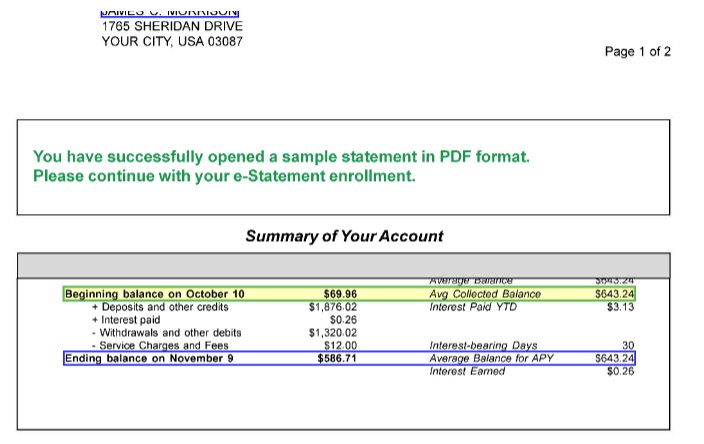
What gets extracted: Account holder info, account numbers, statement period, opening/closing balances, and every individual transaction with date, description, and amount.
Why specific features matter: Transaction-level confidence scores let you review 5 uncertain transactions instead of 500. Balance reconciliation catches extraction errors automatically. On-premise deployment keeps sensitive financial data on your network.
Table of Contents
- The Core Challenge: Every Bank Is Different
- What Actually Gets Extracted
- Where Extraction Fails (And How to Spot It)
- Accuracy Expectations by Source
- The Lending Use Case
- Beyond Lending: Accounting and Compliance
- Evaluating Solutions: What to Test
- FAQ
- Key Takeaways
The Core Challenge: Every Bank Is Different
Chase formats statements one way. Wells Fargo another. Your local credit union? Something else entirely.
A lending platform processing applications nationwide encounters statements from hundreds of banks. Template-based extraction—where you predefine exactly where each field appears—would require maintaining hundreds of templates at any given moment. And these templates will break every single time a bank updates their format.
AI-powered extraction solves this completely differently. Instead of rigid templates, modern systems learn what bank statements look like conceptually: where transaction tables typically appear, how balances are presented, what date formats mean. They generalize across formats rather than memorizing specific limiting layouts.
What Actually Gets Extracted
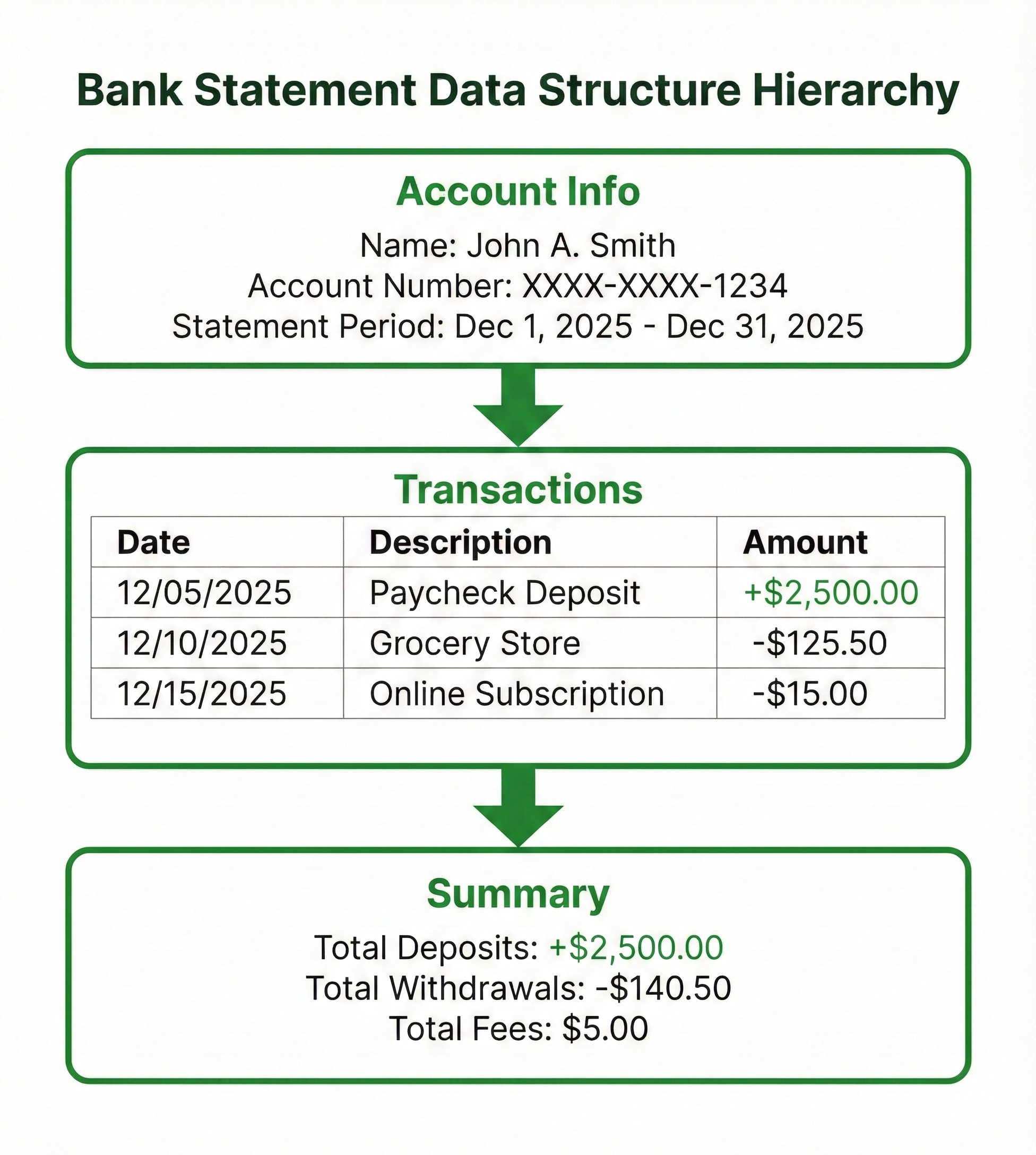
When extraction works, you get structured data for every element that matters:
Account-level data: Account holder names, account numbers (often masked), account type, bank name, statement period dates, opening balance, closing balance.
Transaction-level data: For each transaction you get the date, description, amount, whether it's a debit or credit, running balance if shown, transaction type (ACH, wire, check, card), check numbers where applicable, etc.
Summary data: Total deposits, total withdrawals, fees charged, interest earned.
The output is structured JSON that can flow directly into underwriting systems, accounting software, or analysis tools.
 Bank statement data hierarchy diagram
Where Extraction Fails (And How to Spot It)
Bank statement extraction isn't solved perfectly. Knowing the failure modes helps in evaluating solutions and knowing when you can actually trust the output.
Multi-page tables are the most common failure point. Long transaction histories span multiple pages. Headers appear only on page one. Poor extraction systems will either entirely miss transactions at page boundaries or duplicate them. See our guide to table extraction for why this is technically challenging.
Debit/credit confusion happens when banks represent transactions differently. Some use separate columns. Some use positive/negative in one column. Some use parentheses. If the system misreads this, every single transaction amount could be wrong.
Date format ambiguity causes silent errors. Is 01/02/2026 January 2nd or February 1st? International statements add more variations. Wrong date identification can corrupt the entire timeline.
Scanned vs. native PDFs produce different accuracy. Statements downloaded from online banking contain embedded text—easy to extract. Scanned paper statements, on the other hand, require OCR and leave accuracy of the extraction depending largely on scan quality. For more on handling PDFs, see our guide to PDF data extraction.
Accuracy Expectations by Source
| Statement Source | Transaction Accuracy | Balance Accuracy |
|---|---|---|
| Downloaded PDF (major bank) | 97-99% | 99%+ |
| Downloaded PDF (smaller bank) | 94-98% | 98-99% |
| High-quality scan | 92-97% | 97-99% |
| Mobile photo | 85-94% | 94-98% |
| Fax or poor scan | 75-90% | 90-96% |
The key isn't achieving 100% accuracy—it's knowing which extractions to trust. Transaction-level confidence scores are what make extraction practical. A 200-transaction statement might have 195 high-confidence extractions and 5 that need review. There's no reason to go through all 200 if you have a system that can identify the 5.
 Bank statement with extracted fields highlighted
The Lending Use Case
Bank statement extraction transforms lending operations because it attacks one of the biggest bottlenecks: document review time.
Mortgage underwriting: Verify income deposits, assess monthly expenses, confirm account ownership. What took 30+ minutes per statement can now take seconds.
Small business lending: Categorize transactions to understand the business. Revenue patterns, seasonal variations, existing debt payments. AI extraction enables analysis that manual review just can't scale.
Personal lending: Quick verification of income and existing obligations. Faster decisions mean better borrower experience and higher conversion.
The pattern is consistent: extraction doesn't completely eliminate human judgment, it focuses that judgment on the exceptions rather than routine verification.
Beyond Lending: Accounting and Compliance
Reconciliation: Monthly bank reconciliation means matching statement transactions against internal records. For businesses with multiple accounts, extraction feeds transactions directly into matching workflows.
Audit: Auditors need transaction-level detail with clear links to source documents. A quality extraction system creates that audit trail automatically—click any value, see exactly where it came from in the original statement.
AML compliance: Anti-money laundering requires transaction monitoring. Structured transaction data enables automated rules and pattern detection that PDF review can't support.
Evaluating Solutions: What to Test
Skip the marketing demos with clean, well-formatted statements. Test the technology with your actual messy documents.
Multi-page statements: Does extraction handle table continuation correctly? Are transactions at page boundaries captured?
Multiple banks: Try statements from 5-10 different banks. Does accuracy hold across all formats?
Scanned documents: If you receive paper statements, test with actual scans at the quality you typically use.
Confidence scores: Does the solution flag uncertain extractions? Can you see which specific transactions need further review?
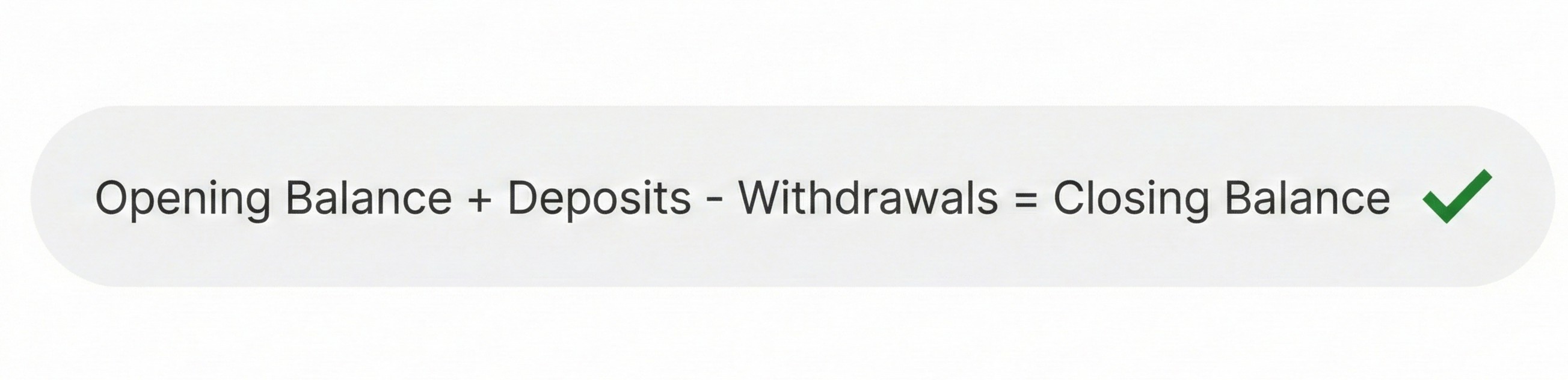
Balance reconciliation: Does the system verify that extracted transactions add up to the balance change? This validation catches errors automatically.
 Balance reconciliation formula
Deployment options: Does the solution offer both cloud and on-premise deployment? For sensitive financial data, many organizations require documents to stay on their network. See our guide to cloud vs on-premise extraction for how to decide.
A Note on Deployment
Bank statements contain sensitive financial data. While some organizations can use cloud extraction with appropriate security controls (SOC 2, encryption, BAAs), others require on-premise deployment so that documents never leave their network.
FAQ
Automated capture of account info, balances, and transaction details from bank statement PDFs, converting them to structured data for lending, accounting, or analysis.
Downloaded PDFs from major banks achieve 97-99% transaction accuracy. Scanned documents achieve 95-97%. Confidence scores identify which specific transactions need review.
AI-powered extraction generalizes across formats without bank-specific templates. Modern systems handle statements from any bank, though accuracy may vary in the case of unusual formats.
Each transaction gets a confidence score indicating extraction certainty. High-confidence transactions flow through automatically. Low-confidence transactions get flagged for human review.
A typical statement processes in seconds. A 12-month statement package might take a few minutes total—compared to hours for manual review.
Account holder info, account numbers, statement period, opening/closing balances, and every transaction with date, description, amount, and type (deposit, withdrawal, transfer, fee).
Yes. Quality extraction systems maintain table context across page breaks, continuing transaction tables without duplicating or missing rows at page boundaries.
Key Takeaways
- Bank statement extraction automates income verification, reconciliation, and financial analysis by capturing transactions and balances from any bank format.
- Transaction-level confidence scores are essential. Review flagged transactions, not entire statements.
- Multi-bank coverage matters. AI-powered extraction handles format variations without bank-specific templates.
- Balance reconciliation validates extraction. If transactions don't reconcile to balances, something's wrong.
- Deployment options matter for sensitive data. Consider whether cloud or on-premise fits your security requirements.
Bank statements contain financial truth: income, expenses, cash flow, account ownership. Manual extraction doesn't scale. Template-based extraction can't handle format variations. AI-powered extraction with transaction-level confidence scores changes the equation—structured data in seconds, with clear signals about which extractions to trust.
Recommended Articles
Related Documents