
Document Extraction: From Unstructured to Structured Data (2026 Guide)

Uri Merhav
Updated Jan 21st, 2026 · 12 min read
Table of Contents
- Introduction
- So, What is Document Extraction?
- What Does a Good Document Pipeline Look Like?
- Document Extraction vs. OCR: Understanding the Difference
- Common Document Extraction Challenges
- Key Technologies Powering Document Extraction
- Document Extraction Use Cases
- How to Evaluate Document Extraction Solutions
- The Future of Document Extraction
- Frequently Asked Questions About Document Extraction
- Key Takeaways
- Start Extracting Documents Reliably
Document Extraction: From Unstructured to Structured Data
Documents arrive in chaos. PDFs, scans, images, faxes. Your systems need clean, structured JSON. Document extraction is the bridge between the two, and getting it right determines whether your automation actually works.
Introduction
Document extraction is the process of converting unstructured or semi-structured documents into machine-readable, structured data that downstream systems can use. It's what happens between your file being uploaded and transferring clean data into your database.
Inevitably, a customer uploads what they think is a photo of their driver's license. In reality, it's a copy of their 2016 electric bill. Obviously, your system will need to catch this error.
You asked for a surgery invoice, but instead they uploaded all 47 pages of a patients discharge packet. Hopefully your system grabs the invoice date and not the hospital admission date.
An employee sent you a reimbursement form from two months ago, but the text is marked in crayon lines their toddler drew. Ideally your system flags it for review instead of hallucinating a random number.
This guide will explain the kind of system that can catch the misuploaded utility bill, find the hidden invoice, and understand the messy form. This guide will cover how extraction actually works: the stages, the challenges, and what separates pipelines that work from ones that will break in production.
What You Need to Know About Document Extraction
What it is: Document extraction is the conversion of raw files (think PDFs, images, scans) into structured data [JSON] that your systems can actually process.
Why it matters: Documents arrive unpredictably. Users upload the wrong files, include unnecessary pages, use formats you've never seen, or even send scans with stains or markings all the time. Extraction handles this chaos systematically.
The pipeline: First, ingestion brings documents into the system. Second, classification identifies what you're looking at (and splits out the pages you need). Third, schema-driven extraction pulls the right fields with the right business logic. Fourth, validation catches errors before they propagate. Finally, integration sends data downstream with a complete audit trail.
The hidden requirement: Every step needs an audit trail. When something goes wrong (and it will), you need to trace exactly what happened to every single document, step by step.
So, What is Document Extraction?
Document extraction is the process of analyzing a document's structure and content to extract specific data elements into a structured, machine-readable format.
That's the technical definition. In practice, extraction is everything that happens between "file uploaded" and "clean data in your database."
Extraction handles documents across the entire spectrum of structure:
- Structured documents have fixed fields in predictable locations. Think tax forms (W-2s, 1099s) where you know exactly where to find each and every value.
- Semi-structured documents have predictable data but variable layouts. Invoices are a classic example: every invoice has a total, but that total appears in different places depending on the vendor.
- Unstructured documents bury the information you need in a completely free-form text. Medical records, contracts, and legal filings fall into this category (ex. doctor scribbles on the top of a form)
The challenge is that real-world document processing involves all three types, often in the same batch, and your system needs to be able to handle whatever arrives at any time.
Extraction isn't just OCR. OCR converts images to text. Simple, but limited.
Extraction understands what that text means, where it belongs, and how to structure it for future use.
A wall of text isn't really useful. Validated JSON with the fields you need is.
For a broader view of how extraction fits into the complete document intelligence pipeline, check out our guide to intelligent document processing.
What Does a Good Document Pipeline Look Like?
Document extraction isn't a single step. It's a pipeline where each stage handles a specific challenge. Skip a stage or implement it poorly, and the entire pipeline will fail.
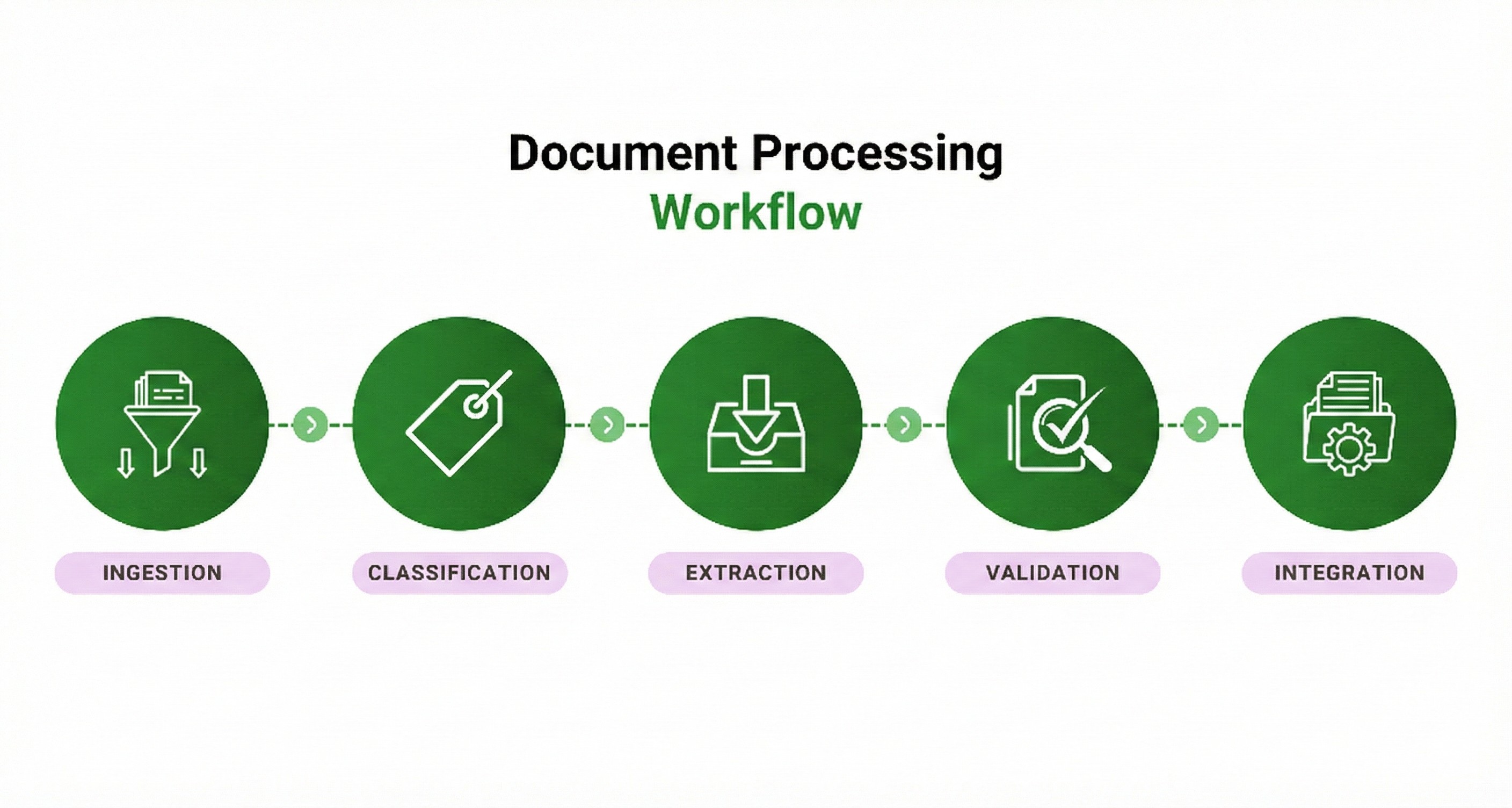 Document extraction pipeline diagram with 5 stages: ingestion, classification, extraction, validation, integration
Stage 1: Ingestion
Documents enter the system from multiple sources:
- API integrations pulling from other systems
- Direct uploads through web interfaces or mobile apps
- Email attachments
- Scanned paper documents
- Watched folders on network drives
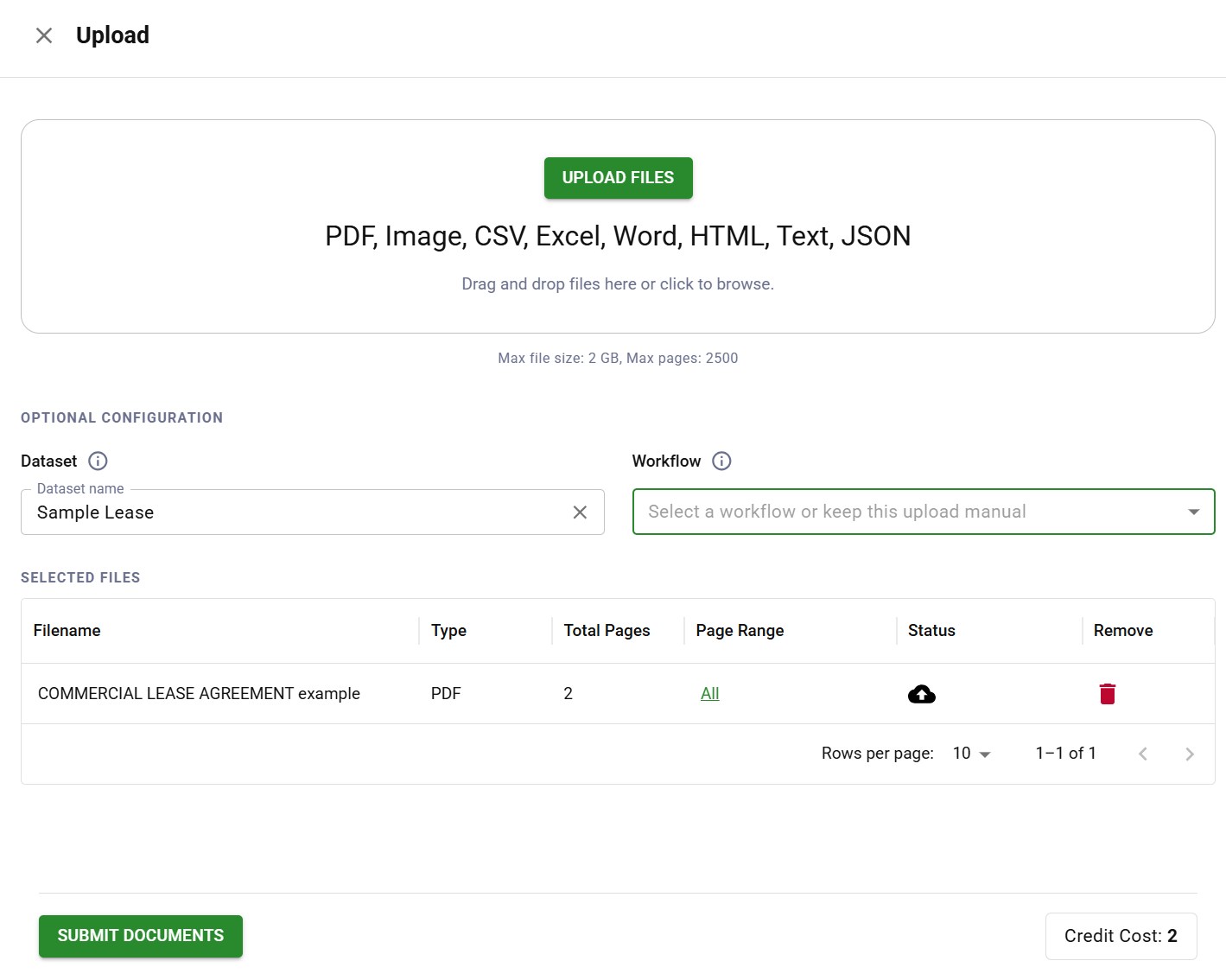 Document upload interface supporting PDF, image, CSV, Excel, and Word file formats
Ingestion normalizes everything into a consistent format for processing. This includes preprocessing steps that will improve downstream accuracy:
- Deskewing crooked scans
- Enhancing contrast on faded documents
- Reducing noise on poor-quality images
- Converting various file formats to a standard representation
The goal is simple: no matter how the document arrives, the rest of the pipeline will see a clean, consistent input.
Stage 2: Classification
This is where most pipelines start failing. Before you can extract anything, you need to know what you're looking at.
Documents are often anonymous or out of distribution. You asked users to upload their driver's license. Some uploaded passports. Some uploaded utility bills. Some uploaded photos of their dog. (This happens more than you'd think.)
Classification answers the question: "What is this document?"
AI classification models identify document types based on:
- Visual layout and structure
- Text content and keywords
- Structural patterns (tables, headers, field arrangements)
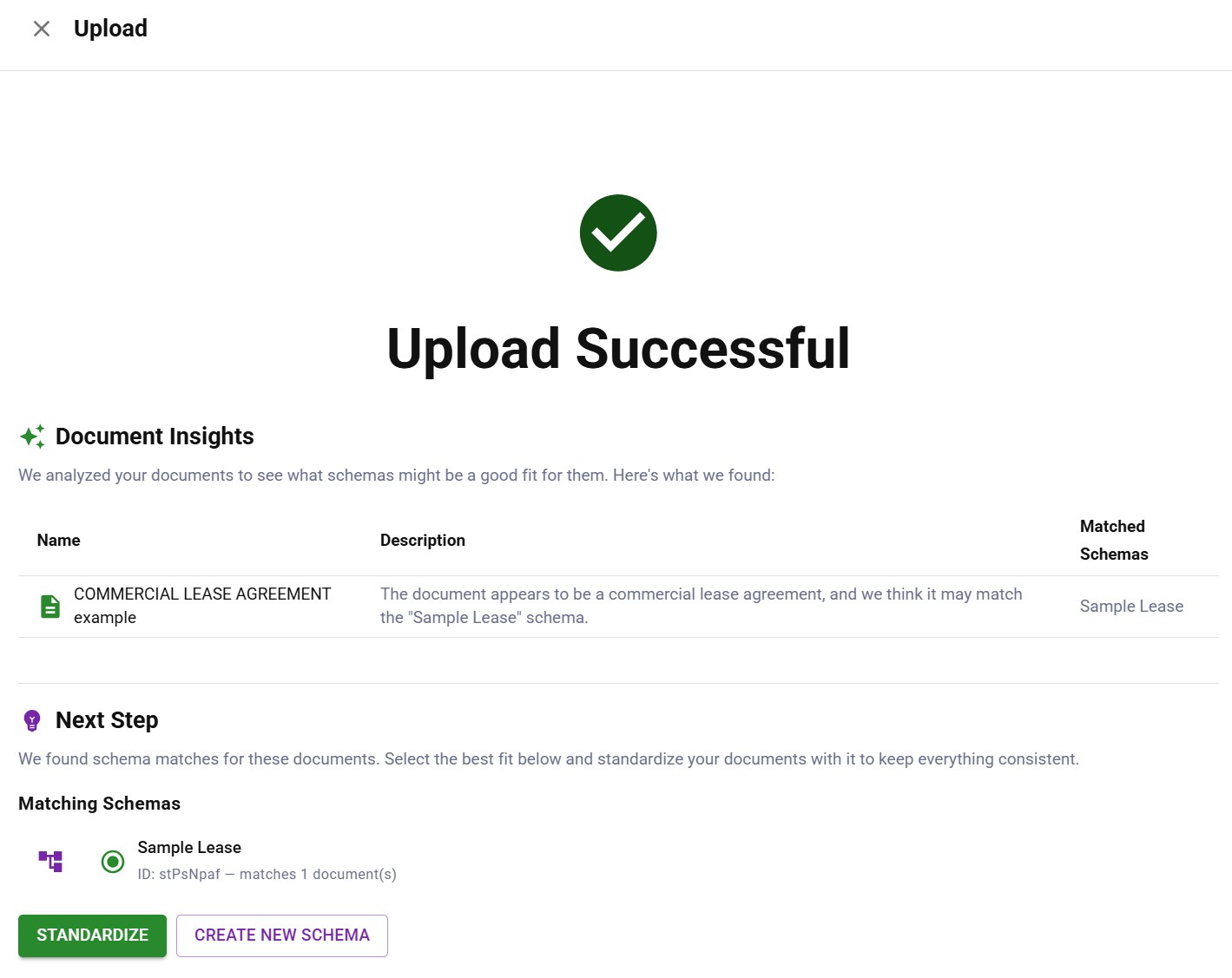 Document classification identifying a commercial lease agreement and matching it to a schema
Great classification handles the unexpected. When someone uploads the wrong document type, the system should recognize this and route it appropriately, either to a different workflow, back to the user for correction, or to a human reviewer.
Classification is also what enables processing mixed batches. Feed the system a stack of different document types and it sorts them automatically, routing each to the appropriate extraction workflow.
Splitting: Isolating What Matters
Classification often goes hand-in-hand with splitting. Documents often contain sub-sections you actually need, buried by pages you don't.
The hospital discharge example from the beginning is a real one: a customer uploads 47 pages when you only need 2. A bank statement package includes cover letters, disclosures, and terms of service with the actual statement pages. A legal filing includes exhibits that need to be processed completely separately from the main document.
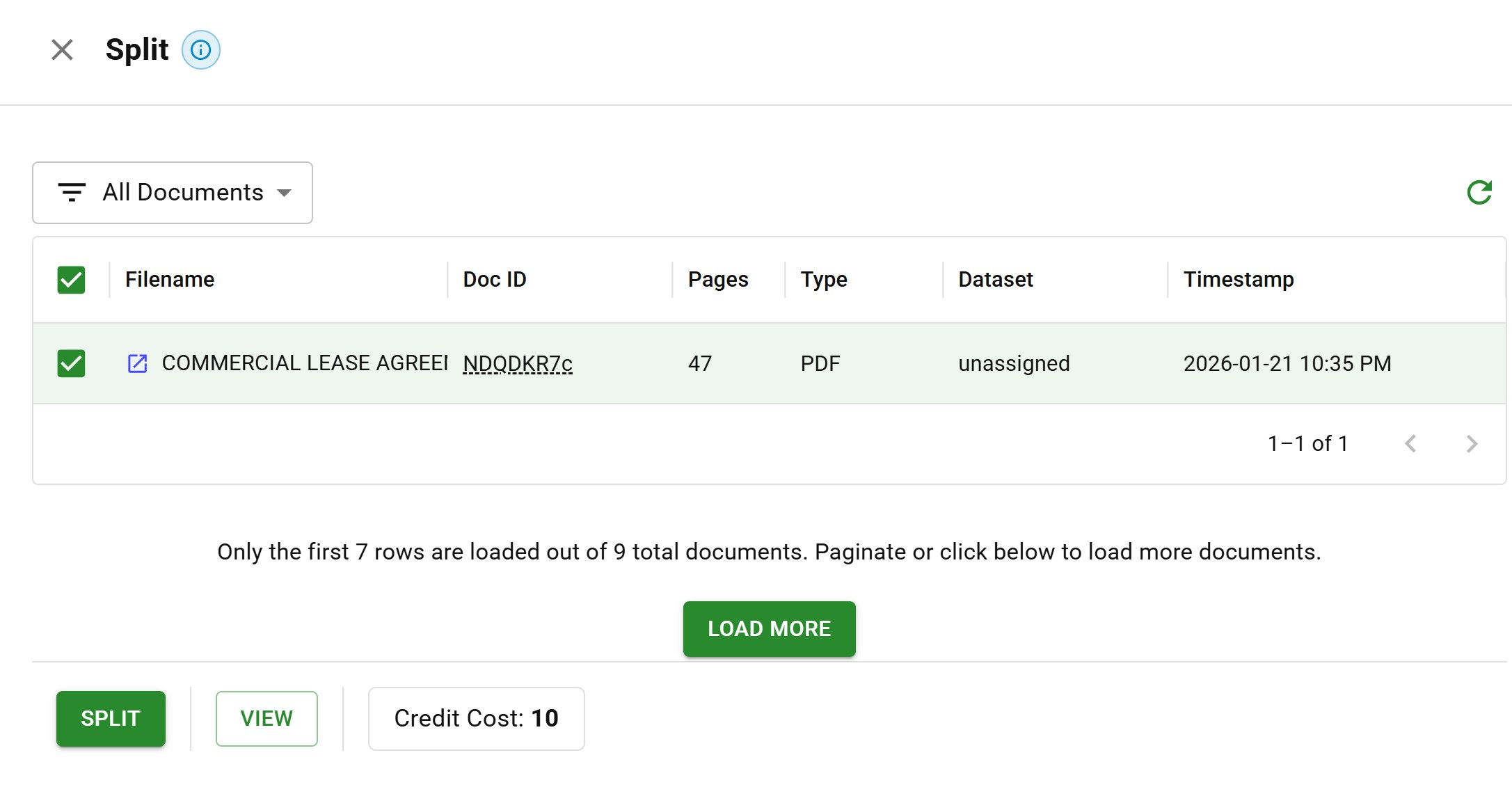 Document splitting interface with a 47-page PDF selected for page extraction
Splitting isolates the relevant portions:
- Identifying document boundaries within multi-document PDFs
- Extracting specific page ranges based on content
- Separating attachments and exhibits from main documents
- Removing cover pages, blank pages, and irrelevant sections
Without splitting, you're either processing unnecessary content (which will waste both time and compute) or missing important information buried deep in the noise.
Intelligent splitting uses content understanding, not just simple page breaks. It recognizes where one logical document ends and another begins, even when they're merged into a single file.
Stage 3: Schema-Driven Extraction
This is where extraction becomes very useful. The system extracts specific data fields from each document into structured output.
But extraction isn't just "pull out all the values you see." It requires intelligence and business logic.
Consider expense categorization for a hotel chain audit. You don't want a flat list of expenses, that would be unhelpful and extremely chaotic. What you need is all of the expenses categorized in ways that matter for your specific analysis: room maintenance vs. expansion costs vs. operational overhead. The same line item, "HVAC repair - $4,500," means two very different things depending on if it was routine maintenance or part of a renovation project.
Schema-driven extraction handles this through the following systems:
Custom schemas that define exactly what fields you need, with the data types, formats, and validation rules that match your business requirements.
Extraction rules that are encoded with business logic. A schema doesn't just say "extract the date." It specifies exactly which date (invoice date vs. due date vs. service date), how to handle ambiguous cases, and what specific format to output.
Contextual understanding that goes beyond simple pattern matching. When "Net 30" appears on an invoice, the system understands this implies a due date 30 days from the invoice date, even if no explicit due date is printed.
Here's how schema creation works in practice. First, you select a document and tell the AI assistant what data you need to extract:
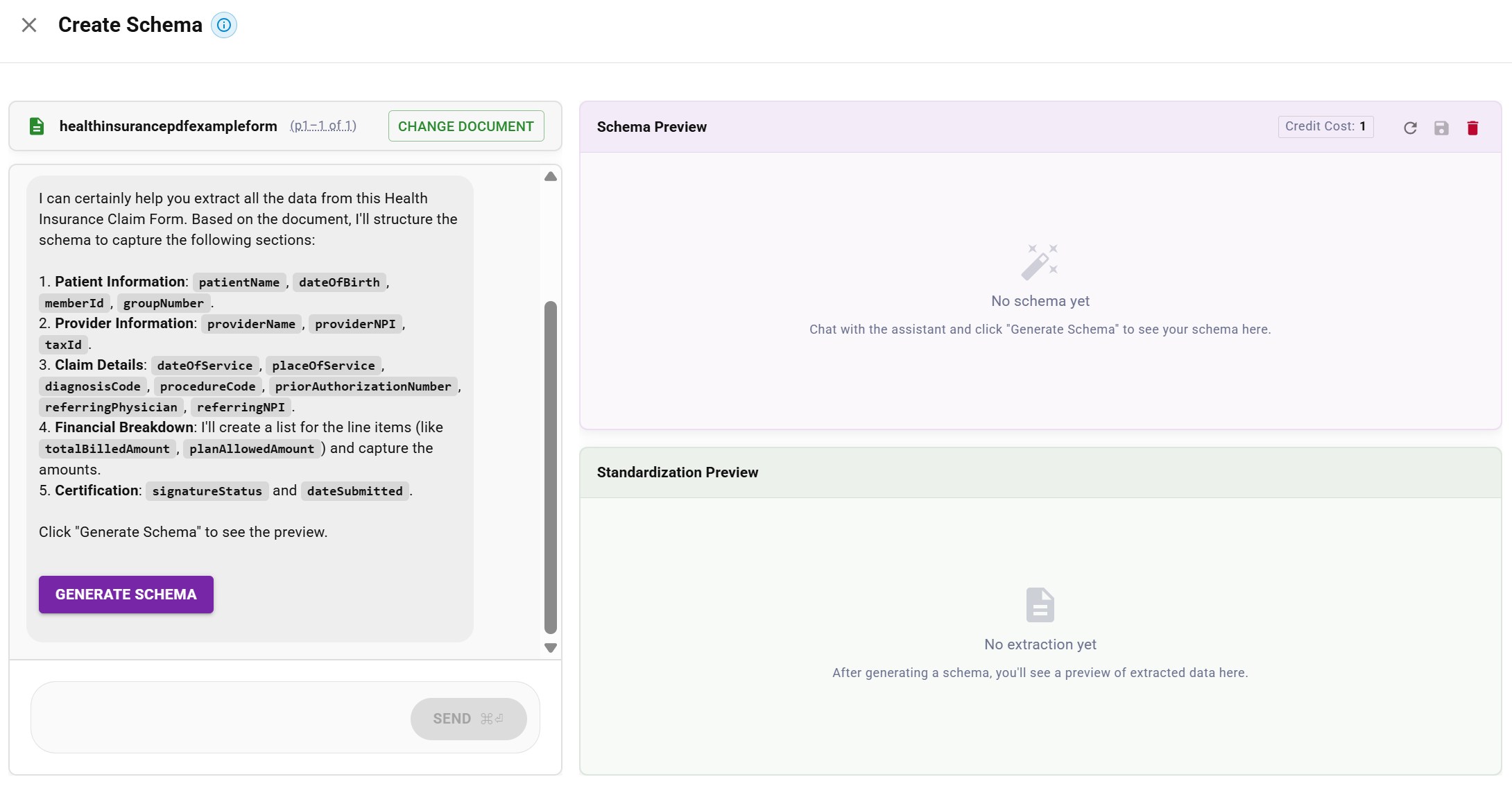 AI assistant proposing schema fields: patient info, provider info, claim details, financial breakdown
Once you generate the schema, you get a structured preview of both the schema definition and the extracted data:
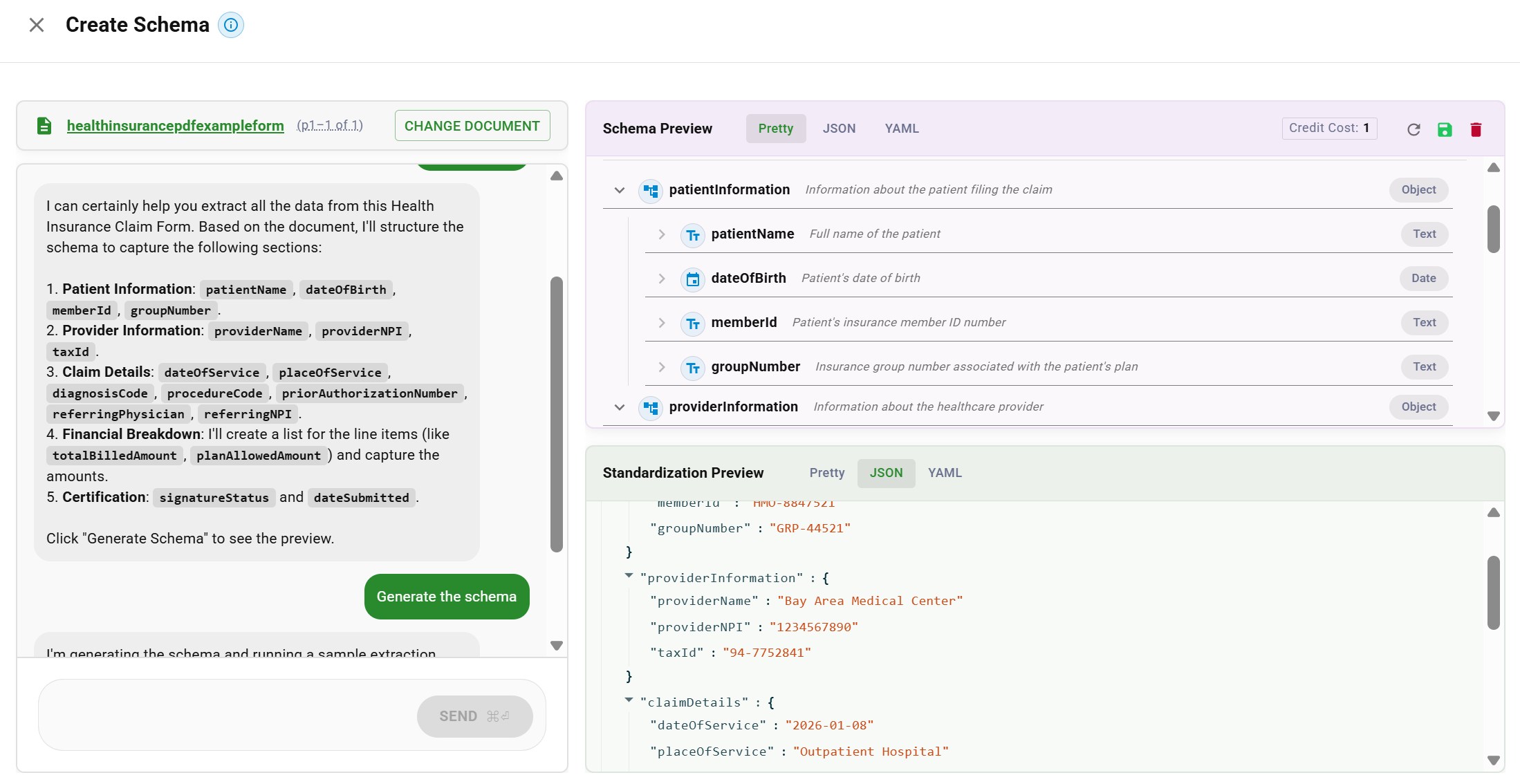 Schema preview with field hierarchy and extracted JSON data from a health insurance claim
The schema is the bridge between raw extraction and business-ready data. It encodes the intelligence that turns "we found these values on the paper" into "here's the structured information you actually need."
Stage 4: Validation and Review
Raw extraction isn't enough. Data often needs verification before it's trustworthy.
Functionally, for extraction to be trustworthy, it means review.
The system assigns confidence scores to each extracted field. High-confidence extractions flow through automatically. Lower-confidence results get flagged for human review.
But confidence scores alone aren't sufficient. Validation applies business rules:
- Does this invoice total match the sum of line items?
- Is this date in a reasonable range?
- Does this vendor exist in our system?
- Are required fields present?
When validation fails or confidence is low, the document routes to a review queue. The key is making review as efficient as possible: reviewers can see exactly where each piece of data came from in the original document. They can jump directly to flagged items instead of reviewing every single field.
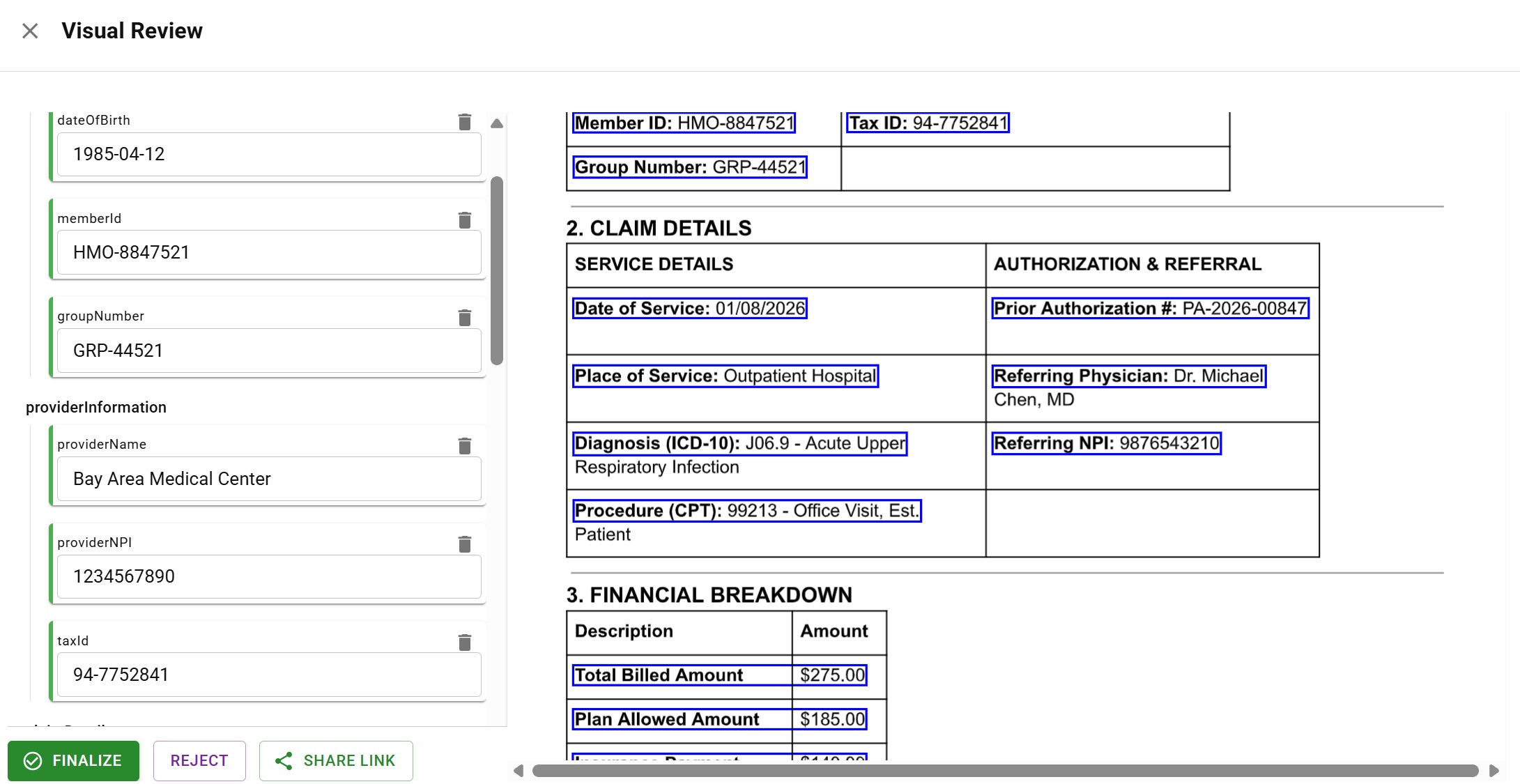 Visual review interface showing extracted fields alongside source document with highlighted data locations
This human-in-the-loop approach catches the errors that pure automation misses while maintaining speed for the majority of documents that process cleanly.
Stage 5: Integration and Audit Trail
Validated data flows to downstream systems: ERPs, CRMs, databases, data warehouses, or other applications via API.
But integration isn't the end. You need to know what happened to every document, in every step of the pipeline.
Audit trails track the complete document journey:
- When was the document received?
- How was it classified?
- What splitting decisions were made?
- What values were extracted, with what confidence?
- Who reviewed it, and what changes did they make?
- Where was the data sent?
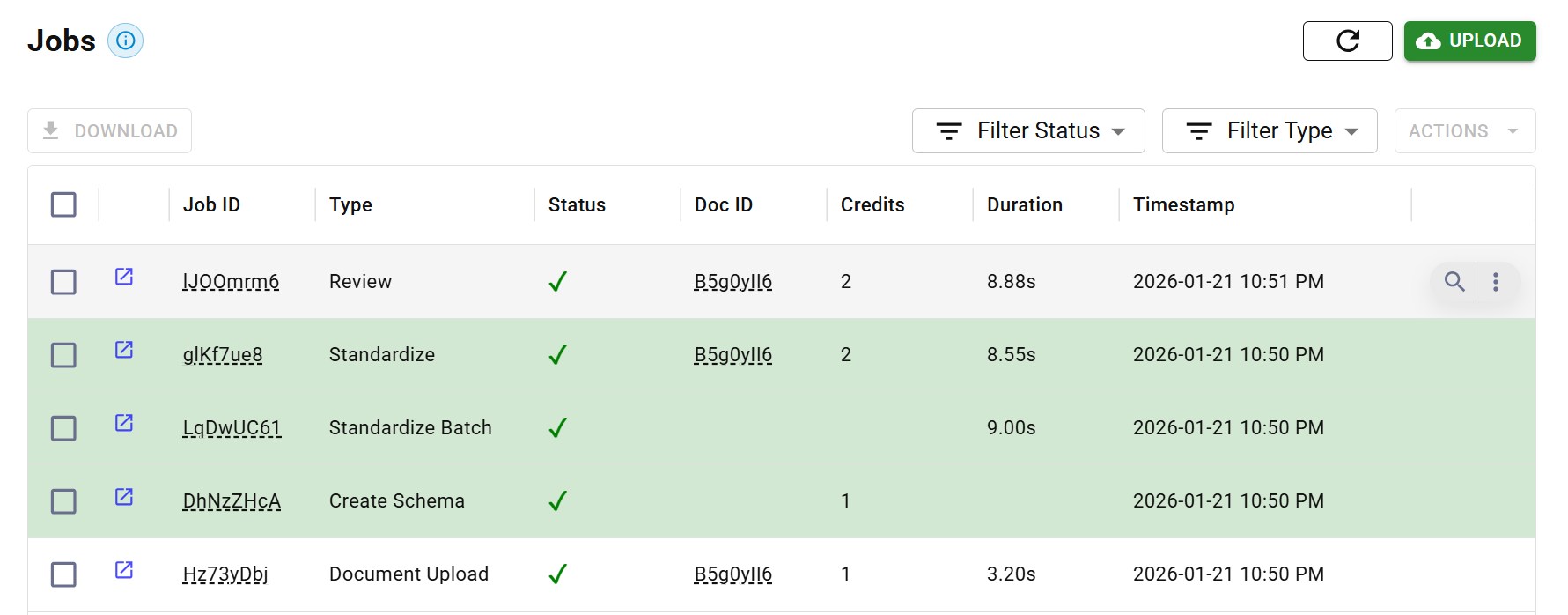 Audit trail showing complete document processing history with timestamps and actions
This data provenance matters for debugging, compliance, and trust. When something goes wrong downstream, you need to trace the root cause. When auditors ask questions, you need answers. When customers dispute extracted values, you need to show exactly where that data came from.
Complete audit trails are a critical part of infrastructure, not a nice-to-have. They're what separates production-ready extraction from demos that break the moment reality hits.
Document Extraction vs. OCR: Understanding the Difference
OCR (optical character recognition) is a component of extraction, NOT a synonym for it.
OCR converts images to text. That's all it does.
OCR takes a scan or image and outputs the characters it recognizes. It doesn't know what those characters mean. It doesn't understand the document's structure. It can't tell you which text is an invoice number vs. a date vs. an address.
Extraction adds the intelligence layer:
| Capability | OCR | Document Extraction |
|---|---|---|
| Converts images to text | Yes | Yes (uses OCR) |
| Understands document structure | No | Yes |
| Classifies document types | No | Yes |
| Splits multi-document files | No | Yes |
| Extracts specific fields | No | Yes |
| Applies business logic | No | Yes |
| Validates against rules | No | Yes |
| Maintains audit trail | No | Yes |
OCR gives you a wall of text. Extraction gives you structured data with field-level values, confidence scores, and provenance.
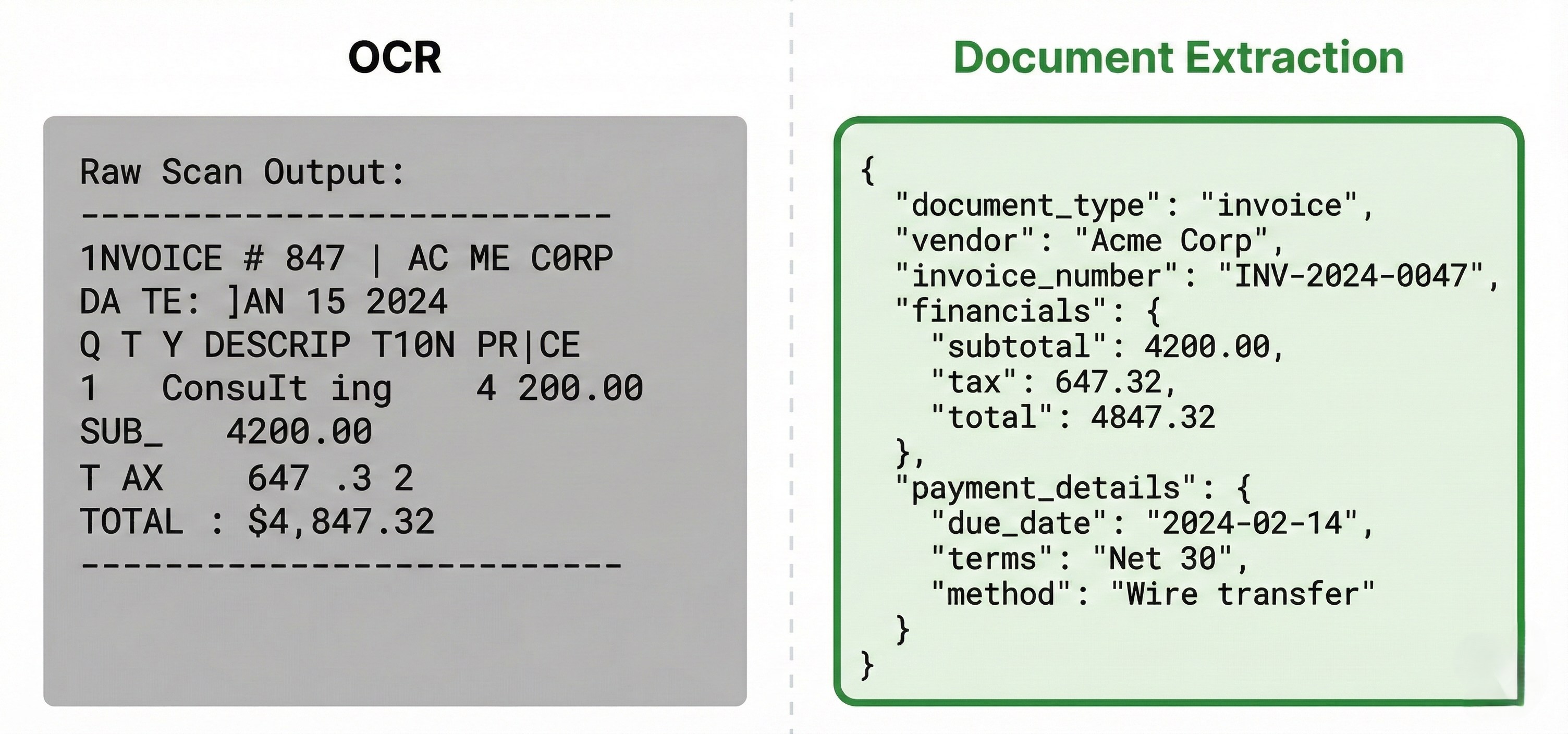 OCR vs document extraction comparison: OCR outputs raw text while extraction outputs structured JSON with fields
If you've tried template-based approaches that broke whenever layouts changed, you've experienced this limitation directly. OCR just sees characters. Extraction can understand documents.
For a deeper comparison, see our IDP vs OCR guide. For PDF-specific challenges, see our guide to PDF data extraction.
Common Document Extraction Challenges
Extraction works well on clean, predictable documents. The challenges emerge with everything else.
Layout Variability
The same document type can have hundreds to thousands of variable layouts. Every vendor has their own invoice format. Every hospital has their own discharge summary structure. Every bank has their own statement design.
Template-based extraction fails at this point. You just can't create templates for layouts you've never seen. Modern extraction uses AI models that generalize across variations, extracting the same fields regardless of where they appear on the page.
Poor Document Quality
Production documents aren't clean PDFs from a demo. They're:
- Faxes of copies of scans
- Photos taken at an angle with shadows
- Documents with coffee stains over critical fields
- Handwritten annotations in margins
- Stamps and signatures overlapping text
Robust extraction handles degraded quality through preprocessing and models that are trained on messy, real-world documents.
Multi-Column and Complex Layouts
Tables that span pages. Multi-column text where the reading order isn't obvious. Nested tables within tables. Forms with checkboxes, radio buttons, and free-text fields that are all mixed together.
These layouts break simple left-to-right, top-to-bottom text extraction. Extraction needs to understand document structure visually, recognizing how elements relate to each other spatially.
Handwriting and Signatures
Forms very often include handwritten fields. Medical records have physician notes. Contracts have signatures and initials. Checks have handwritten amounts.
Intelligent character recognition (ICR) handles handwriting, but it's obviously less reliable than printed text. A great extraction system will recognize when handwriting confidence is low and route those fields for human review to confirm.
Edge Cases at Scale
The first 90% of documents are straightforward. The last 10% is where extraction pipelines break.
At scale, that 10% represents thousands of documents. Documents like the edge case you never anticipated, the new format variations you've never seen, and the data that was put in random places.
Handling edge cases requires a combination of:
- AI models that generalize well
- Confidence scoring that identifies uncertainty
- Human review for low-confidence extractions
- Feedback loops that improve the system over time
Key Technologies Powering Document Extraction
Modern extraction combines multiple technologies, each handling different aspects of the bigger challenge.
Optical Character Recognition (OCR)
The foundational layer for scanned documents and images. Modern OCR can handle multiple fonts, languages, and varying quality levels. Preprocessing (deskewing, contrast enhancement, noise reduction) further improves accuracy on lower quality inputs.
Layout Detection and Analysis
Computer vision models that understand document structure: where headers are, where tables begin and end, how columns relate, which text blocks go together. This spatial understanding is essential for documents where position carries meaning.
Table and Form Element Extraction
Tables are particularly challenging. They have rows, columns, merged cells, headers that span multiple columns, and data that wraps within cells. Specialized extraction models parse these structures into clean row/column data. For more details, see our guide to table extraction.
Beyond tables, forms contain checkboxes, radio buttons, signatures, and handwritten marks. A medical form might have a checkbox filled in with pen, a signature scrawled across a line, or radio buttons circled rather than filled. Extracting these elements reliably requires understanding both the visual structure and the intent behind each mark. See our guide to form data extraction for more on handling these challenges.
Large Language Models (LLMs)
LLMs provide contextual understanding and zero-shot extraction capabilities. They understand what text means, not just what it says. When an invoice says "Net 30," an LLM understands that the payment terms implication is "within 30 days".
But LLMs need smart coordination to work reliably. Ask an LLM to extract all line items from a 100-page bank statement in one pass, and it will work through some of page 1 and drop basically everything else. The solution is breaking documents into multiple passes—but this creates its own challenges. For instance, a table spanning pages 1-3 has headers only on page 1, so you obviously can't process each page in isolation.
Effective LLM orchestration requires:
- Breaking documents into appropriate chunks for extraction
- Maintaining context across pages (like table headers)
- Having LLMs review and validate their own results
- Avoiding duplicate extractions when the same data appears multiple times
- Knowing when to escalate to human review
For more on this, see our guide to LLMs in document processing.
Confidence Scoring
Every single extraction should include a confidence score indicating how certain the system is about the result.
High confidence enables automation. Low confidence triggers review. Without confidence scores, you cannot distinguish reliable extractions from guesses.
Document Extraction Use Cases
Extraction applies wherever documents feed into business processes.
Accounts Payable
Invoices arrive from dozens or hundreds of vendors, each with different formats. Extraction extracts vendor information, line items, totals, payment terms, and routes data to ERP systems for payment processing. See our guide to invoice data extraction for a deeper dive.
Loan Underwriting
Loan applications require bank statements, tax returns, pay stubs, and identity documents. Extraction extracts income figures, account balances, and verification data that underwriters need for decisions. See our guide to bank statement extraction for specifics on financial document processing.
Insurance Claims
Claims processing involves policy documents, medical records, police reports, and supporting evidence. Extraction extracts claim details, validates against policy terms, and prepares data for adjudication.
Healthcare Administration
Patient intake forms, insurance cards, prior authorization requests, and clinical documents all require extraction. Extracted data flows to EHR systems, billing platforms, and administrative workflows.
Contract Management
Contracts contain terms, dates, obligations, and parties that need tracking. Extraction extracts these elements into structured data for contract lifecycle management systems.
Real Estate and Property Management
Property management involves leases, amendments, renewals, and extensions across hundreds or thousands of properties. A logistics real estate company might have a database listing rent amounts and addresses, but the legal reality lives in the actual documents. Extraction validates database records against source documents, catching discrepancies and outdated entries.
Compliance and Audit
Regulatory filings, audit documents, and compliance reports require data extraction for analysis, verification, and reporting.
How to Evaluate Document Extraction Solutions
Not all extraction solutions handle the world's complexity equally.
Accuracy on Your Documents
Marketing claims about accuracy are meaningless without testing on your actual documents. Request a proof-of-concept or utilize their free trials, using representative samples of your documents (including your edge cases and difficult documents).
Look for field-level accuracy metrics, not just document-level success rates. A document can be "successfully processed" while still having critical fields extracted incorrectly.
Handling of Classification and Splitting
Does the solution handle documents that arrive out of order or mislabeled? Can it split multi-document files intelligently? These capabilities are integral for production workflows where documents arrive unpredictably.
Schema Flexibility
How easily can you define custom schemas with your business logic? Can you add new document types without weeks of professional services? The capacity to iterate quickly on schemas is essential for handling your specific requirements.
Confidence Scores and Review Workflows
Does the system provide confidence scores for individual fields? Does it support human review for low-confidence extractions? Can reviewers see exactly where data came from in the original document?
Audit Trail Completeness
What level of detail is captured in audit logs? Can you trace every extraction back to its source? Is the audit trail accessible for debugging and compliance?
Integration Capabilities
How does extracted data reach your systems? Evaluate API quality, webhook support, pre-built connectors, and export formats.
Deployment Options
Does the solution offer cloud, on-premise, or hybrid deployment? For sensitive documents, you may need data to stay on your network. See our cloud vs on-premise guide for how to decide.
For teams deciding whether to build extraction in-house or use a platform, see our build vs buy guide.
The Future of Document Extraction
Extraction technology continues to advance rapidly.
Zero-Shot Extraction
LLMs enable extraction from document types the system has never seen before. Define what you need, and the system can extract it without document-specific training. This dramatically reduces time-to-value for new document types.
Agentic Workflows
The next evolution: AI agents that don't just extract data but take action on it. Parse an invoice, verify against the PO, check the vendor, identify discrepancies, and either approve payment or escalate with specific context.
Document Understanding at Scale
Extraction becomes infrastructure that makes document data as accessible as structured database data. Organizations can query across millions of documents, finding patterns and extracting insights that were previously locked on paper.
Frequently Asked Questions About Document Extraction
Document extraction converts files like PDFs and images into data that software can use.
OCR converts images to text. Document extraction goes a step further: it understands document structure, classifies types, extracts specific fields, and validates data. OCR is a component of an extraction pipeline.
Yes! Modern extraction can handle handwritten text. Accuracy is often lower than printed text, so good systems will also flag low-confidence handwritten fields for human review.
Quality extraction solutions achieve 95-99% field-level accuracy on well-structured documents. Accuracy varies by document type and quality. Human review handles the few remaining edge cases.
Modern extraction handles PDFs, images (JPG, PNG, TIFF), Microsoft Office documents, scanned paper, and most common business file formats.
Extraction systems use confidence scores to identify uncertain extractions. Low-confidence results route to human review. Business rule validation catches logical errors before data reaches downstream systems.
Schema-driven extraction uses a predefined template that specifies what fields to extract, their data types, validation rules, and business logic. This ensures consistent output that matches your requirements.
Audit trails track what happened to every document: how it was classified, what was extracted, who reviewed it, where data was sent. This is essential for debugging, compliance, and resolving disputes about extracted values.
Key Takeaways
-
Document extraction converts chaos to structure, transforming raw files into validated, machine-readable data your systems can use.
-
The pipeline has five stages: Ingestion, Classification, Extraction, Validation, and Integration. Each stage handles a specific challenge.
-
Classification catches the unexpected. Users upload wrong documents, mislabeled files, and formats you've never seen. Classification identifies what you're looking at and isolates the pages you need.
-
Schema-driven extraction encodes business logic. You're not just extracting values; you're structuring data according to your specific requirements.
-
Validation makes extraction trustworthy. Confidence scores, business rules, and human review catch errors before they propagate.
-
Audit trails are infrastructure. Every document needs a complete record of what happened, step by step, for debugging and compliance.
Start Extracting Documents Reliably
Documents shouldn't be a bottleneck. The data trapped in your PDFs, scans, and images should flow into your systems automatically, accurately, and with complete traceability.
That's what DocuPipe delivers.
The technology exists. The question is whether your current approach handles the messy reality of production documents, or whether it breaks when things get complicated. DocuPipe handles the chaos - classification, extraction, validation, and audit trails - so your team doesn't have to.
Recommended Articles
Related Documents