
Can Public Mining Data Predict Stock Prices? Part 1: Getting the Data

Nitai Dean
Updated Mar 24th, 2026 · 5 min read
Table of Contents

Why mining data?
As a machine learning enthusiast, I've always dreamed of outsmarting the market. (Spoiler: harder than it looks.) Without a unique edge, beating the market is nearly impossible. That's where Ontario's geological data comes in. I came across this through one of DocuPipe's enterprise users, VerAI Discoveries. They use machine learning to predict where to drill for minerals, standardizing vast amounts of publicly available documents from the Canadian stock exchange. The idea: What if this largely untapped data could predict mining stock prices?
OK, so the source of data can be found here:
https://www.hub.geologyontario.mines.gov.on.ca
It's a publicly available database of mineral exploration data in Ontario, Canada. A huge unstructured dataset, which is part of the edge. Using DocuPipe, we can make sense of messy, handwritten geological data. The Canadian government requires mining companies to submit their findings here. Their bureaucracy is our treasure trove.
Where to begin?
By browsing the website, we can find that they let you download a file called OGSDataListing.kml - which is a KML file that contains the locations of all the mineral exploration sites in Ontario. If we install Google Earth, we can view a map of all the sites:
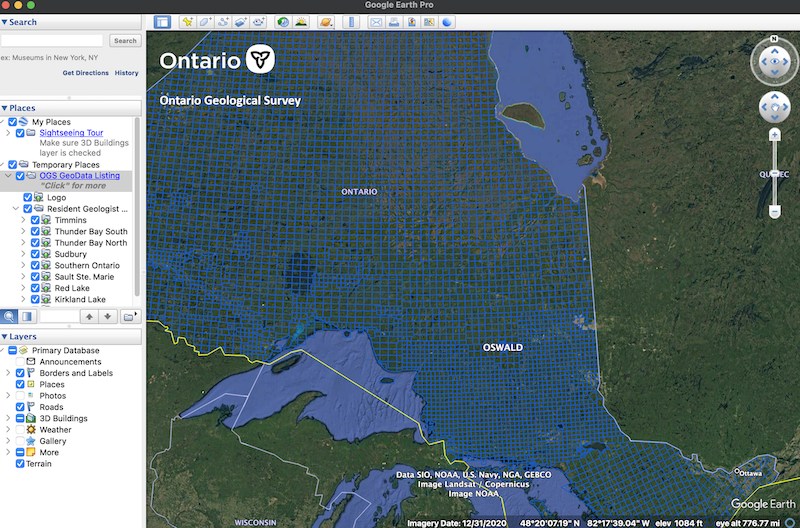 Google Earth view of the mineral exploration sites in Ontario
Clicking any square opens a webpage inside Google Earth with a link to an Excel file containing metadata for that region's reports and filings. If we can grab all these Excel files, we have a launching point for systematically scraping everything. But there are thousands of regions. Manual clicking is not an option. This is where LLMs come in.
Using LLMs to write the scraper
I work in my IDE with multiple LLMs set up via their APIs. More effective than playgrounds because I can add entire files to the prompt. I explain the situation, load the KML file into context, and ask how to scrape all these Excel files from the website.
And lo and behold, it solves it. It gives me a script that knows how to load this obscure KML file and make sense of it. Check out this snippet:
def extract_kmz_urls(kml_file): tree = et.parse(kml_file) root = tree.getroot() ns = {'kml': 'http://www.opengis.net/kml/2.2'} # Find all NetworkLink/Link/href elements that point to kmz files urls = [] for href in root.findall('.//kml:NetworkLink/kml:Link/kml:href', ns): if href.text and href.text.endswith('.kmz'): urls.append(href.text) return urls
Do I have any clue what et.parse is? Of course not. But that's the point - with LLM assistants, I don't really need to know everything. I simply run the script, and it works (more or less) on the first try. When something inevitably breaks, I just copy-paste the error back into ChatGPT, and voila, problem solved. Now, my only problem is it takes forever. So I ask Claude to make my script parallel, and it does - giving me something like this:
# Create output directories
output_dir = params.Paths.data_dir.joinpath("mining", "OGSData")
output_dir.mkdir(parents=True, exist_ok=True)

# Get KMZ URLs from main KML file
kmz_urls = extract_kmz_urls(Paths.resources_dir.joinpath(
    "mining", "OGSDataListing.kml"))
print(f"Found {len(kmz_urls)} KMZ files")

# Process each KMZ file
for kmz_url in kmz_urls:
    path_parts = Path(kmz_url).parts
    source_name = path_parts[path_parts.index('OGSDataListing')]
    source_output_dir = output_dir.joinpath(source_name)
    source_output_dir.mkdir(parents=True, exist_ok=True)
    print(f"Processing {kmz_url}")
    html_urls = extract_html_urls_from_kmz(kmz_url)
    print(f"Found {len(html_urls)} HTML pages")

    # Parallelize the download process for each HTML page
    with ThreadPoolExecutor(max_workers=5) as executor:
        futures = [executor.submit(
            download_excel_files, html_url, source_output_dir)
        for html_url in html_urls]
        for future in as_completed(futures):
            try:
                future.result()
            except Exception as e:
                print(f"Error processing HTML page: {e}")
So within just a few minutes, my laptop is diligently downloading all the Excel files from the website. I sit back and have some coffee while over five thousand files are downloaded. There's something satisfying about watching your script systematically collect tons of files that would have taken weeks to download manually. It is very neat that ChatGPT can unlock a lot of coding abilities that previously felt somewhat hard (or at least would require a lot of trial and error + googling), but now are largely just a few prompts away.
Now that we have all these Excel files, let's open a few to see what is in there:
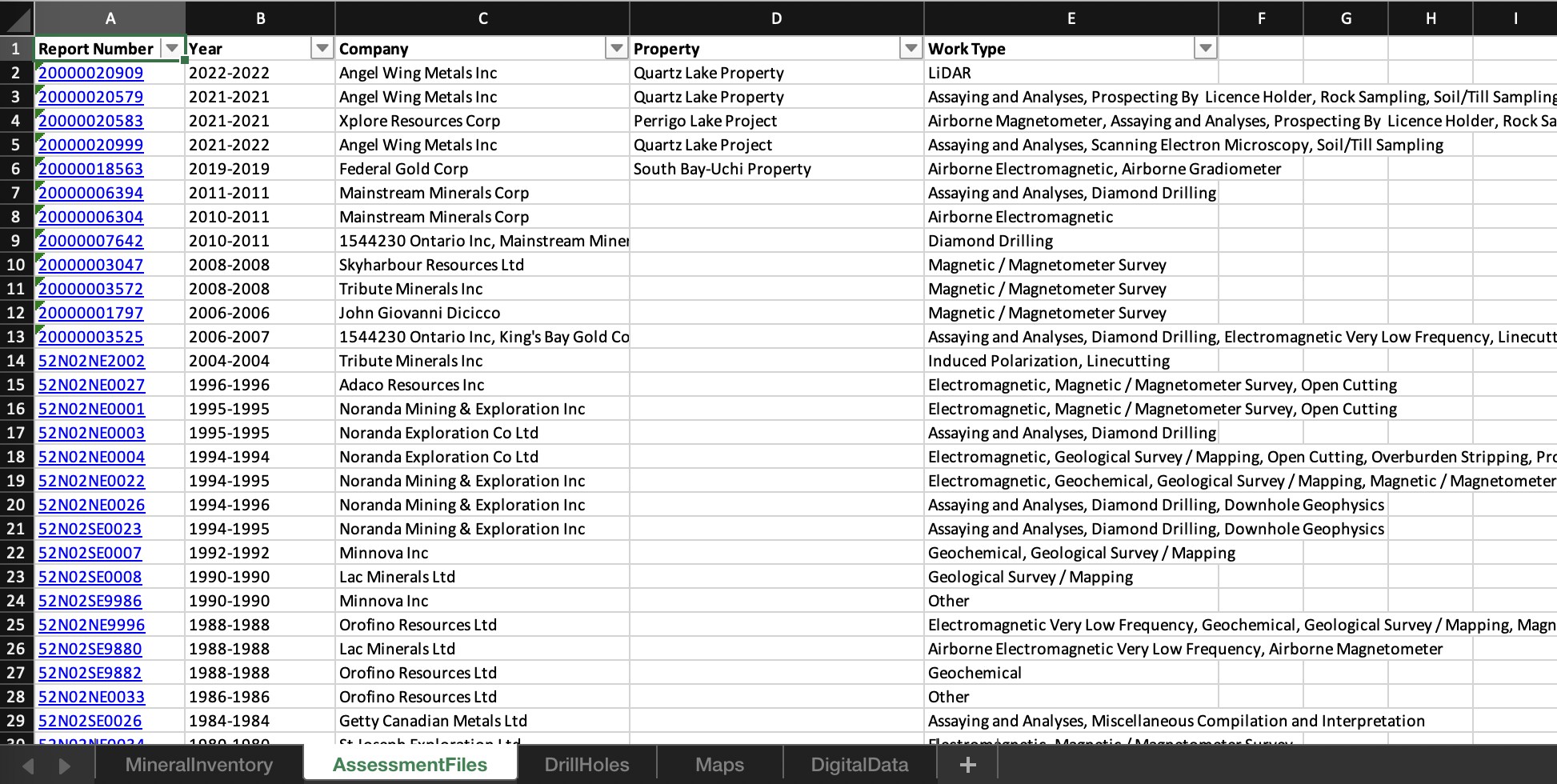 Each Excel has multiple tabs, and each tab has a bunch of data
Each Excel has multiple tabs, and each tab has a bunch of dataSome of the Excel sheets contain mostly junk, but three seem to have substantial data:
- Assessment Files: This sheet (the one visible in the screenshot) contains a list of all the actual reports that were filed for this region. Each link goes to a webpage, which contains some metadata, but also links to multiple PDFs - which can be downloaded. This is the goldmine. Each value under the Report Number column can basically be mapped to a webpage with multiple PDF files. These files can be hundreds of pages long, and often contain hard to parse things like maps, handwritten notes, messy handwritten tables, etc.
- Drill Holes: This sheet doesn't contain any actual PDF links, but it does have a list of links to a webpage that shows a lot of useful metadata such as lat/long coordinates, the type of hole drilled, and all kinds of other details. It also has a reference to an assessment file, so we could just use this to match the PDFs to this drill data and combine them.
- Mineral Inventory: Like with Drill Holes, this sheet doesn't contain any actual PDF links, but it does have a list of links to a webpage that shows a lot of useful metadata about the minerals found in the region by a specific company.
OK, so we have thousands of Excel files, and each Excel file has multiple tabs, and each tab has a bunch of data. In short, the Excel files are our treasure maps, pointing us to web pages where we can scrape metadata or download the linked PDFs. This is the kind of thing that used to take real know-how to do, but now with ChatGPT, we can short circuit the process and get moving in no time. We will conclude the data scraping in the next episode, and then move onto the fun stuff - exploring and standardizing the data with DocuPipe!
Curious how we’ll turn this mountain of PDFs into stock market gold? Continue to the next episode: Web Scraping OGS.

Recommended Articles

Related Documents