
Document Extraction: The Boring AI Use Case That Actually Works

Uri Merhav
Updated Mar 24th, 2026 · 7 min read
Table of Contents
- The future is here. No killer robots. Just really good automation for tedious office work.
- Very hard becomes trivial
- High Value Office Work == Understanding Documents
- Reasoning about text is LLM's home turf
- Text extraction is trickier than first meets the eye
- If something's wrong with the world, build a SaaS company to fix it
- Building Schemas is a trial an error process… That an LLM can do
- Plenty More!
The future is here. No killer robots. Just really good automation for tedious office work.
Almost a decade ago, I worked as a Machine Learning Engineer at LinkedIn’s illustrious data standardization team. From the day I joined to the day I left, we still couldn’t automatically read a person’s profile and reliably understand someone’s seniority and job title across all languages and regions.
This looks simple at first glance. “software engineer” is clear enough, right? How about someone who just writes “associate”? It might be a low seniority retail worker, if they’re in Walmart, or a high ranking lawyer if they work in a law firm. But you probably knew that — do you know what’s a Java Fresher? What’s Freiwilliges Soziales Jahr? This isn’t just about knowing the German language — it translates to “Voluntary Social year”. But what’s a good standard title to represent this role? If you had a large list of known job titles, where would you map it?
I joined LinkedIn, I left LinkedIn. We made progress, but making sense of even the most simple regular texts — a person’s résumé, was elusive.
Very hard becomes trivial
You probably won't be shocked to learn that this problem is trivial for modern LLMs like GPT-4
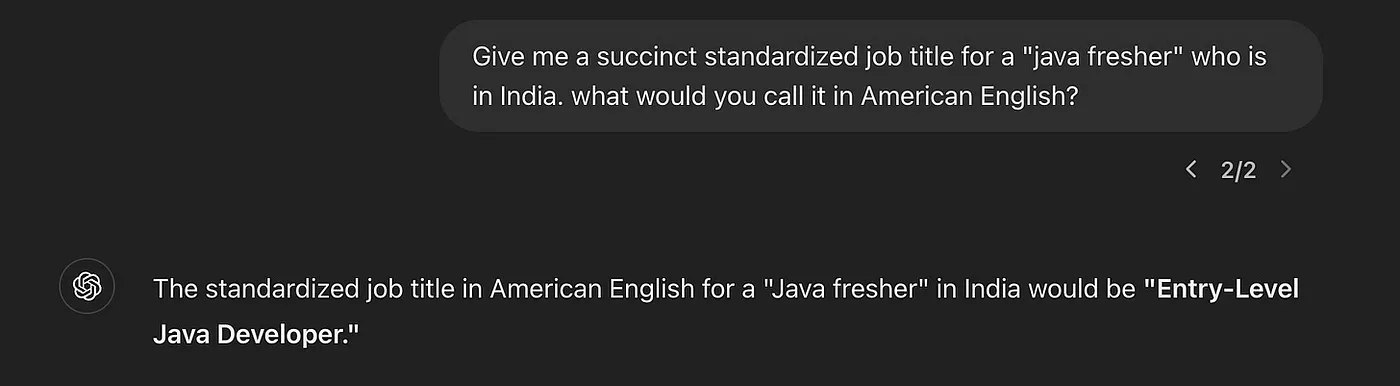 Easy peasy for GPT
But wait, we’re a company, not a guy in a chat terminal, we need structured outputs.
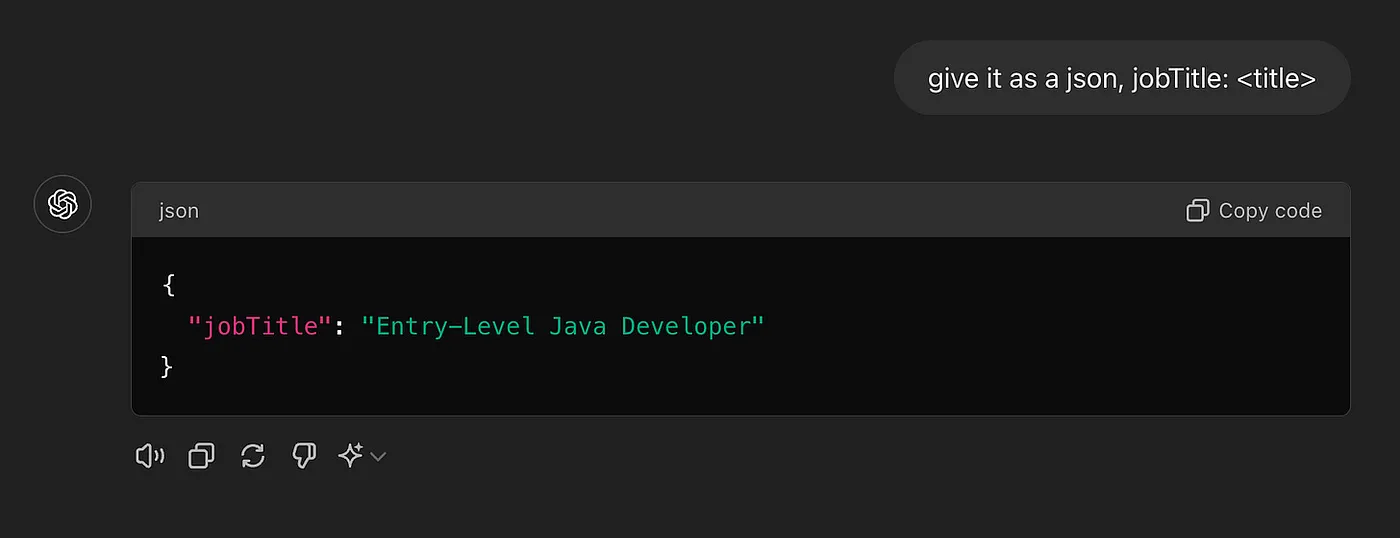 GPT returning structured JSON output for job title classification
Ah, that’s better. You can repeat this exercise with the most nuanced and culture-specific questions. Even better, you can repeat this exercise when you get an entire person’s profile, that gives you more context, and with code, which gives you the ability to use the results consistently in a business setting, and not only as a one off chat. With some more work you can coerce the results into a standard taxonomy of allowable job titles, which would make it indexable. It’s not an exaggeration to say if you copy & paste all of a person’s resume and prompt GPT just right, you will exceed the best results obtainable by some pretty smart people a decade ago, who worked at this for years.
High Value Office Work == Understanding Documents
The specific example of standardizing reumès is interesting, but it stays limited to where tech has always been hard at work — at a tech website that naturally applies AI tools. I think there’s a deeper opportunity here. A large percent of the world’s GDP is office work that boils down to expert human intelligence being applied to extract insights from a document repeatedly, with context. Here are some examples at increasing complexity:
- Expense management is reading an invoice and converting it to a standardized view of what was paid, when, in what currency, and for which expense category. Potentially this decision is informed by background information about the business, the person making the expense, etc.
- Healthcare claim adjudication is the process of reading a tangled mess of invoices and clinican notes and saying “ok so all told there was a single chest X-ray with a bunch of duplicates, it cost $800, and it maps to category 1-C in the health insurance policy”.
- A loan underwriter might look at a bunch of bank statements from an applicants and answer a sequence of questions. Again, this is complex only because the inputs are all over the place. The actual decision making is something like “What’s the average inflow and outflow of cash, how much of it is going towards loan repayment, and which portion of it is one-off vs actual recurring revenue”.
Reasoning about text is LLM's home turf
By now LLMs are notorious for being prone to hallucinations, a.k.a making shit up. The reality is more nuanced: hallucinations are in fact a predictable result in some settings, and are pretty much guaranteed not to happen in others.
The place where hallucinations occur is when you ask it to answer factual questions and expect the model to just “know” the answer from its innate knowledge about the world. LLMs are bad and introspecting about what they know about the world — it’s more like a very happy accident that they can do this at all. They weren’t explicitly trained for that task. What they were trained for is to generate a predictable completion of text sequences. When an LLM is grounded against an input text and needs to answer questions about the content of that text, it does not hallucinate. If you copy & paste this blog post into chatGPT and ask does it teach you how to cook a an American Apple Pie, you will get the right result 100% of the time. For an LLM this is a very predictable task, where it sees a chunk of text, and tries to predict how a competent data analyst would fill a set of predefined fields with predefined outcomes, one of which is
{“is cooking discussed”: false}.As AI consultants, we solved project after project involving document extraction. Insurance, finance, healthcare. There was a disconnect between what clients feared ("LLMs hallucinate") and what actually caused failures (bad table extraction that cascaded into everything else). LLMs failed when we failed to give them clean input text. Two ingredients make document pipelines work:
- Perfect Text extraction that converts the input document into clean, understandable plain text. That means handling tables, checkmarks, hand-written comments, variable document layout etc. The entire complexity of a real world form needs to convert into a clean plaintext that makes sense in an LLM’s mind.
- Strict Schemas that define exactly what outputs you're looking for from a given document type, how to handle edge cases, what data format to use, etc.
Text extraction is trickier than first meets the eye
Here’s what causes LLMs to crash and burn, and get ridiculously bad outputs:
- The input has complex formatting like a double column layout, and you copy & pasted in text from e.g. a PDF from left to right, taking sentences completely out of context.
- The input has checkboxes, checkmarks, hand scribbled annotations, and you missed them altogether in conversion to text
- Even worse: you skip text conversion entirely and paste a picture of a document hoping GPT will figure it out. This leads straight to hallucination city. Ask GPT to transcribe an image of a table with empty cells and watch it confidently invent data.
It always helps to remember what a crazy mess goes on in real world documents. Here’s a casual tax form:
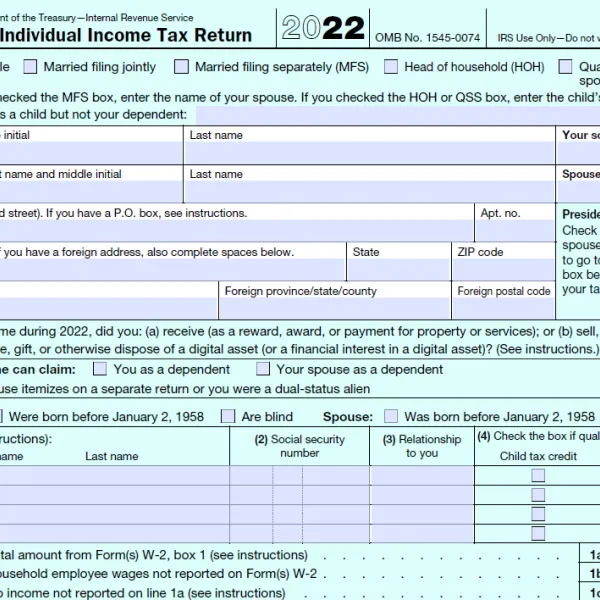 Of course real tax forms have all these fields filled out, often in handwriting
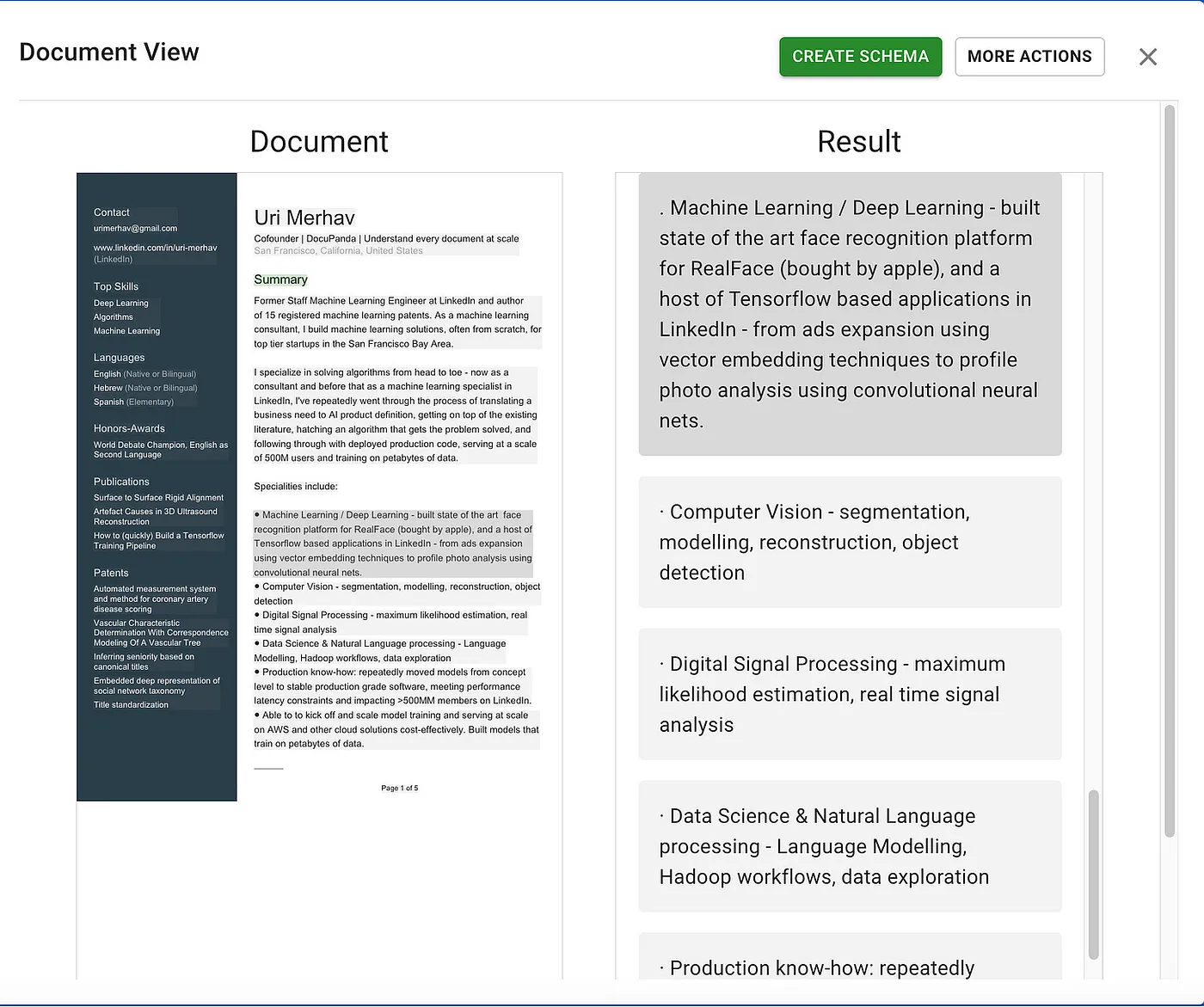
Or here’s my resumè
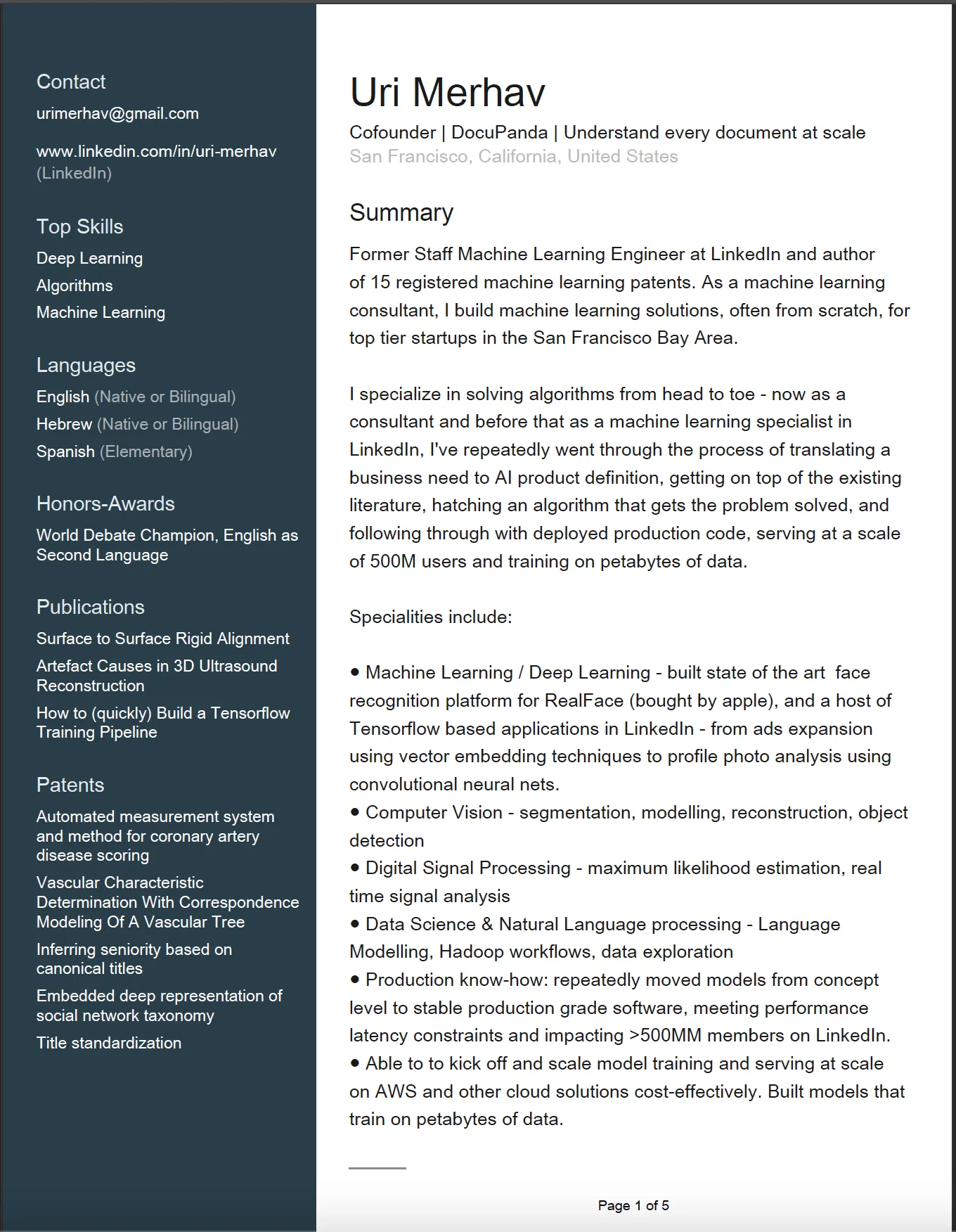 Example resume with complex multi-column formatting
Or a publicly available example lab report (this is a front page result from Google)
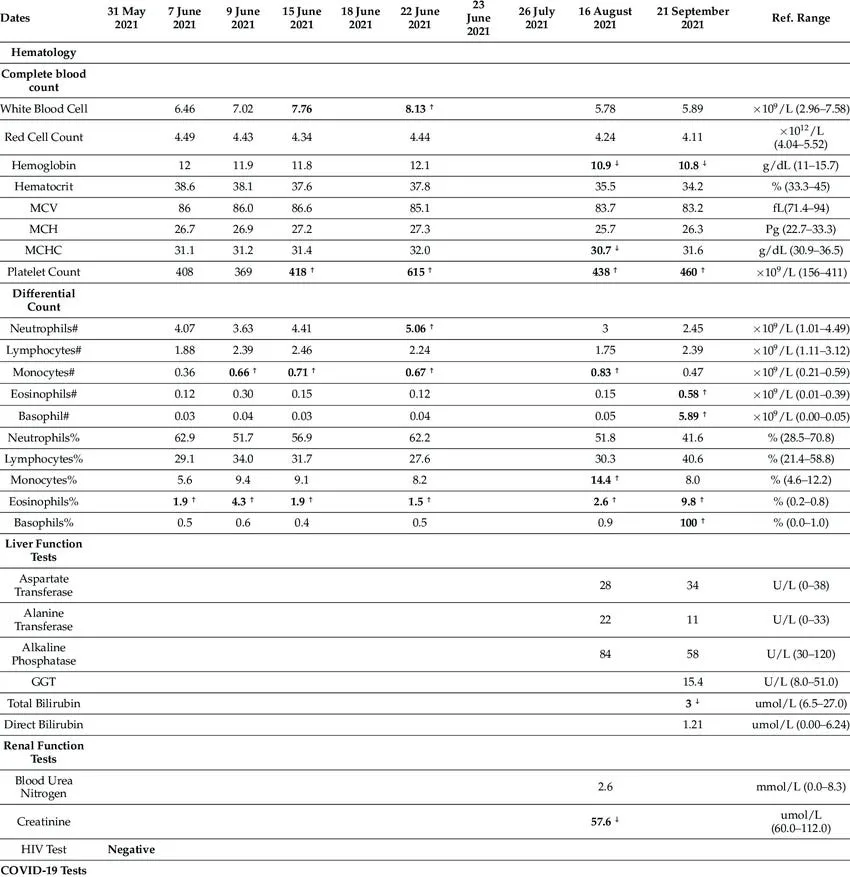 Source: research gate, public domain image
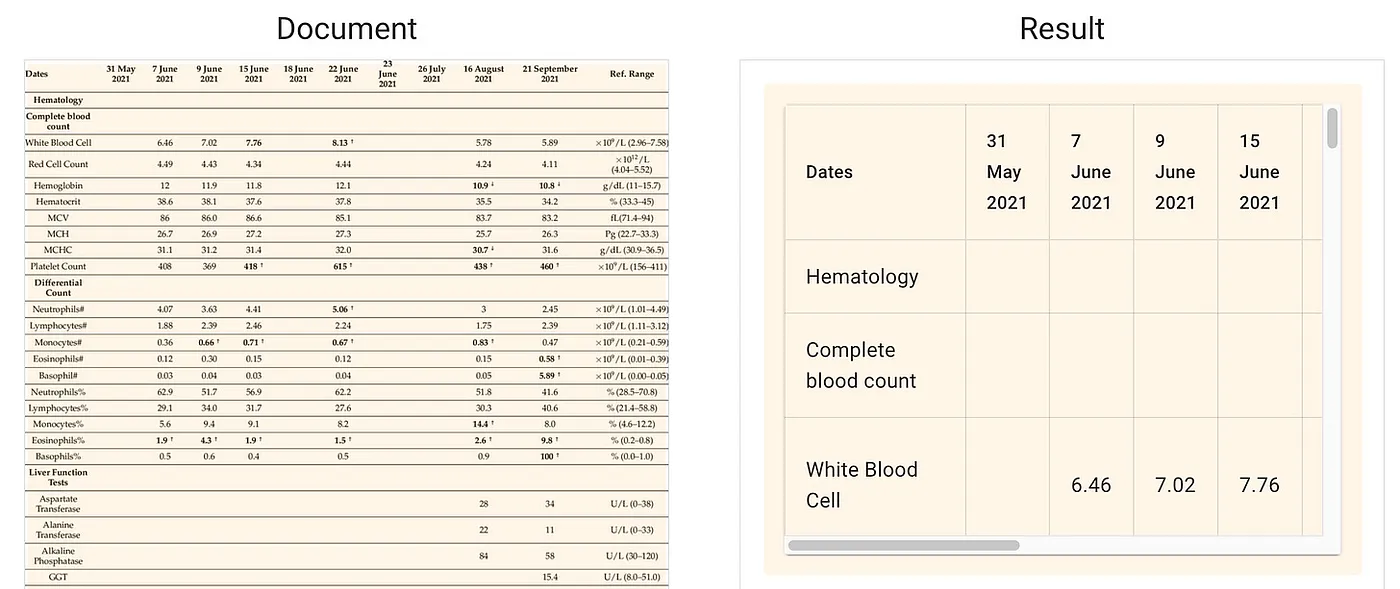
The worst thing you can do is ask GPT's multimodal capabilities to transcribe a table directly. Try it. The output looks right at first glance, then you notice it invented data for some cells and pulled others completely out of context.
If something's wrong with the world, build a SaaS company to fix it
When we started working on these kinds of documents, my cofounder Nitai Dean and I were surprised there weren't any off-the-shelf solutions that actually worked.
Some people claim to solve it, like AWS Textract. But they make numerous mistakes on any complex document we’ve tested on. Then you have the long tail of small things that are necessary, like recognizing checkmarks, radio button, crossed out text, handwriting scribbles on a form, etc etc.
So, we built DocuPipe.ai — which first generates a clean text representation of any page you throw at it. On the left hand you’ll see the original document, and on the right you can see the text output
 Source: docupipe.ai
Tables are similarly handled. Under the hood we just convert the tables into huuman and LLM-readable markdown format:
 Source: docupipe.ai
The last piece to making sense of data with LLMs is generating and adhering to rigid output formats. It’s great that we can make AI mold its output into a json, but to apply rules, reasoning, queries etc on data — we need to make it behave in a regular way. The data needs to conform to a predefined set of slots which we’ll fill up with content. In the data world we call that a Schema.
Building Schemas is a trial an error process… That an LLM can do
The reason we need a schema, is that data is useless without regularity. If we’re processing patient records, and they map to “male” “Male” “m” and “M” — we’re doing a terrible job.
So how do you build a schema? In a textbook, you might build a schema by sitting long and hard and staring at the wall, and defining that what you want to extract. You sit there, mull over your healthcare data operation and go “I want to extract patient name, date, gendfer and their physician’s name. Oh and gender must be M/F/Other.”
In real life, to define what to extract from documents, you freaking stare at your documents… a lot. You start off with something like the above, but then you look at documents and see that one of them has a LIST of physicians instead of one. And some of them also list an address for the physicians. And some addresses have a unit number and a building number, so maybe you need a slot for that. On and on it goes.
What we came to realize is that being able to define exactly what’s all the things you want to extract, is both non-trivial, difficult, and very solvable with AI.
That’s a key piece of DocuPipe. Rather than just asking an LLM to improvise an output for every document, we’ve built the mechanism that lets you:
- Specify what things you need to get from a document in free language
- Have our AI map over many documents and figure out a schema that answers all the questions and accommodates the kinks and irregularities observed in actual documents.
- Change the schema with feedback to adjust it to your business needs
What you end up with is a powerful JSON schema — a template that says exactly what you want to extract from every document, and maps over hundreds of thousands of them, extracting answers to all of them, while obeying rules like always extracting dates in the same format, respecting a set of predefined categories, etc.
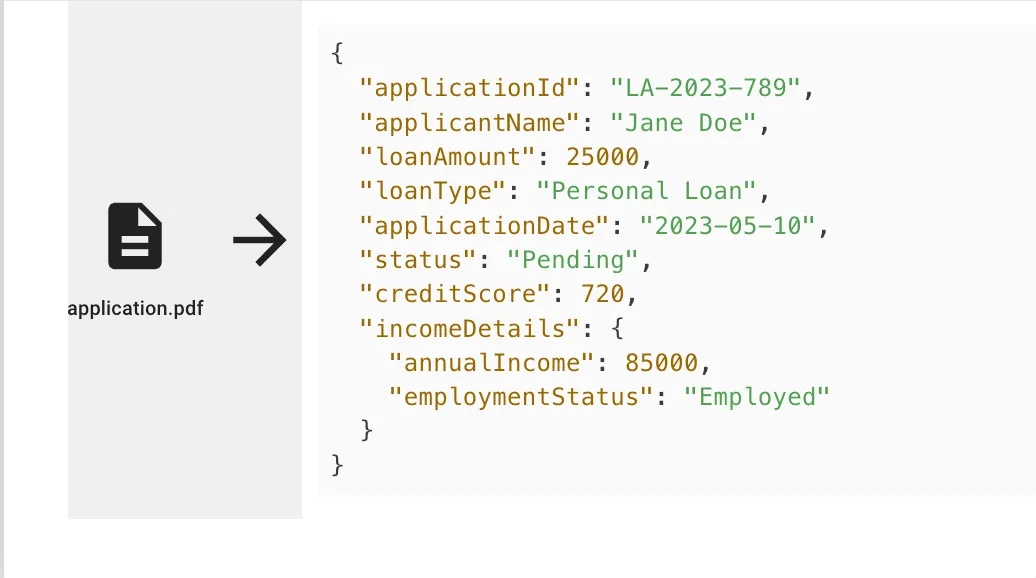 DocuPipe schema builder interface showing extracted fields
Plenty More!
Like with any rabbit hole, there’s always more stuff than first meets the eye. As time went by, we’ve discovered that more things are needed:
- Often organizations have to deal with an incoming stream of anonymous documents, so we automatically classify them and decide what schema to apply to them
- Documents are sometimes a concatenation of many documents, and you need an intelligent solution to break apart a very long documents into its atomic, seperate components
- Querying for the right documents using the generated results is super useful
If there’s one takeaway from this post, it’s that you should look into harnessing LLMs to make sense of documents in a regular way. If there’s two takeawways, it’s that you should also try out DocuPipe.ai. The reason I’m building it is that I believe in it. Maybe that’s a good enough reason to give it a go?
 A future office worker
Recommended Articles
Related Documents