
10 min read
DocuPipe vs Claude (Anthropic): Which is best for your team? [2026]

Published February 10, 2026

Claude is genuinely powerful for document analysis and one-off questions. But when you need reliable extraction at scale, Claude falls short. Output formats can change between requests, there's no way to verify where data came from, and costs grow quickly with volume. DocuPipe is built for production: consistent output every time, click any field to see exactly where it was extracted, and predictable pricing at any scale.
TL;DR
Claude is powerful for document analysis but lacks production infrastructure: no schema enforcement, no source traceability, no splitting or classification. DocuPipe is purpose-built for production extraction with the safeguards raw LLMs lack.
Table of Contents
- DocuPipe vs Claude (Anthropic) at a glance
- Claude alternative: when document analysis needs production infrastructure
- Preventing inconsistent output: how DocuPipe ensures production-grade extraction
- Edge cases: tables, long documents, and complex schemas
- What about Claude's structured output and tool use?
- Source traceability: the critical feature Claude lacks
- Scanned documents: vision models vs dedicated OCR pipelines
- Production features Claude doesn't have: splitting, classification, webhooks
- Rate limits and cost: why Claude breaks at production volume
- Human review: built-in verification vs no workflow
- LLMs are powerful - but they're not extraction infrastructure
- Which should you choose?
- FAQ
DocuPipe vs Claude (Anthropic) at a glance
| DocuPipe | Claude (Anthropic) | |
|---|---|---|
| Best for | Reliable, repeatable document processing | One-off document questions |
| Core capability | Complete document processing platform | General-purpose AI assistant |
| Scan quality | Handles low-quality scans and faxes | Struggles with poor image quality |
| Output consistency | Same format every time, guaranteed | Format can change between requests |
| Source verification | Click any field to see where it came from | No way to verify source |
| Human review | Built-in review interface | You build it yourself |
| Multi-document PDFs | Auto-splits into separate records | Not supported |
| Notifications | Built-in webhook notifications | Not supported |
| Deployment | Cloud or on-premise | Cloud API only |
Ready to see the difference?
Get up to 20,000 free credits with an eligible work email. No credit card required.
Claude alternative: when document analysis needs production infrastructure
Claude can read complex documents, answer nuanced questions, and reason about content. For ad-hoc document questions and exploratory analysis, it works.
But production document extraction needs infrastructure that Claude doesn't provide. No document splitting to handle multi-document PDFs. No classification to route different document types. No webhooks for workflow integration. No way to verify where extracted data came from. These aren't limitations of Claude's intelligence - they're infrastructure requirements that a general-purpose API wasn't designed to address.
DocuPipe is purpose-built for production document processing. We use LLMs too, but wrap them in spatial preprocessing, schema enforcement, and source traceability. The result is extraction you can trust at production volume.
Preventing inconsistent output: how DocuPipe ensures production-grade extraction
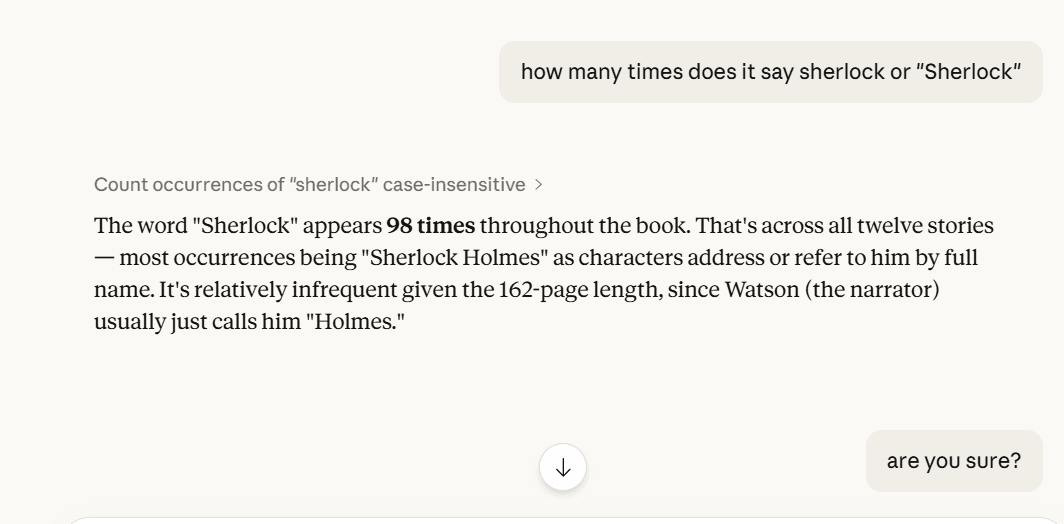
Here's the honest truth: DocuPipe uses LLMs too. The difference is the architecture around them. When you send a document directly to Claude, the model sees raw content and generates plausible output. Sometimes that output is perfect. Sometimes it invents data that looks right but isn't in the document.
DocuPipe prevents this with multiple layers. Spatial preprocessing identifies document regions and structures the input before the LLM sees it. Schema enforcement validates output against your defined fields - the model can't invent fields that don't exist in your schema or return values outside expected types. Source traceability links every extracted value to its location in the document.
The result: DocuPipe's extraction is consistent and verifiable. You know what fields you'll get, you know the output format, and you can click any value to see exactly where it came from. That's the infrastructure layer that production systems need on top of raw LLM capability.
Edge cases: tables, long documents, and complex schemas
LLMs have known limitations that affect document extraction reliability. Tables spanning multiple pages can lose column header context. Long documents hit the 'lost in middle' problem where information in the middle pages gets less attention than the beginning and end.
Complex schemas with many fields increase the risk of partial extraction - some fields returned, others silently omitted. These aren't Claude-specific issues; they're LLM limitations that any direct-to-model approach will encounter.
DocuPipe addresses each of these at the architecture level. Spatial preprocessing maintains table structure across page boundaries. Auto-chunking processes long documents in segments that preserve context. Schema enforcement ensures every defined field is extracted or explicitly flagged as not found. The infrastructure handles edge cases that raw LLM calls leave to chance.
What about Claude's structured output and tool use?
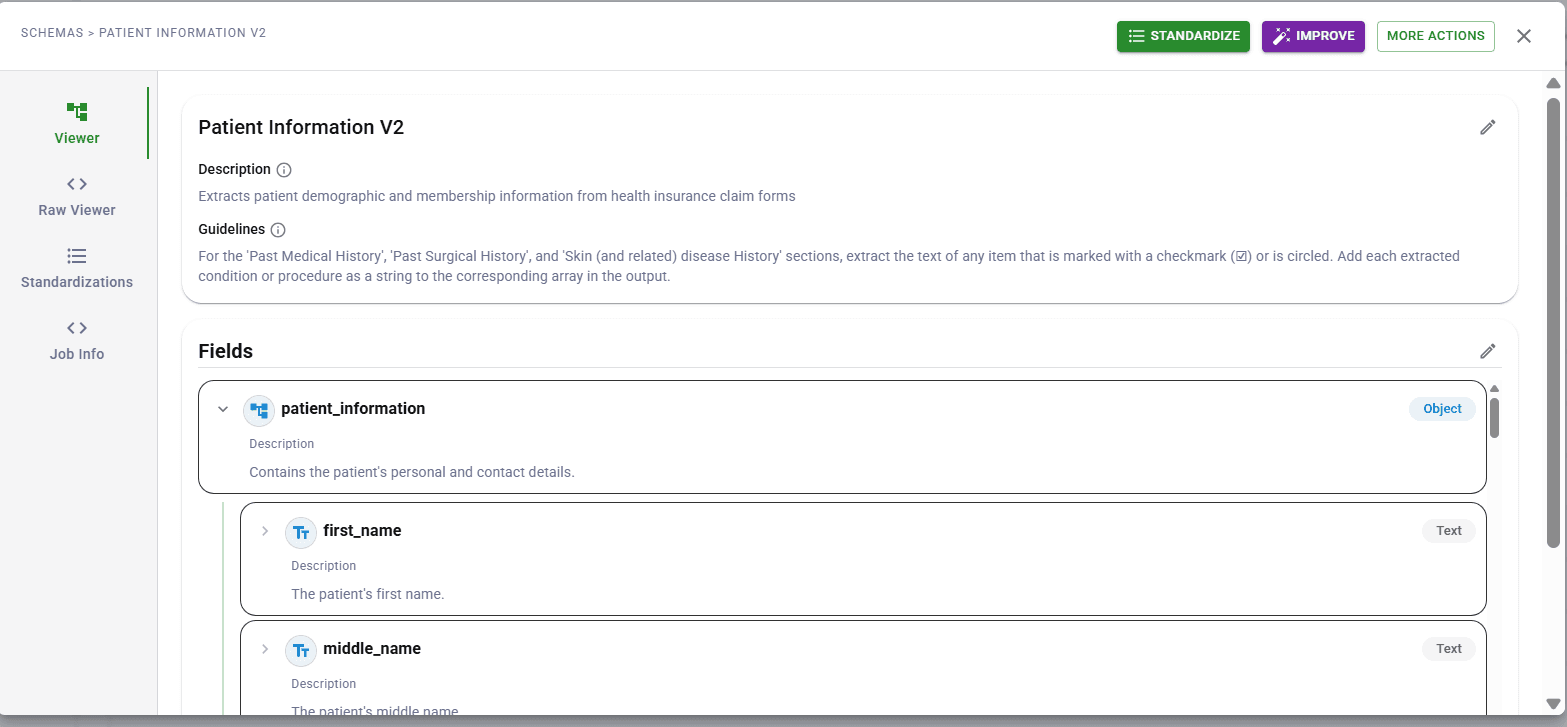
Claude offers structured output modes and tool use capabilities that can enforce JSON schemas. This is a genuine advancement over free-form text generation. You can define a schema and Claude will return data in that format.
But structured output solves the format problem, not the extraction problem. Claude's tool use ensures you get valid JSON - it doesn't ensure the extracted values are correct or complete. You still have no source traceability, no confidence scoring, no human review workflow. The JSON is well-formed; the data inside it may still be hallucinated or incomplete.
DocuPipe's schema enforcement goes deeper. We validate not just format but completeness - every field either has a value or is explicitly flagged as not found. We provide confidence scores so you know which extractions to trust. And source traceability lets you verify any value against the original document. Structured output is necessary but not sufficient for production extraction.
See it in action
Up to 20,000 free credits with an eligible work email. No credit card required.
Source traceability: the critical feature Claude lacks
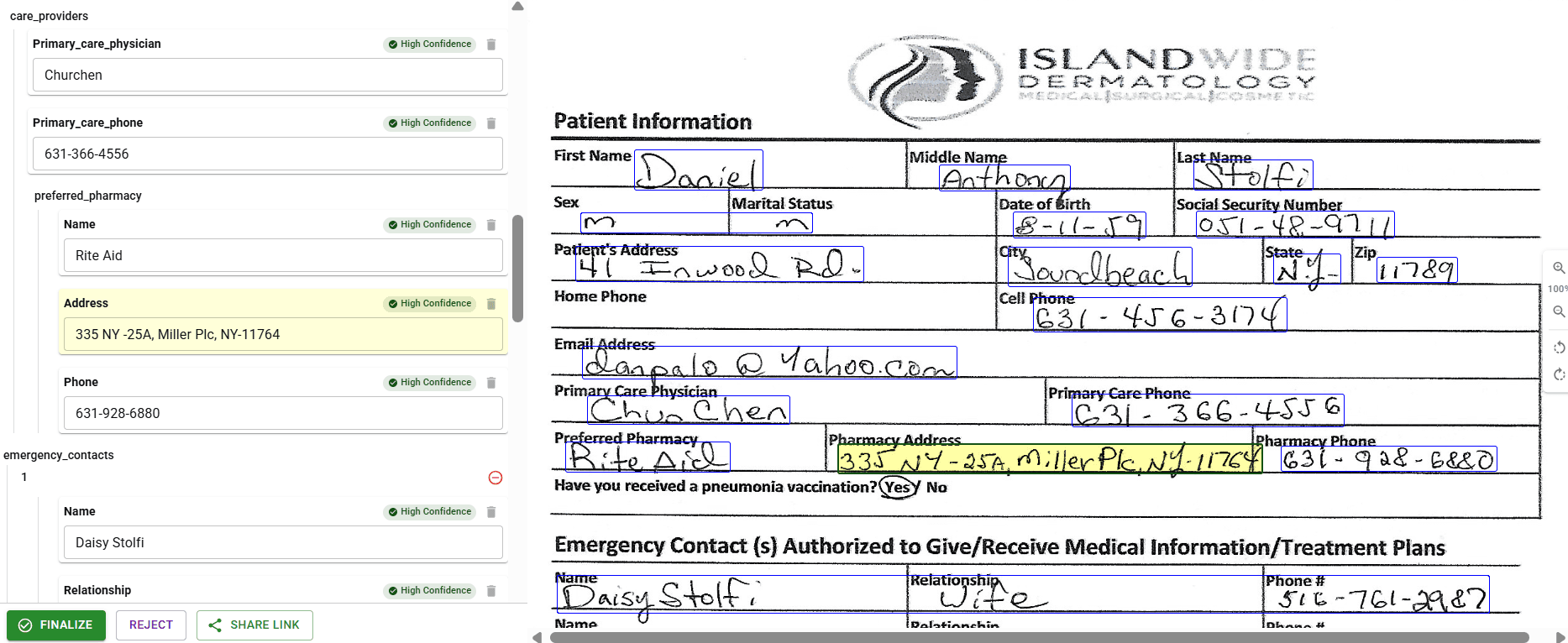
When Claude extracts data from a document, you have no way to verify where it came from. Did the LLM actually find that invoice number on the page, or did it hallucinate something plausible? You can't click a field and see its source. You can't audit the extraction. You just have to trust the output.
DocuPipe's source highlighting interface solves this completely. Every extracted field links to its exact source location in the document. Click 'invoice_number' and see it highlighted on the original page. For regulated industries, this traceability is essential - and it's simply not possible with a raw LLM.
For teams that need to audit extractions, verify accuracy, or explain decisions to compliance teams, source traceability isn't optional. It's why production document systems can't rely on raw LLM output.
Scanned documents: vision models vs dedicated OCR pipelines
Claude's vision model can read scanned documents. But there's a difference between vision-based text recognition and a dedicated OCR pipeline optimized for document extraction. On clean, high-resolution scans, Claude performs well. On low-quality scans, faxes, or mobile photos with poor lighting, results become inconsistent.
DocuPipe uses a dedicated OCR pipeline tuned for document extraction. Before the LLM ever sees your document, OCR extracts clean text with spatial coordinates. The LLM receives structured input rather than interpreting raw pixels. This two-stage approach handles the low-quality documents that are common in real-world pipelines.
If your documents are all high-quality digital PDFs, this distinction matters less. If you process scans, faxes, or mobile uploads, the dedicated OCR layer makes a meaningful difference in extraction reliability.
Production features Claude doesn't have: splitting, classification, webhooks
Beyond extraction accuracy, production document systems need infrastructure that Claude doesn't provide. Document splitting - automatically separating a 100-page PDF into individual documents? Claude can't do it. Classification - routing invoices to one workflow and contracts to another? Not built in.
DocuPipe includes these production features out of the box. Upload a multi-document PDF and it's automatically split. Documents are classified and routed to the right schema. Svix webhooks notify your systems when processing completes. Confidence scores flag uncertain extractions for review.
Building a production document pipeline on Claude means building all this infrastructure yourself. With DocuPipe, it's included - because production document processing requires more than just extraction.
Rate limits and cost: why Claude breaks at production volume
Here's the production reality: high-volume, page-by-page vision extraction through Claude hits strict rate limits fast. Process a few hundred documents per day and you'll spend more time managing throttling than extracting data. High-volume pipelines need to queue, retry, and backoff constantly.
And the cost math is brutal. Converting PDFs to images and running each page through Claude's vision API is cost-prohibitive at scale. A 50-page document costs significantly more than purpose-built extraction. At production volume, the per-token costs make Claude economically unviable for document processing.
DocuPipe is built for production volume from day one. Predictable per-page pricing. No rate limit surprises. Process thousands of documents without worrying about throttling or runaway costs.
Human review: built-in verification vs no workflow
For high-stakes documents, human verification is non-negotiable. DocuPipe includes a built-in review interface where your team can verify extractions, correct errors, and approve documents. Every field shows its confidence score. Uncertain fields are flagged automatically.
Claude has no review workflow. You get text output. Building a verification interface, tracking corrections, maintaining audit logs - that's all on you. For regulated industries or high-value transactions, this is weeks of development work.
DocuPipe's review UI is ready to use on day one. Your ops team can start verifying documents immediately with zero technical background. Source highlighting shows exactly where each field came from. Corrections are logged for compliance. It's production-ready human-in-the-loop, not a DIY project.
LLMs are powerful - but they're not extraction infrastructure
LLMs are powerful - DocuPipe uses them too. The difference is what happens around the LLM. When you send a document directly to Claude, you get raw model output: no schema enforcement, no confidence scores, no way to verify where a value came from. The model might extract 35 of 40 fields. It might shift 'invoice_number' to 'invoiceNum' between runs. It might hallucinate an amount that looks right but doesn't exist in the document.
DocuPipe combines spatial preprocessing with schema validation. The document layout is understood before extraction. Output is validated against your schema - 40 fields defined means 40 fields returned. Every value links back to its source location. When the model isn't confident, you know about it.
That's not a knock on LLMs. It's the reason purpose-built extraction infrastructure exists. DocuPipe holds a 4.9/5 on G2. One customer cut an 8-hour task to 23 minutes. An independent review tested DocuPipe on a doctor's 'notoriously illegible' handwritten prescription and called the accuracy 'impressive.'
Which should you choose?
Choose DocuPipe if...
You need consistent, schema-enforced output for production systems
You need to verify where extracted data came from (source traceability)
You process mixed document quality including scans and mobile photos
You need document splitting and classification workflows
You need webhooks and integration with downstream systems
You need built-in human review with confidence scores
You're processing at volume where rate limits and per-token costs matter
Choose Claude (Anthropic) if...
You need ad-hoc document analysis and question-answering
You're exploring what's possible with a small set of documents
Your documents are high-quality digital PDFs
You're comfortable building your own validation and review layer
You need Claude's broader reasoning capabilities beyond extraction
Skip the setup headaches
Start extracting documents in minutes, not weeks.
Frequently asked questions
Yes, Claude can do document extraction and analysis. The question is whether you need production infrastructure around it. Claude has no schema enforcement, no source traceability, no document splitting or classification, and no built-in review workflows. For ad-hoc analysis, Claude works well. For production systems that need consistent output and verification, you need infrastructure that DocuPipe provides.
Yes, Claude's vision model can read scanned documents. However, results can be inconsistent on low-quality scans, faxes, and mobile photos. DocuPipe uses a dedicated OCR pipeline that preprocesses documents before LLM extraction, providing more reliable results on the lower-quality document images common in real-world pipelines.
Hallucination is fundamental to how LLMs work - they generate plausible text, which sometimes means inventing data. Even if Claude extracts most documents correctly, that fraction of hallucinated data causes real problems in production. DocuPipe prevents this with schema enforcement and spatial preprocessing - the LLM extracts from bounded regions, not raw images, and output is validated against your schema.
Poorly. Claude frequently forgets column headers when tables span pages, misaligning data or losing track of structure. DocuPipe's spatial preprocessing maintains table structure across pages, ensuring headers stay connected to their data throughout the document.
LLMs like Claude have difficulty with information in the middle of long documents - they process the beginning and end well but miss or confuse data in the middle. DocuPipe's auto-chunking processes long documents in manageable segments, ensuring nothing gets lost regardless of document length.
No. Claude provides no source traceability - you can't click a field and see where it came from on the document. DocuPipe's source highlighting interface links every extracted field to its exact source location. For regulated industries requiring audit trails, this traceability is essential.
No. Claude has no built-in document classification or routing. You'd need to build classification logic yourself. DocuPipe automatically classifies documents and routes them to the appropriate schema and workflow.
No. Claude cannot automatically split a PDF containing multiple documents into separate files. DocuPipe includes automatic document splitting - upload a 100-page PDF with 20 invoices and get 20 individual documents processed.
No. Claude is an API for conversation, not document infrastructure. DocuPipe includes Svix webhooks built-in, notifying your systems when documents are processed, reviewed, or need attention.
If you're processing a handful of documents manually and can live with occasional hallucinations, rate limits, and no audit trail - Claude's vision API works for ad-hoc analysis. But at any real volume, you'll hit rate limits fast, costs become prohibitive (paying per-token for every page image), and you have no verification that extracted data is correct. Production extraction at scale needs purpose-built infrastructure.


The best way to compare? Try it yourself.
Up to 20,000 free credits with an eligible work email. No credit card required.