
8 min read
DocuPipe vs Sensible: Which is best for your team? [2026]

Published March 17, 2026

Looking for the best Sensible alternative? DocuPipe vs Sensible comes down to this: DocuPipe uses plain JSON schemas that any developer can read. Sensible requires learning SenseML - their proprietary query language with its own syntax, anchors, and methods. It's not standard JSON - it's a custom config format that takes hours to days to master. And when you process documents with Sensible, you're paying per document ($0.66 each), not per page. A 50-page contract costs the same as a 1-page receipt. If you have time to learn a proprietary language and your documents are mostly single-page, Sensible works. But if you want plain JSON schemas and fair per-page pricing, DocuPipe is what you need.
TL;DR
Sensible requires learning SenseML, a proprietary query language. DocuPipe uses plain JSON schemas any developer can read. Per-page pricing, not per-document.
Table of Contents
- DocuPipe vs Sensible at a glance
- Sensible alternative: DocuPipe uses plain JSON, not proprietary SenseML
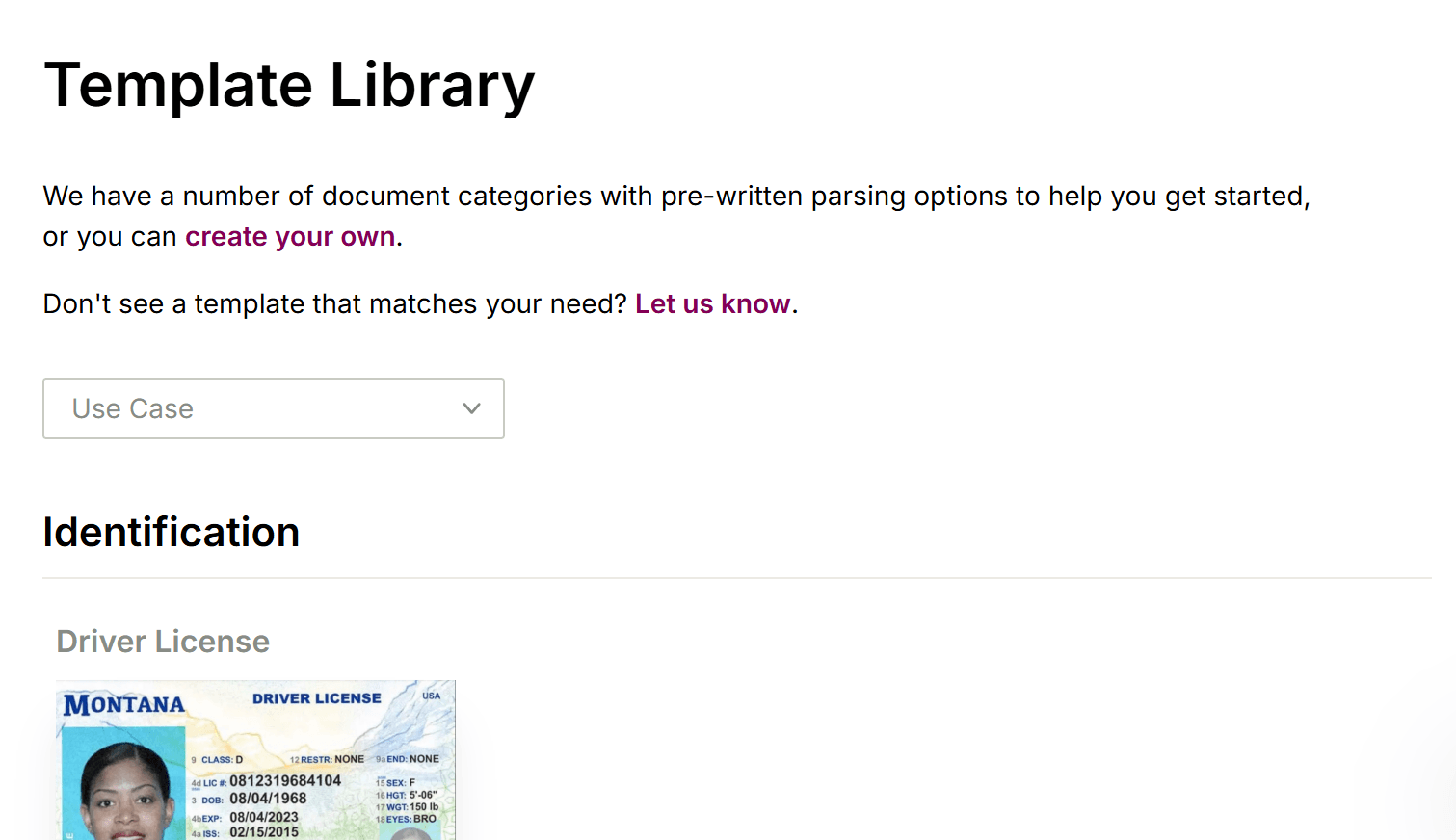
- Minutes vs hours: DocuPipe vs Sensible time to first extraction
- Per-document vs per-page: why Sensible pricing hurts multi-page documents
- Built-in review UI: why teams choose DocuPipe over Sensible
- Vendor lock-in: SenseML configs vs portable JSON schemas
- Schema management: developers only vs the whole team
- What Sensible users actually say
- Which should you choose?
- FAQ
DocuPipe vs Sensible at a glance
| DocuPipe | Sensible | |
|---|---|---|
| Best for | Teams that want to ship fast with standard JSON | Teams willing to invest in learning SenseML |
| Schema definition | Plain JSON schemas any dev can read | Proprietary SenseML query language |
| Time to first extraction | Minutes (upload sample, get AI-suggested fields) | Hours to days (learn SenseML, configure anchors) |
| Learning curve | None - if you know JSON, you're ready | Steep - SenseML has its own syntax and concepts |
| Pricing model | Per-page (fair for multi-page docs) | Per-document ($0.66/doc, $0.50 overage) |
| AI extraction mode | AI-native from day one | Sensible Instruct added later, still pushes SenseML |
| Human review | Built-in source highlighting UI with source highlighting | No built-in review interface |
| Compliance | HIPAA, ISO 27001 | SOC 2 Type II |
| Pricing example | Tiered credits, predictable monthly cost | $499/mo for 750 docs, then $0.50 each |
Ready to see the difference?
Get up to 20,000 free credits with an eligible work email. No credit card required.
Sensible alternative: DocuPipe uses plain JSON, not proprietary SenseML
The biggest difference when comparing Sensible vs DocuPipe is the schema definition approach. DocuPipe uses plain JSON schemas. If you know JSON, you already know how to define extraction schemas. Field names, data types, nested structures - it's all standard JSON that any developer on your team can read, write, and maintain.
Sensible takes a different approach with their hybrid LLM/SenseML system. SenseML is their proprietary query language with its own syntax for anchors, methods, match rules, and layout-based queries. The problem? This hybrid approach creates a massive 'prompt janitor' problem. As you build complex extraction logic for variable documents, maintaining those configurations, handling model deprecations, and managing validations turns into a massive engineering overhead. What starts as flexibility becomes technical debt.
For teams that want to extract documents today, DocuPipe's plain JSON approach eliminates the learning curve entirely. No proprietary syntax. No prompt janitor maintenance. No configuration rot when Sensible updates their underlying models.
Minutes vs hours: DocuPipe vs Sensible time to first extraction
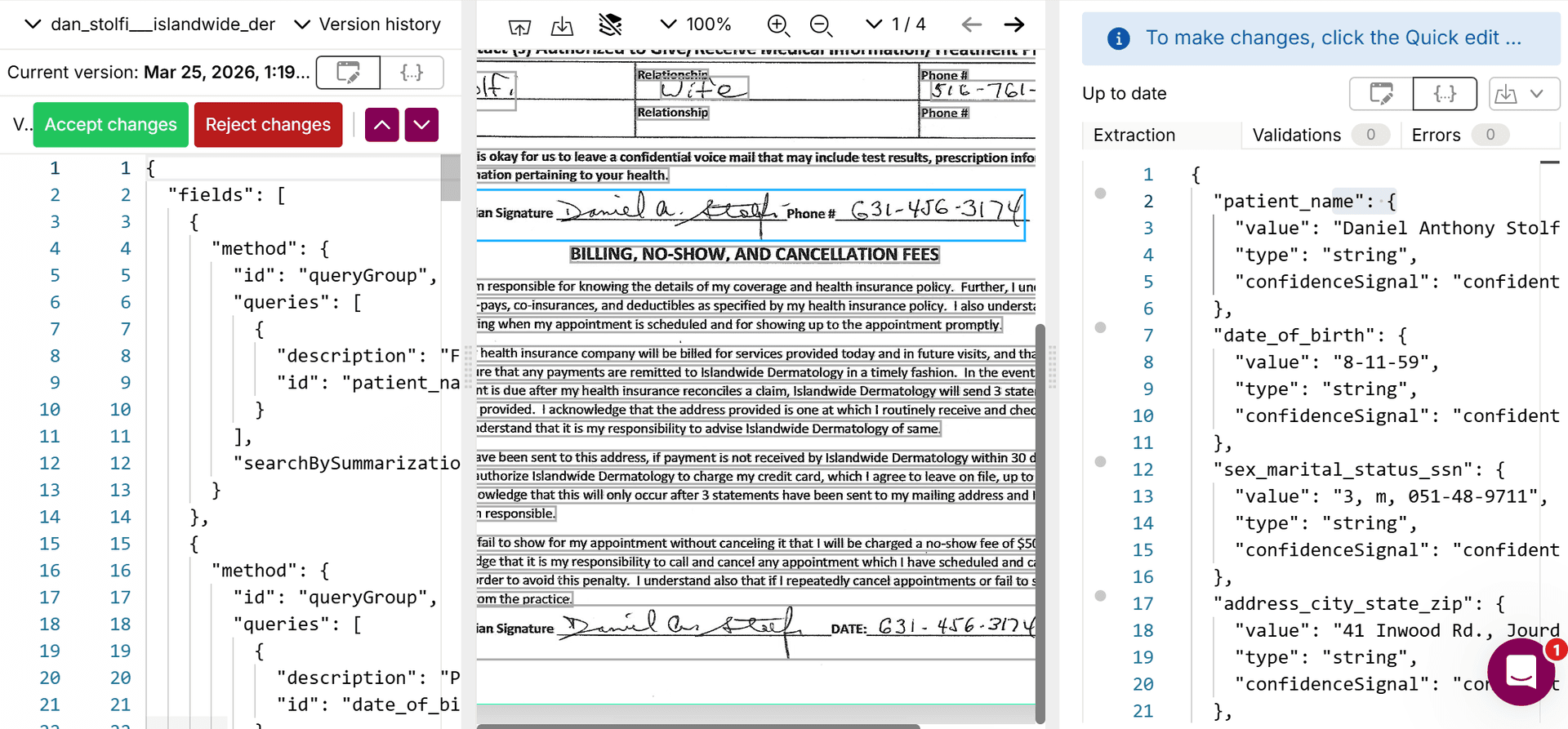
Time to first extraction is dramatically different between DocuPipe and Sensible. With DocuPipe, upload a sample document and our AI suggests fields automatically. Review the suggestions, adjust if needed, and you're extracting in minutes. No configuration language to learn. No anchor positioning to debug.
With Sensible, you start by reading documentation about SenseML concepts: anchors, methods, match types, preprocessors. Then you write your first config, test it, realize the anchor didn't match, adjust the match text, test again. Developers report spending hours to days getting complex documents working correctly.
Sensible added 'Sensible Instruct' - an LLM-based mode that reduces SenseML complexity. But the product still centers around SenseML, and many features require dropping back into the proprietary syntax. DocuPipe was AI-native from day one, designed so you never need to learn a custom query language.
Per-document vs per-page: why Sensible pricing hurts multi-page documents
Pricing structure is a key differentiator in the Sensible vs DocuPipe comparison. DocuPipe charges per page - process a 50-page contract and pay for 50 pages. Process a 1-page receipt and pay for 1 page. Fair and predictable.
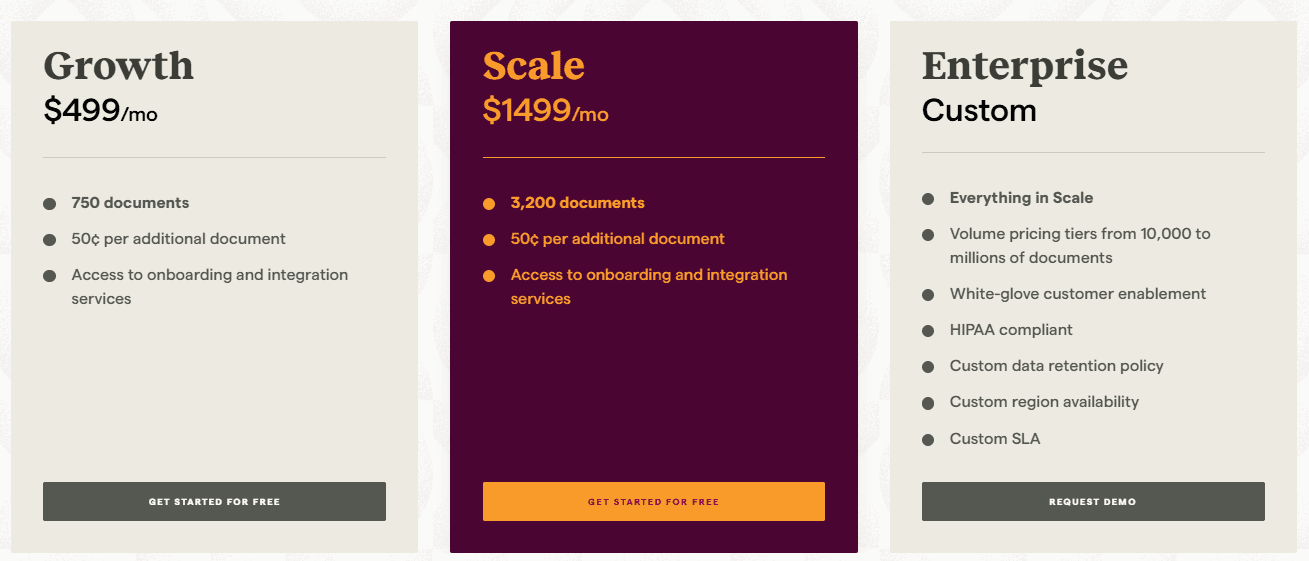
Sensible charges per document regardless of page count. Their Growth plan is $499/month for 750 documents - that's $0.66 per document. A 50-page contract costs the same as a 1-page form. And when you exceed your allocation, overage is $0.50 per document. For teams processing multi-page documents like contracts, reports, or loan applications, this pricing model inflates costs significantly.
Consider processing 1,000 contracts averaging 30 pages each. With DocuPipe's per-page model, you pay based on actual content processed. With Sensible's per-document model, every contract costs the same whether it's 5 pages or 100 pages. For high-page-count documents, DocuPipe's pricing is substantially more cost-effective.
Built-in review UI: why teams choose DocuPipe over Sensible
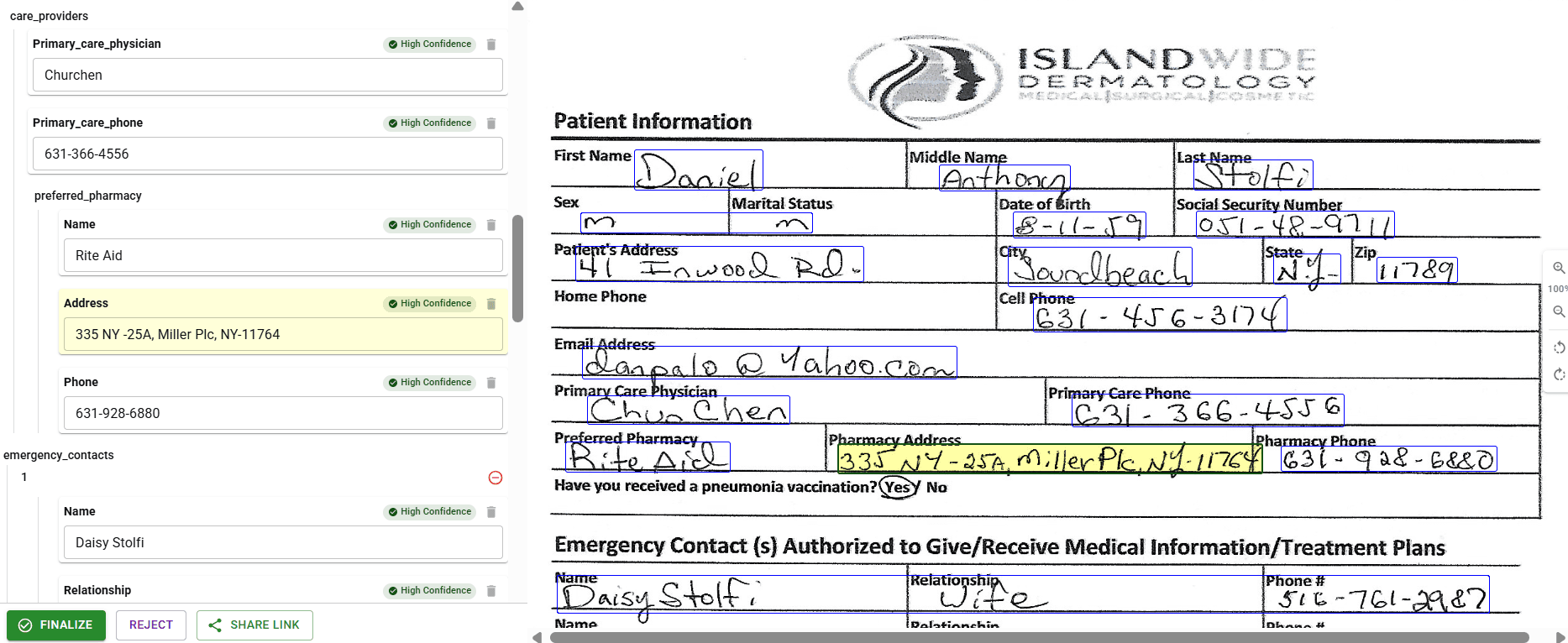
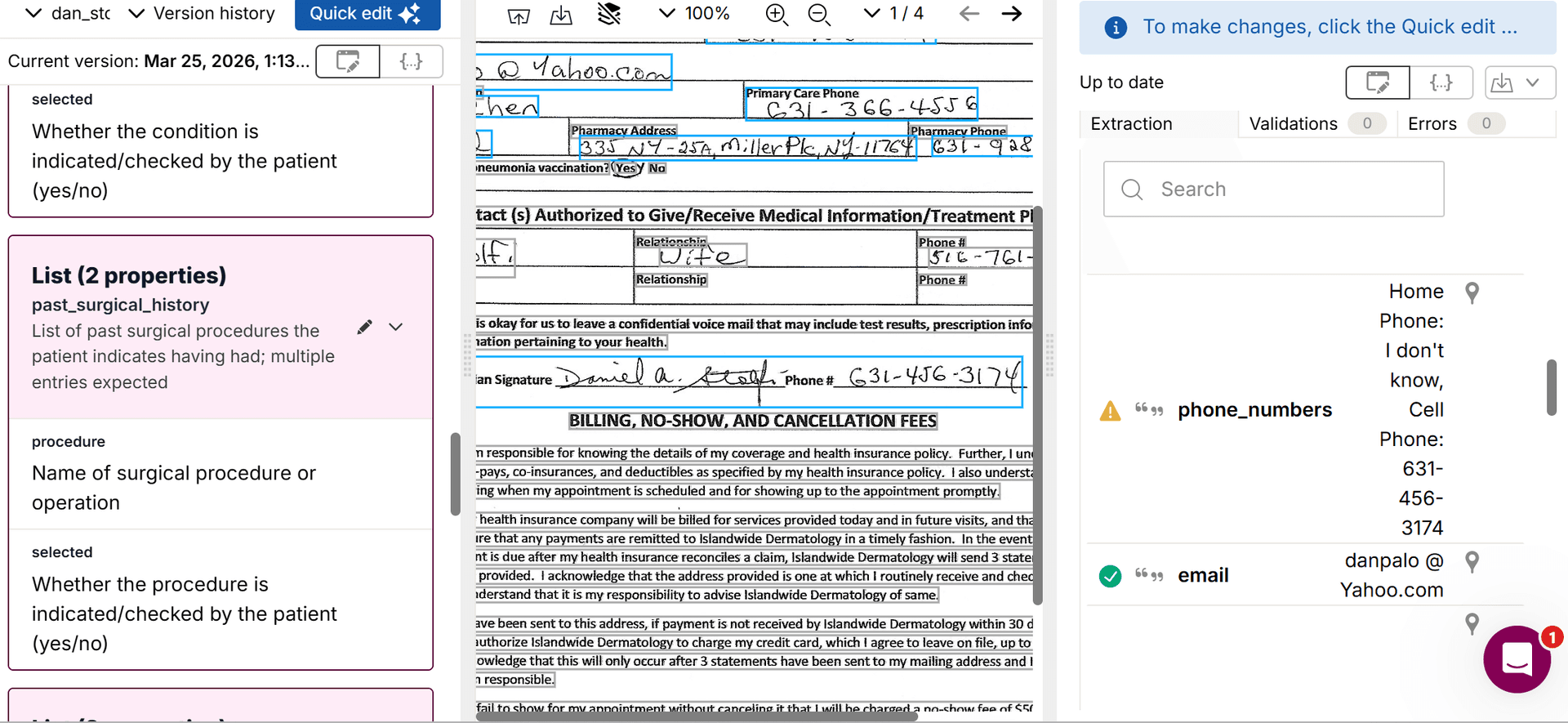
For production document extraction, human review is essential. DocuPipe ships with source highlighting - a built-in review interface where your team can verify extractions with source highlighting. Click any field and see exactly where it came from on the document. Your ops team can start reviewing today without any development work.
Sensible focuses on the extraction API but doesn't include a review interface. You get JSON responses with bounding box coordinates, but building the actual review UI is your responsibility. That means frontend development, user management, and connecting the review workflow to your systems.
For teams that need verification workflows - especially in regulated industries like healthcare, finance, or insurance - DocuPipe's built-in review saves weeks of development time. Sensible expects you to build that layer yourself.
See it in action
Up to 20,000 free credits with an eligible work email. No credit card required.
Vendor lock-in: SenseML configs vs portable JSON schemas
When evaluating Sensible alternatives, vendor lock-in is worth considering. SenseML configurations only work with Sensible. The anchors, methods, and match rules you learn are proprietary. If you ever need to switch providers, those configs don't transfer.
DocuPipe schemas are plain JSON. While specific field names might differ between providers, the fundamental structure is standard. Your team's JSON knowledge applies everywhere. No proprietary syntax to relearn if your needs change.
This matters for long-term planning. Teams building on SenseML are building expertise that only applies to one vendor. Teams using DocuPipe's JSON schemas are building on universal knowledge that transfers across tools and team members.
Schema management: developers only vs the whole team
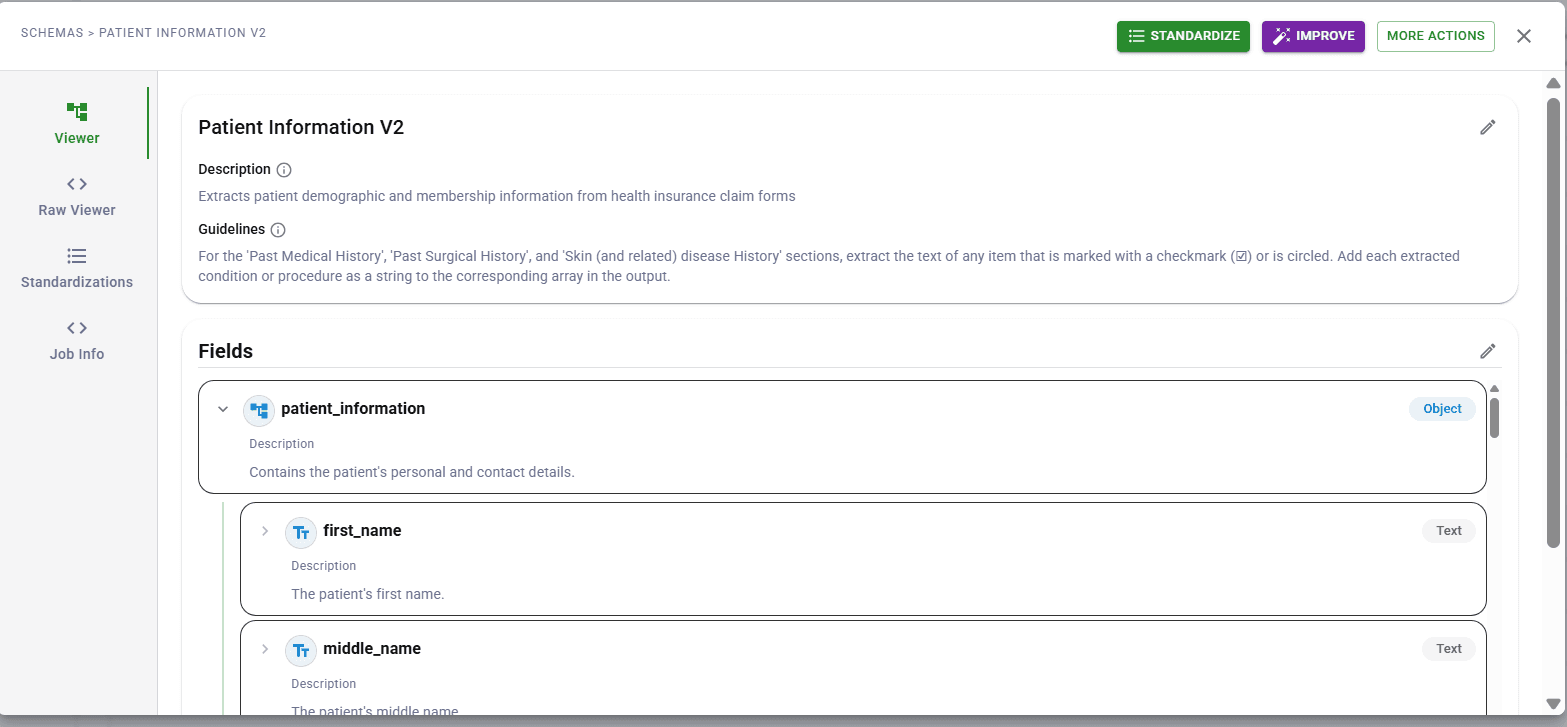
Who manages your extraction schemas matters for operational efficiency. DocuPipe's schema dashboard is designed for operations teams, not just developers. Business users can view schemas, understand field mappings, and make adjustments without writing code.
Sensible's SenseML requires developer involvement for any schema changes. Even small adjustments - changing an anchor text, adding a field - require someone who understands the proprietary syntax. This creates bottlenecks when your ops team needs quick iterations.
For organizations where business teams need to manage document types independently, DocuPipe removes the developer dependency. If you have dedicated engineering resources specifically for document processing and don't mind the SenseML learning curve, Sensible is an option - but most teams find that investment hard to justify.
What Sensible users actually say
Sensible makes good extraction software - their G2 reviewers praise the speed and the rules-based approach. But two things stand out in the reviews. First: 'incredibly expensive and difficult to justify the license cost if it's not a core part of daily operational processes.' Second: you need to learn SenseML, their proprietary query language, before you extract anything.
DocuPipe uses plain JSON schemas. If you know JSON, you already know how to define extraction. And at $99/mo vs Sensible's $499/mo starting tier, the math works for teams that aren't processing documents every single day.
DocuPipe has a 4.9/5 on G2. A robotics team mentor went from reading our API docs to a working system in under an hour. No proprietary query language required.
Which should you choose?
Choose DocuPipe if...
You want plain JSON schemas without learning a proprietary language
You need to extract documents in minutes, not hours or days
You process multi-page documents and want fair per-page pricing
You need built-in human review with source highlighting
You want ops teams to manage schemas without developer involvement
You prefer AI-native extraction without falling back to custom syntax
You need on-premise deployment for data residency
Choose Sensible if...
You're willing to invest time learning SenseML
You process mostly single-page documents (per-document pricing works)
You have developers dedicated to maintaining extraction configs
You don't need built-in review interfaces
You've already invested in SenseML expertise
Skip the setup headaches
Start extracting documents in minutes, not weeks.
Frequently asked questions
SenseML is Sensible's proprietary query language for defining document extractions. It uses anchors, methods, and match rules to locate data on pages. While powerful, it requires significant learning investment - developers report hours to days to become productive. DocuPipe uses plain JSON schemas instead, eliminating this learning curve entirely. This is a key reason teams look for Sensible alternatives.
Sensible Instruct is Sensible's LLM-powered extraction mode, added to reduce SenseML complexity. However, Sensible still centers around SenseML, and many features require the proprietary syntax. DocuPipe was AI-native from day one - you never need to learn a custom query language. Upload a sample document, get AI-suggested fields, and start extracting in minutes.
Sensible charges per document regardless of page count. A 50-page contract costs the same as a 1-page receipt. At $499/month for 750 documents ($0.66 each), multi-page document processing gets expensive fast. DocuPipe charges per page, so you pay for actual content processed. For contracts, reports, or any multi-page documents, this difference significantly impacts total cost.
No, Sensible focuses on the extraction API and expects you to build review interfaces yourself. You get bounding box coordinates in the response, but the UI is your responsibility. DocuPipe includes source highlighting - a built-in review interface where teams can verify extractions with source highlighting. This saves weeks of frontend development.
Developers consistently report that SenseML takes hours to days to become productive. The syntax includes anchors, methods, match types, preprocessors, and layout concepts that require dedicated learning time. DocuPipe uses plain JSON schemas - if you know JSON, you're ready immediately. No new language to learn.
Yes. While SenseML configs won't transfer directly (they're proprietary), the underlying document extraction logic maps to DocuPipe's JSON schemas. Most teams complete migration within days. We're happy to help guide you through mapping your Sensible configurations to DocuPipe schemas.
Yes. DocuPipe automatically classifies and routes documents to the appropriate schema. This works out of the box without configuration. Sensible also offers classification, but routing rules often require SenseML knowledge to configure properly.
Yes, DocuPipe is ISO 27001 compliant, and signs BAAs for HIPAA compliance. For organizations needing maximum data control, DocuPipe also offers on-premise deployment - something Sensible doesn't provide.
For teams that want plain JSON schemas without proprietary languages, built-in review interfaces, and per-page pricing, DocuPipe is the best Sensible alternative. If your team has already invested heavily in SenseML expertise and is locked into their ecosystem, switching has a cost. But for new projects, DocuPipe's simpler approach gets you to production faster without the proprietary language overhead.
DocuPipe supports 100+ languages out of the box, handling multi-language documents automatically. Language detection is built in. Sensible also supports multiple languages, but language configuration may require SenseML adjustments depending on the document type.


The best way to compare? Try it yourself.
Up to 20,000 free credits with an eligible work email. No credit card required.